
Problem Statement
Modern cloud systems are complex and distributed across multiple services and environments. Managing them manually creates several challenges:
As cloud infrastructure grows in complexity, traditional DevOps tools fall short – this is where AWS DevOps Agent brings AI-powered automation into the picture.
- Slow incident detection and resolution
- Lack of visibility across infrastructure
- Reactive approach (fix after failure)
- High dependency on DevOps engineers
- Repeated issues due to no learning mechanism
Traditional DevOps tools like monitoring dashboards and alerts work in isolation and require manual effort to analyze and fix problems.
Solution: AWS DevOps Agent
AWS DevOps Agent is an AI-powered intelligent system that:
- Monitors infrastructure continuously
- Investigates incidents automatically
- Correlates logs, metrics, and deployments
- Suggests or executes solutions
It works like an experienced DevOps engineer and improves over time.
It shifts systems from manual & reactive → automated & proactive
What is AWS DevOps Agent?
AWS DevOps Agent is Amazon’s AI-powered DevOps automation platform that monitors, investigates, and resolves cloud infrastructure incidents autonomously.
AWS DevOps Agent is an intelligent automation layer that:
- Learns your infrastructure and dependencies
- Integrates with tools like monitoring, CI/CD, and logs
- Performs autonomous incident investigation
- Provides actionable insights and fixes
In simple words:
It is a smart assistant that monitors, thinks, and acts for your cloud system
Traditional DevOps vs AWS DevOps Agent
| Aspect | Traditional DevOps | AWS DevOps Agent |
|---|---|---|
| Monitoring | Manual monitoring | Automatic continuous monitoring |
| Incident Detection | Alerts → human investigation | AI-based automatic detection |
| Investigation | Engineer-driven analysis | Autonomous investigation |
| Decision Making | Static scripts & runbooks | AI-based dynamic decision making |
| Actions | Manual execution | Self-healing automated actions |
| Learning | No learning from past incidents | Continuous learning from history |
| Approach | Reactive (fix after failure) | Proactive (prevent before failure) |
| Dependency | High dependency on engineers | Minimal human intervention needed |
| Speed | Slow resolution (high MTTR) | Fast resolution (low MTTR) |
| Scalability | Limited by team bandwidth | Scales with infrastructure |
About AWS DevOps Agent
What is a DevOps Agent Web App?
- Web interface to interact with the agent
- Allows chat-based queries and actions
- Helps in monitoring and investigation
What are DevOps Agent Spaces?
- Logical environments for managing agents
- Contains configurations, permissions, integrations
- Supports multiple environments (dev, prod)
What is DevOps Agent Topology?
- Visual graph of system components
- Shows relationships between resources
- Helps in root cause analysis
DevOps Agent Skills
- Predefined capabilities
- Example:
- Check CPU
- Restart instance
- Analyze logs
Learned Skills
- Improves based on past incidents
- Learns from user feedback
- Enhances decision-making
Supported Regions
- Available in selected AWS regions
- Depends on service availability (like AI models)
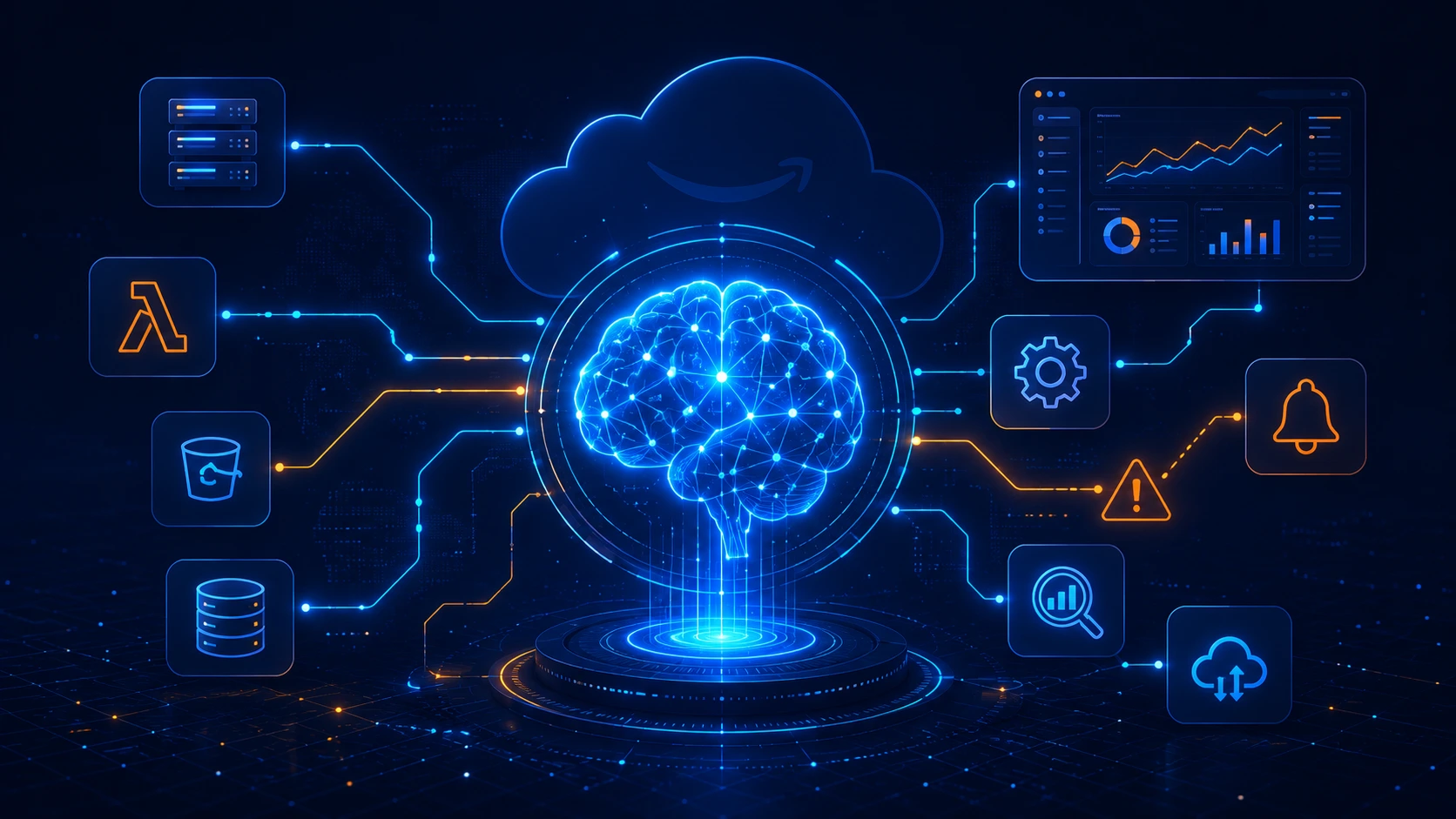
Architecture diagram
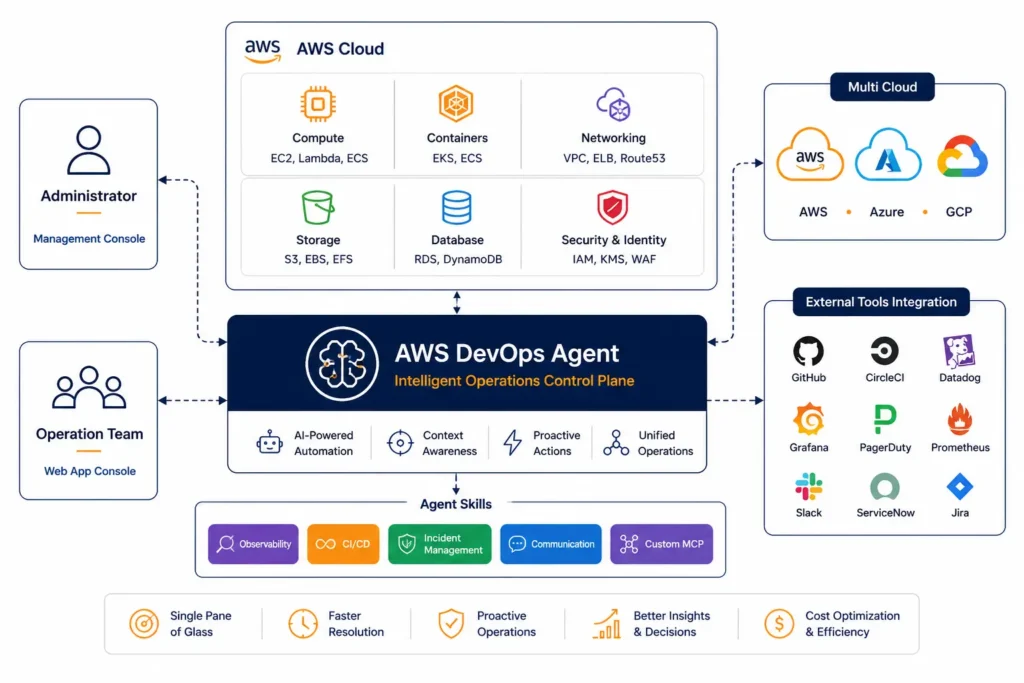
- User sends a request
- DevOps Agent collects data from AWS services
- It detects if there is any problem
- It makes a decision based on the issue
- It performs an action (like restart, scaling, or sending alerts)
- It notifies external tools (like Slack, GitHub, etc.)
One-line version:
User → Agent → Analyze → Decide → Act → Notify
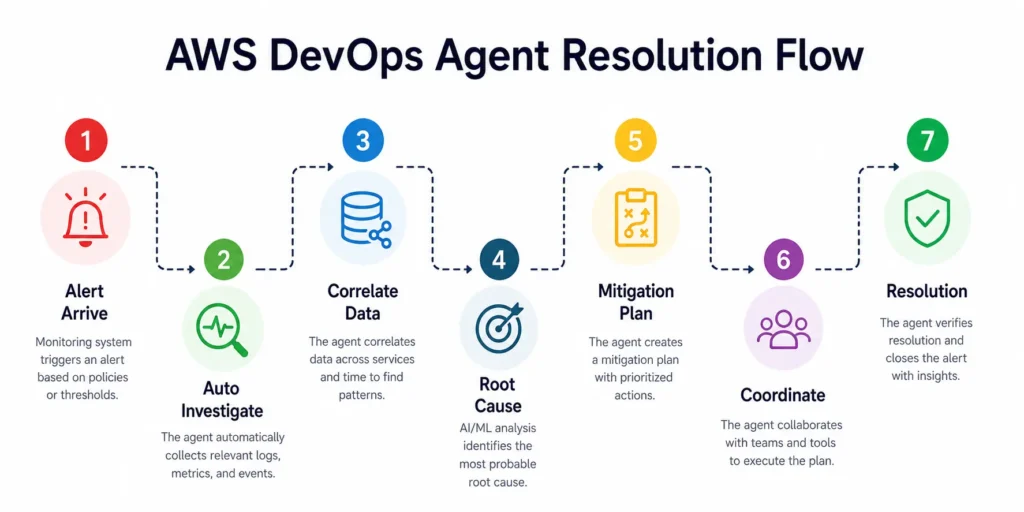
Summary: AWS DevOps Agent Resolution Flow
The AWS DevOps Agent is an automated system that handles issues end-to-end:
- Receives an alert when a problem occurs
- Automatically investigates the issue
- Analyzes data to find the root cause
- Creates a mitigation plan
- Executes actions (restart, scale, etc.)
- Notifies tools or teams
- Resolves the issue
Detect → Analyze → Decide → Act → Resolve
Getting Started with AWS DevOps Agent
Getting started with AWS DevOps Agent involves three main steps: creating an Agent Space, onboarding via CLI, and setting up your test environment.
🔹 Creating an Agent Space
- Setup workspace
- Configure permissions and integrations
🔹 AWS DevOps Agent CLI Onboarding
- Install CLI
- Connect AWS account
- Initialize agent
🔹 Creating a Test Environment
- Setup EC2
- Enable CloudWatch
- Create Lambda functions
🔹 Infrastructure Setup Options
AWS CDK
- Code-based infrastructure
AWS CloudFormation
- Template-based setup
Terraform
- Multi-cloud infrastructure tool
Working with DevOps Agent
Autonomous Incident Response
- Automatically detects and investigates issues
- Suggests or executes fixes
Proactive Incident Prevention
- Analyzes historical data
- Suggests improvements
On-Demand DevOps Tasks
- Manual commands using chat
- Example: “Check system health”
Configuring Capabilities
🔹 Migration (Preview → GA)
- Update configurations
- Ensure compatibility
🔹 AWS EKS Access Setup
- Connect Kubernetes clusters
🔹 Integrations
– AWS DevOps Agent supports a wide range of integrations including Slack, Jira, Azure, CI/CD pipelines, MCP servers, and telemetry tools.
- Azure (multi-cloud)
- CI/CD pipelines
- MCP servers
- Multiple AWS accounts
- Telemetry tools
- Ticketing systems (Jira, etc.)
- Chat tools (Slack, etc.)
🔹 Event & Automation
- Webhook triggering
- EventBridge integration
🔹 Monitoring
- Logs and metrics access
- Observability setup
🔹 Private Tool Integration
- Connect internal/private tools securely
AWS DevOps Agent Security
– AWS DevOps Agent security is built on IAM, encryption at rest, VPC PrivateLink, and least privilege access controls.
🔹 IAM Permissions
- Role-based access control
🔹 Limiting Access
- Apply least privilege principle
🔹 Authentication
- IAM Identity Center
- External IdP
🔹 Encryption
- Data encrypted at rest
🔹 VPC Endpoints (PrivateLink)
- Secure private connections
Quotas
AWS applies limits such as:
- API request limits
- AI model token limits
- Lambda execution limits
These need monitoring and adjustment
Use Cases
- Automatic incident resolution
- Root cause analysis
- Infrastructure optimization
- CI/CD automation
- Multi-cloud monitoring
- Cost optimization
Benefits
- Faster issue resolution (low MTTR)
- Reduced downtime
- Less manual effort
- Better scalability
- Improved reliability
Future Scope
- Fully autonomous cloud systems
- AI-driven DevOps
- Predictive issue detection
- Smart scaling and optimization
Conclusion
AWS DevOps Agent represents the next evolution of DevOps by combining AI, automation, and system intelligence.
It transforms operations from:
Manual → Automated → Intelligent → Autonomous
Explore how OpsTree helps teams implement AWS DevOps Agent for autonomous incident response and cost optimization.
Frequently Asked Questions
Q1. What is AWS DevOps Agent?
Answer – AWS DevOps Agent is an AI-powered cloud automation platform from Amazon Web Services that monitors infrastructure, investigates incidents automatically, correlates logs and metrics, and suggests or executes remediation actions — functioning like an experienced DevOps engineer available around the clock.
Q2. How is AWS DevOps Agent different from traditional DevOps monitoring tools?
Answer – Traditional DevOps tools generate alerts that require human investigation. AWS DevOps Agent goes further — it autonomously investigates incidents, performs root cause analysis, learns from past events, and can execute corrective actions like restarting instances or scaling resources, reducing the need for manual intervention.
Q3. What is an AWS DevOps Agent Space?
Answer – An Agent Space is a logical workspace within AWS DevOps Agent where you configure the agent’s permissions, integrations, and connected environments. You can create separate spaces for development, staging, and production environments, each with its own access controls and tooling.
Q4. What is topology mapping in AWS DevOps Agent?
Answer – Topology mapping is a visual graph that shows all your infrastructure components and their relationships. AWS DevOps Agent automatically builds this map when you connect your AWS account. It’s used for root cause analysis — when an incident occurs, the agent can trace dependencies to identify the origin of the problem.
Q5. What tools and services does AWS DevOps Agent integrate with?
Answer – AWS DevOps Agent supports integrations with Slack, Jira, GitHub, CI/CD pipelines, Amazon EKS, Azure (multi-cloud), MCP servers, telemetry and observability tools, ticketing systems, and EventBridge for webhook-based automation. It can also connect to internal private tools via secure VPC configurations.
Q6. Is AWS DevOps Agent available in all AWS regions?
Answer – No. AWS DevOps Agent is currently available in a limited set of regions including US East (N. Virginia), US West (Oregon), Asia Pacific (Sydney and Tokyo), and Europe (Frankfurt and Ireland). Availability depends on underlying AI model support in each region.
Q7. What are the main use cases for AWS DevOps Agent?
Answer – Key use cases include autonomous incident response, root cause analysis, infrastructure cost optimization, CI/CD pipeline automation, multi-cloud monitoring, and proactive issue prevention through historical data analysis. It is particularly useful for teams looking to reduce mean time to resolution (MTTR) and operational overhead.
Q8. How does AWS DevOps Agent handle security and access control?
Answer – AWS DevOps Agent uses IAM role-based access control with the least privilege principle, supports IAM Identity Center and external identity providers for authentication, encrypts data at rest, and offers VPC PrivateLink endpoints for private, secure connectivity within your AWS environment.