
Table of Contents
Objective
This guide walks through an AWS DevOps Agent webhook integration POC focused on cloud cost optimization using AWS Lambda, EventBridge, and Compute Optimizer.
The objective of this Proof of Concept (POC) is to demonstrate how AWS DevOps Agent can be integrated with a Webhook-based event flow to support cost optimization use cases.
This POC focuses on detecting potential cost-saving opportunities in AWS infrastructure and sending those events to AWS DevOps Agent for investigation and recommendations.
AWS DevOps Agent – Region Limitations
- AWS DevOps Agent is not available in all AWS regions
- It works only in selected supported regions
- United States (N. Virginia) United States (Oregon)
- Asia Pacific (Sydney) Asia Pacific (Tokyo)
- Europe (Frankfurt) Europe (Ireland)
Use Case
The selected use case for this POC is:
Cost Optimization Assistant
This assistant helps identify and reduce unnecessary cloud costs by:
- detecting underutilized or idle resources
- identifying EC2 instances with low usage
- triggering DevOps Agent investigations through webhook events
- enabling cost optimization recommendations for the current AWS setup
Read the Case Study : Nearly $40K AWS Cloud Cost Reduction in Just 6 Weeks
Approach Overview
There are two possible approaches for implementing the AWS DevOps Agent integration:
- Webhook-Based Integration using AWS Lambda (Current Approach) In this approach, the DevOps Agent communicates with AWS services through webhooks, which trigger AWS Lambda functions to perform required actions. This is the approach currently being implemented as part of this POC.
- MCP-Based Integration (Future Scope) The second approach involves using an MCP (Model Context Protocol) server for integration. This would require building and exposing MCP tools, typically using Python, and connecting them with the DevOps Agent. This approach is planned for further exploration.
POC Focus
For this POC, the primary focus is on demonstrating the Webhook-Based Integration using AWS Lambda, as it provides a simpler and more direct way to enable communication between the DevOps Agent and AWS services.
Solution Overview
In this POC, a simple and scalable architecture is implemented using:
- AWS Lambda as the event generation layer
- Webhook as the communication layer
- AWS DevOps Agent as the analysis and recommendation engine
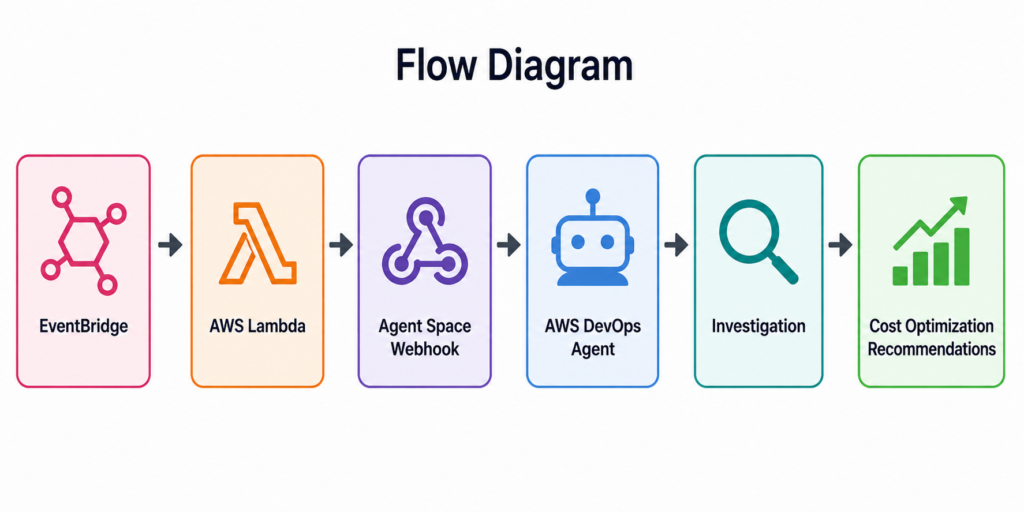
AWS Lambda monitors AWS resources (such as EC2 instances) and detects cost-related signals like low CPU utilization. When such a condition is identified, Lambda sends a structured event to the DevOps Agent using a webhook.
The DevOps Agent then investigates the infrastructure context and provides recommendations for cost optimization.
Explore our – AWS Consulting Services
Flow Diagram
Prerequisites
Before starting this POC, the following prerequisites were required:
- AWS account access
- AWS DevOps Agent enabled
- Agent Space created successfully
- Primary AWS account connected
- Topology mapping completed
- Webhook configuration access available
- Basic understanding of AWS infrastructure resources
POC Implementation Steps
Step 1: Create Agent Space
- Navigate to AWS DevOps Agent
- Create a new Agent Space
- Provide name and configure access
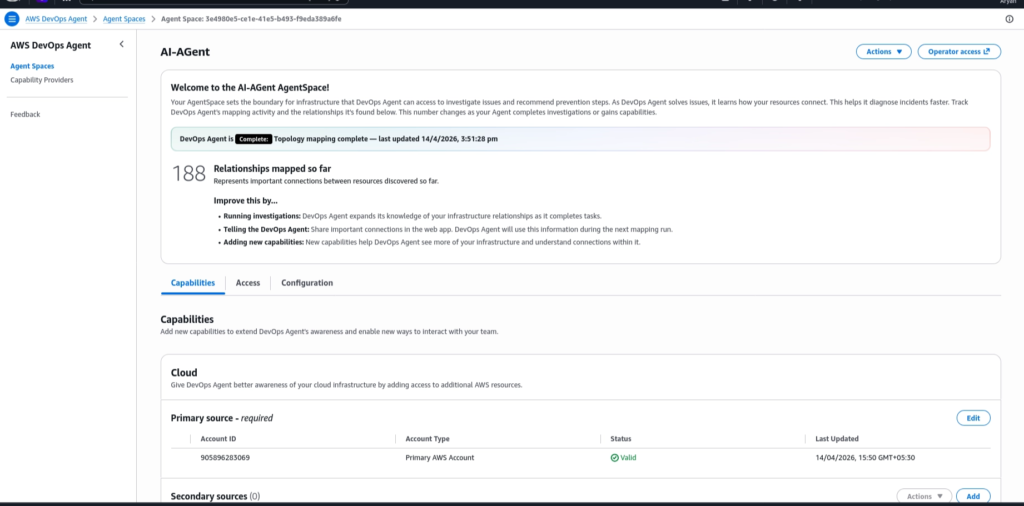
Result: Agent Space created successfully
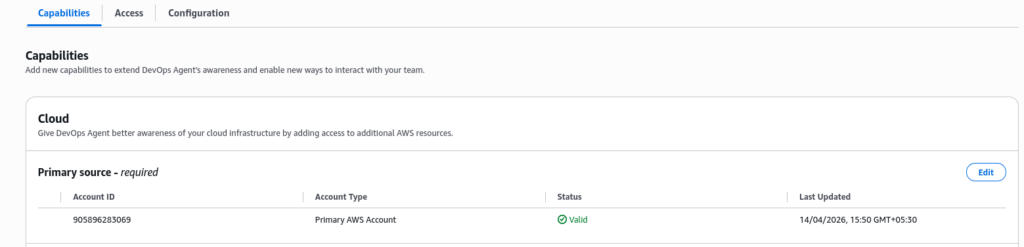
Step 2: Connect AWS Account
- Add AWS account as Primary Cloud Source
- Verify status as Valid
Result: DevOps Agent gains access to infrastructure
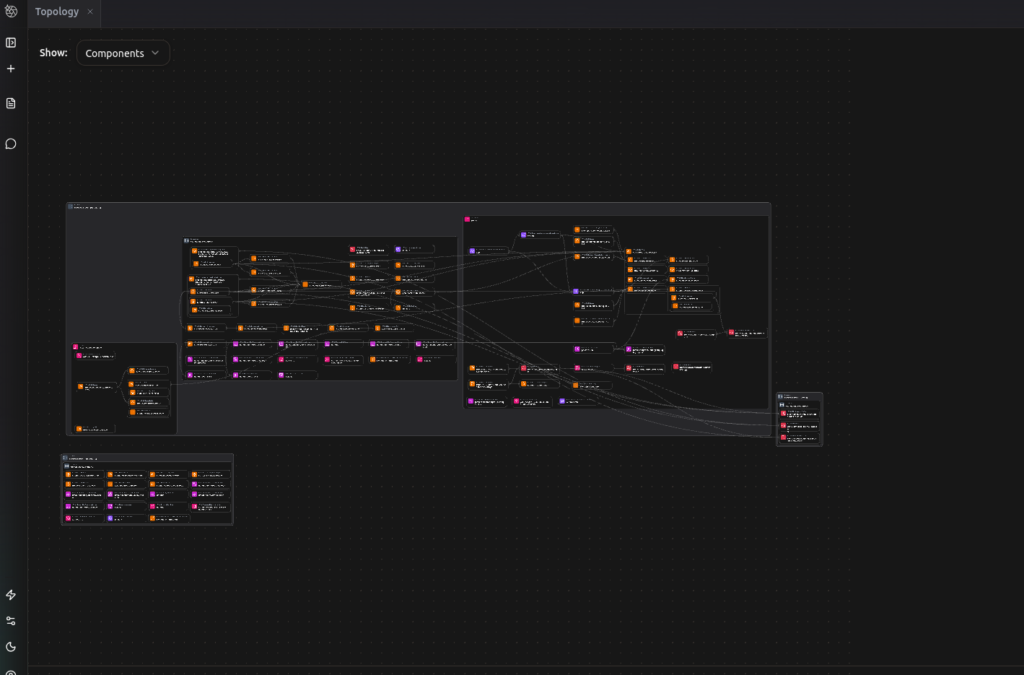
Step 3: Verify Topology Mapping
Once the account was connected, DevOps Agent completed topology mapping and discovered relationships between infrastructure resources.
- Go to DevOps Agent
- click on Action
- Then go to web app link
- click on oprater Access
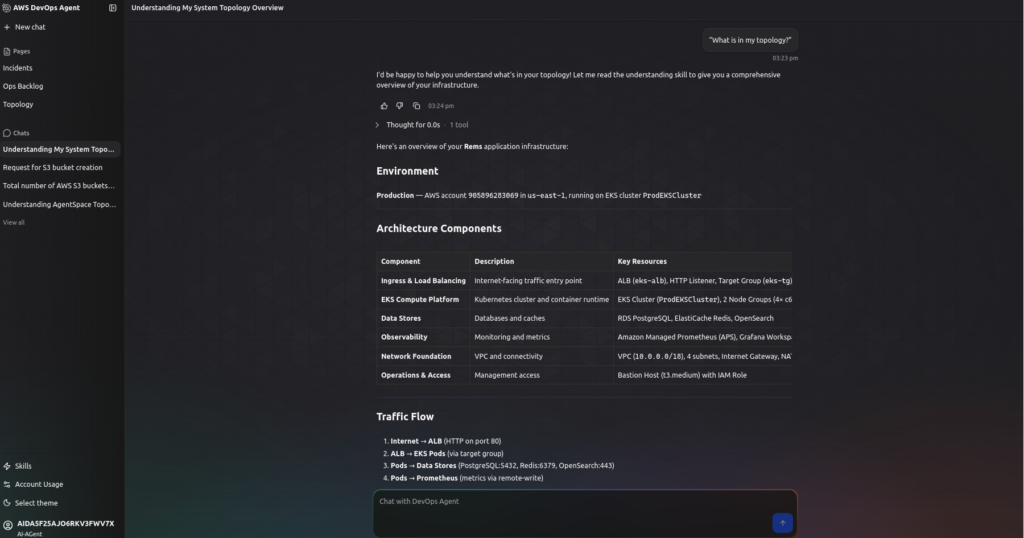
Step 4: Open DevOps Agent Web App
The DevOps Agent Web App was opened to interact with the agent in chat mode.
Using the web interface, infrastructure queries were submitted to validate whether the agent could understand the environment.
Example prompt used:
“What is in my topology?”
Step 5: Configure Webhook
- Go to Webhooks section
- Click Add Webhook
- Follow steps:
- Review schema
- Enable HMAC security
- Generate URL and Secret
- save URL & SECRET-KEY

Step 6: Create Lambda Function
- Go to AWS Lambda
- Create function (Python runtime)
- Attach IAM role with required permissions
Permissions required:
- EC2 (DescribeInstances)
- CloudWatch (GetMetricStatistics)
- Compute Optimizer (GetEC2InstanceRecommendations)
- Logs
Step 7: Add Lambda Logic
Lambda performs:
- Fetch running EC2 instances
- Calculate average CPU usage (7 days)
- Identify idle instances
- Fetch Compute Optimizer recommendations
- Send webhook event
Step 8: Configure Environment Variables
Add:
WEBHOOK_URLWEBHOOK_SECRET
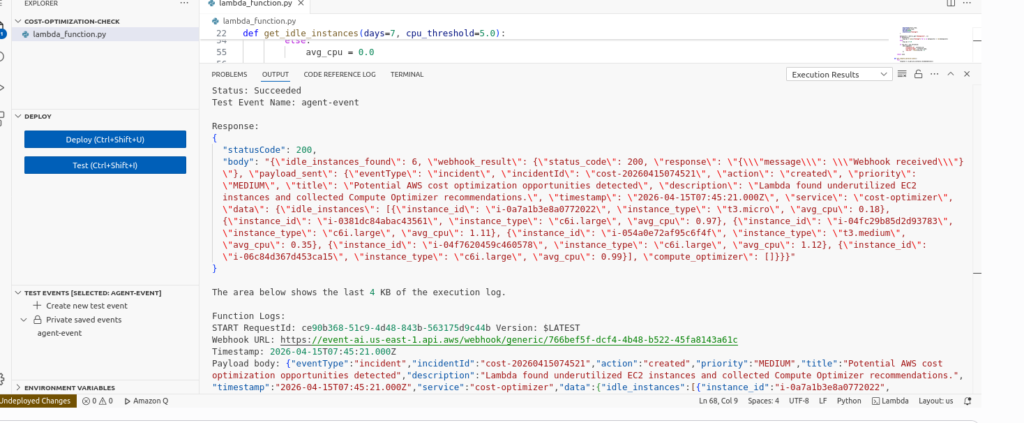
Step 9: Test Lambda
- Run test event
{} - Verify:
- Lambda execution success
- CloudWatch logs
- DevOps Agent receives event
use this code
import json
import boto3
import os
import hmac
import hashlib
import base64
from datetime import datetime, timedelta, timezone
import urllib3

ec2 = boto3.client("ec2")
cw = boto3.client("cloudwatch")
co = boto3.client("compute-optimizer")

http = urllib3.PoolManager(
    timeout=urllib3.util.Timeout(connect=5.0, read=10.0)
)

WEBHOOK_URL = os.environ["WEBHOOK_URL"]
WEBHOOK_SECRET = os.environ["WEBHOOK_SECRET"]


def get_idle_instances(days=7, cpu_threshold=5.0):
    reservations = ec2.describe_instances(
        Filters=[{"Name": "instance-state-name", "Values": ["running"]}]
    )["Reservations"]

    instances = []
    for reservation in reservations:
        for instance in reservation["Instances"]:
            instances.append(instance)

    end_time = datetime.now(timezone.utc)
    start_time = end_time - timedelta(days=days)

    idle = []

    for instance in instances:
        instance_id = instance["InstanceId"]
        instance_type = instance.get("InstanceType", "unknown")

        metric = cw.get_metric_statistics(
            Namespace="AWS/EC2",
            MetricName="CPUUtilization",
            Dimensions=[{"Name": "InstanceId", "Value": instance_id}],
            StartTime=start_time,
            EndTime=end_time,
            Period=86400,
            Statistics=["Average"]
        )

        datapoints = metric.get("Datapoints", [])

        if datapoints:
            avg_cpu = sum(x["Average"] for x in datapoints) / len(datapoints)
        else:
            avg_cpu = 0.0

        if avg_cpu < cpu_threshold:
            idle.append({
                "instance_id": instance_id,
                "instance_type": instance_type,
                "avg_cpu": round(avg_cpu, 2)
            })

    return idle


def get_compute_optimizer_data():
    try:
        response = co.get_ec2_instance_recommendations()
        recommendations = []

        for item in response.get("instanceRecommendations", []):
            recs = []

            for opt in item.get("recommendationOptions", [])[:3]:
                recs.append({
                    "instance_type": opt.get("instanceType"),
                    "performance_risk": opt.get("performanceRisk")
                })

            recommendations.append({
                "instance_arn": item.get("instanceArn"),
                "current_instance_type": item.get("currentInstanceType"),
                "finding": item.get("finding"),
                "recommendations": recs
            })

        return recommendations

    except Exception as e:
        return [{"error": str(e)}]


def sign_payload(secret, body, timestamp):
    message = f"{timestamp}:{body}".encode("utf-8")

    digest = hmac.new(
        secret.encode("utf-8"),
        message,
        hashlib.sha256
    ).digest()

    return base64.b64encode(digest).decode("utf-8")


def send_to_devops_agent(payload):
    body = json.dumps(payload, separators=(",", ":"))

    timestamp = datetime.now(timezone.utc).strftime(
        "%Y-%m-%dT%H:%M:%S.000Z"
    )

    signature = sign_payload(
        WEBHOOK_SECRET,
        body,
        timestamp
    )

    headers = {
        "Content-Type": "application/json",
        "x-amzn-event-timestamp": timestamp,
        "x-amzn-event-signature": signature
    }

    print("Webhook URL:", WEBHOOK_URL)
    print("Timestamp:", timestamp)
    print("Payload body:", body)
    print("Signature:", signature)

    response = http.request(
        "POST",
        WEBHOOK_URL,
        body=body.encode("utf-8"),
        headers=headers
    )

    print("Webhook response status:", response.status)

    return {
        "status_code": response.status,
        "response": response.data.decode(
            "utf-8",
            errors="ignore"
        )
    }


def lambda_handler(event, context):

    idle_instances = get_idle_instances(
        days=7,
        cpu_threshold=5.0
    )

    optimizer_data = get_compute_optimizer_data()

    incident_id = (
        f"cost-"
        f"{datetime.now(timezone.utc).strftime('%Y%m%d%H%M%S')}"
    )

    payload = {
        "eventType": "incident",
        "incidentId": incident_id,
        "action": "created",
        "priority": "MEDIUM",
        "title": "Potential AWS cost optimization opportunities detected",
        "description": "Lambda found underutilized EC2 instances and collected Compute Optimizer recommendations.",
        "timestamp": datetime.now(timezone.utc).strftime(
            "%Y-%m-%dT%H:%M:%S.000Z"
        ),
        "service": "cost-optimizer",
        "data": {
            "idle_instances": idle_instances,
            "compute_optimizer": optimizer_data
        }
    }

    webhook_result = send_to_devops_agent(payload)

    return {
        "statusCode": 200,
        "body": json.dumps({
            "idle_instances_found": len(idle_instances),
            "webhook_result": webhook_result,
            "payload_sent": payload
        })
    }
Step 10: Schedule Automation
- Use EventBridge
- Create rule (daily or periodic trigger)
- Attach Lambda
Sample Webhook Event
A sample event for the cost optimization use case is shown below:
{
  "eventType": "incident",
  "incidentId": "cost-001",
  "action": "created",
  "priority": "MEDIUM",
  "title": "Idle EC2 detected",
  "description": "Some EC2 instances are underutilized and may be candidates for cost optimization.",
  "timestamp": "2026-04-14T10:00:00Z",
  "service": "cost-optimizer",
  "data": {
    "instances": [
      "i-1234567890abcd",
      "i-0987654321efgh"
    ]
  }
}
POC Outcome
This POC successfully demonstrates:
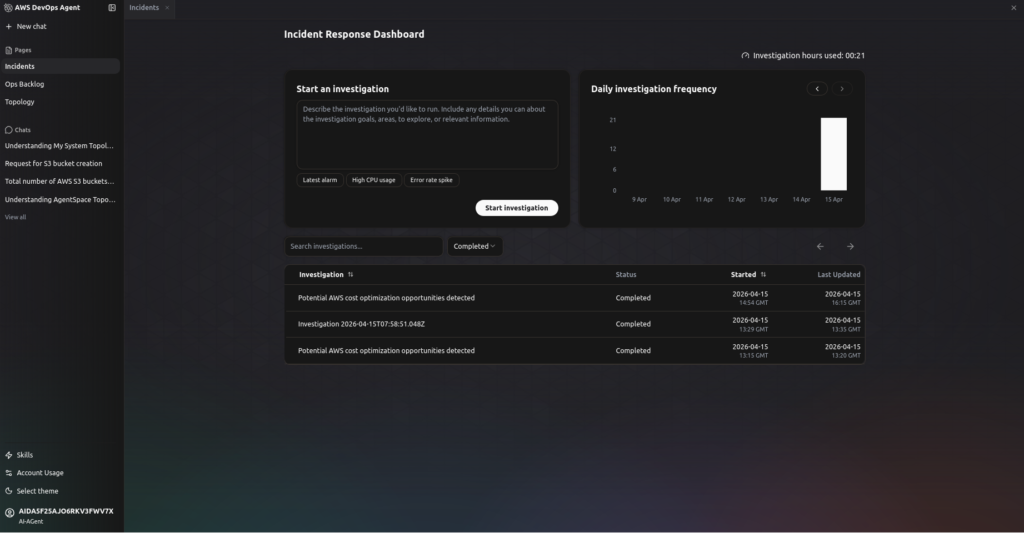
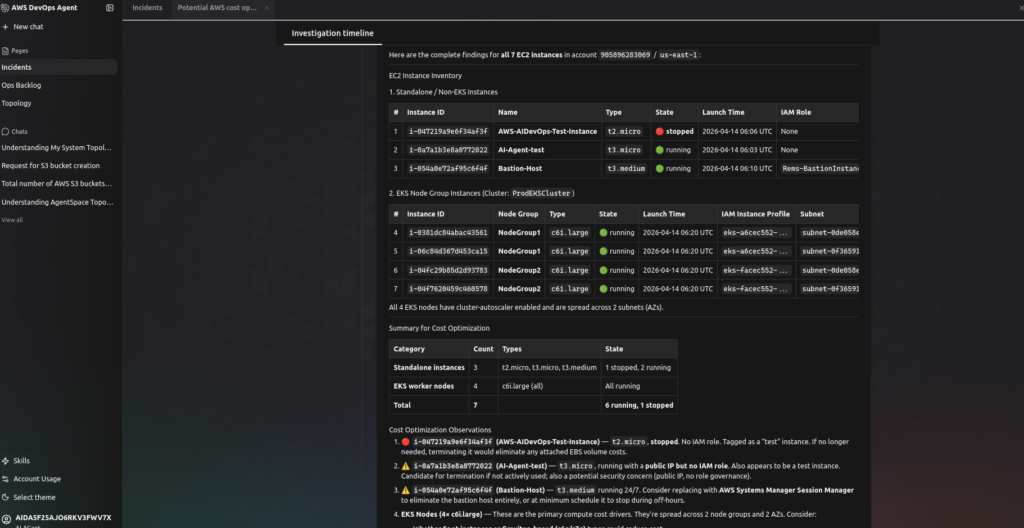
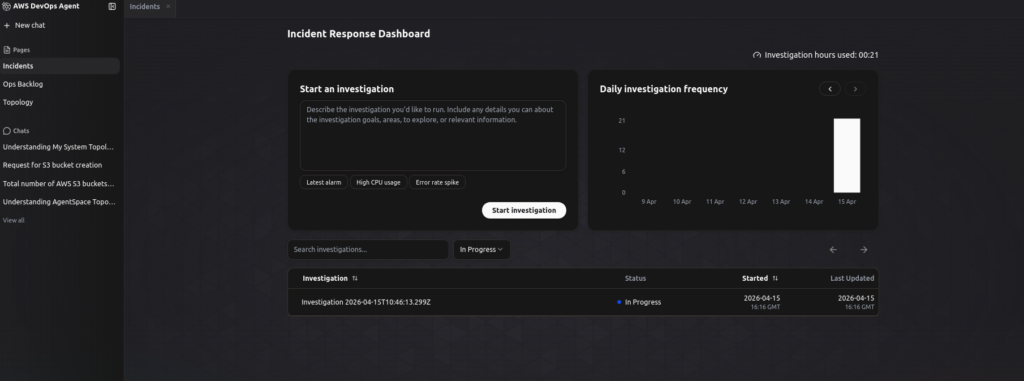
- DevOps Agent setup and topology mapping
- Cost optimization analysis via DevOps Agent
- Webhook integration for event-driven architecture
- Lambda-based cost signal generation
Benefits
- Beginner-friendly implementation
- No need for MCP server initially
- Scalable architecture
- Supports automation using Lambda and EventBridge
- Enables proactive cost optimization
Limitations
- Lambda automation is basic in current POC
- Advanced optimization logic not fully implemented
- Region availability is limited
- Requires additional integrations for full automation
Future Enhancements
- Advanced cost analysis logic in Lambda
- Real-time CloudWatch integration
- SNS / Slack alerts
- Auto-remediation workflows
- Multi-region support
Conclusion
This POC demonstrates a practical and scalable approach to cost optimization using:
- AWS DevOps Agent for intelligent analysis
- AWS Lambda for automation
- Webhook for event-driven communication
It provides a strong foundation for building a fully automated cost optimization system in AWS.
Frequently Asked Questions
Q1. What is AWS DevOps Agent and what does it do?
Answer – AWS DevOps Agent is an AI-powered assistant from AWS that helps teams investigate, analyze, and optimize their cloud infrastructure. It understands your environment through topology mapping and responds to events sent via webhooks or MCP-based integrations — making it useful for cost optimization, incident investigation, and proactive recommendations.
Q2. Which AWS regions support AWS DevOps Agent?
Answer – As of this POC, AWS DevOps Agent is available in six regions: US East (N. Virginia), US West (Oregon), Asia Pacific (Sydney), Asia Pacific (Tokyo), Europe (Frankfurt), and Europe (Ireland). It is not available in all AWS regions, so verify your region before setup.
Q3. What is the difference between Webhook-based and MCP-based integration for AWS DevOps Agent?
Answer – Webhook-based integration uses AWS Lambda to send structured events to the DevOps Agent — it’s simpler, beginner-friendly, and doesn’t require running a server. MCP (Model Context Protocol) integration involves building and exposing custom tools via a Python-based MCP server, enabling richer, bidirectional tool interaction. The webhook approach is recommended for most POC and initial production setups.
Q4. How does the Lambda function detect idle EC2 instances?
Answer – The Lambda function queries CloudWatch for CPU utilization metrics over the past 7 days for all running EC2 instances. Any instance with an average CPU below 5% is flagged as idle. The function also fetches recommendations from AWS Compute Optimizer and bundles everything into a structured webhook event sent to the DevOps Agent.
Q5. How is the webhook secured in this integration?
Answer – The webhook uses HMAC-SHA256 signing. Each outbound request from Lambda includes a timestamp header and a base64-encoded signature generated using a shared secret. This ensures the DevOps Agent can verify that events are genuinely sent by your Lambda function and haven’t been tampered with.
Q6. Can this setup be automated to run on a schedule?
Answer – Yes. Amazon EventBridge can trigger the Lambda function on a daily or custom schedule (e.g., every 24 hours). This enables continuous, automated cost signal generation without manual intervention — making it suitable for ongoing cost governance workflows.
Q7. What IAM permissions does the Lambda function need?
Answer – The Lambda function requires permissions for EC2 (DescribeInstances), CloudWatch (GetMetricStatistics), AWS Compute Optimizer (GetEC2InstanceRecommendations), and CloudWatch Logs for execution logging. These should be attached via an IAM role following the principle of least privilege.
Related Searches
- AWS For Beginners: What Is It, How It Works, and Key Benefits
- Complete AWS CloudFormation Guide In 2026
- Complete Guide to Server Migration Using AWS Application Migration Service