
Introduction
For DevOps engineers, the standard Horizontal Pod Autoscaler (HPA) is a reliable workhorse for scaling based on CPU and memory. However, in modern event-driven architectures, like the workflow automation tasks you might build with n8n or messaging systems like Kafka, resource metrics are often a lagging indicator.
If your message queue has 10,000 pending tasks, your pods might still show low CPU usage while idling. You need a way to scale proactively based on the work waiting to be done. This is where KEDA shines.
What is KEDA?
KEDA is a single-purpose, lightweight component that provides event-driven autoscaling for any Kubernetes container. It was originally created by Microsoft and Red Hat and is now a CNCF graduated project.
Key Components
1. KEDA Operator
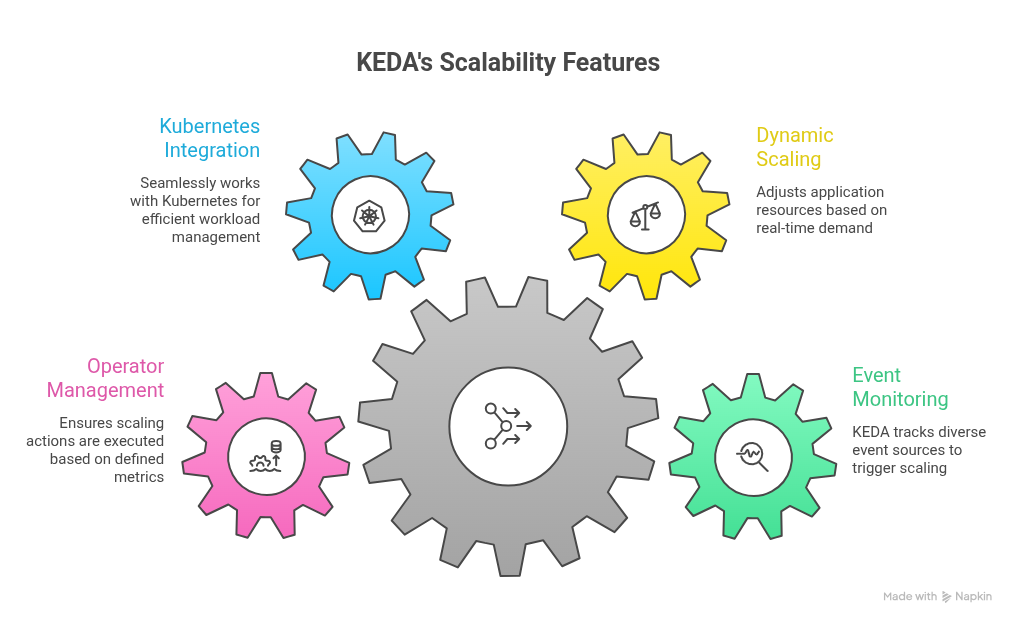
The KEDA Operator is the core component that manages the lifecycle of KEDA resources within a Kubernetes cluster. It is responsible for:
- Monitoring Scalers: The Operator continuously monitors the defined Scalers to determine when to scale the associated workloads
- Managing Custom Resources: It handles the creation, update, and deletion of KEDA-specific resources, ensuring that the desired state of the application is maintained.
- Integration with Kubernetes : The Operator interacts with the Kubernetes API to facilitate scaling actions based on the metrics provided by the Scalers
2. Scalers
Scalers are the building blocks of KEDA that define how to scale applications based on specific metrics or events. They can be categorized into two main types:
Built-in Scalers: KEDA comes with a variety of built-in Scalers that support common event sources, such as:
- Message Queues: Scale based on the number of messages in queues like RabbitMQ, Kafka, or Azure Service Bus.
- HTTP Requests: Scale based on incoming HTTP requests.
- Database Metrics: Scale based on database load or query metrics.
External Scalers: Users can also create custom external Scalers to integrate with other event sources or metrics that are not covered by built-in options. This flexibility allows KEDA to be tailored to specific application needs.
3. Custom Resource Definitions (CRDs)
KEDA introduces several Custom Resource Definitions (CRDs) that extend Kubernetes’ capabilities. The primary CRDs include:
ScaledObject: This CRD defines the scaling behavior for a specific deployment. It specifies:
- The target deployment to scale.
- The Scaler(s) to use for determining the scaling metrics.
- The minimum and maximum replicas for the deployment.
Trigger Authentication: This CRD is used to manage authentication details for external services that the Scalers may need to access. It allows users to securely store credentials and tokens required for scaling operations.
4. Metrics Server
While KEDA does not include its own metrics server, it relies on existing Kubernetes metrics servers to gather data. The metrics server provides the necessary metrics that KEDA uses to make scaling decisions. KEDA can work with various metrics sources, including:
- Kubernetes Metrics API: For standard metrics like CPU and memory usage.
- External Metrics: For metrics provided by external systems or custom metrics defined by users.
5. Event Sources
KEDA supports a wide range of event sources that can trigger scaling actions. These event sources can be integrated with various cloud services and messaging systems, enabling applications to respond to real-time events. Some common event sources include:
- Cloud Pub/Sub Services: Such as Google Cloud Pub/Sub or AWS SNS/SQS.
- Database Change Streams: For scaling based on changes in databases like MongoDB or PostgreSQL.
- Custom Webhooks: For integrating with proprietary systems or services.
6. Kubernetes Deployments
KEDA works in conjunction with standard Kubernetes deployments. The scaling actions performed by KEDA directly affect the number of replicas in a Kubernetes deployment. This integration ensures that applications can scale seamlessly based on the defined metrics and events.
7. Dashboard and Monitoring Tools
While KEDA does not come with a built-in dashboard, it can be integrated with various monitoring and visualization tools to provide insights into scaling activities. Popular tools include:
- Prometheus: For collecting and querying metrics.
- Grafana: For visualizing metrics and scaling behavior.
- Kubernetes Dashboard: For monitoring the overall health and performance of Kubernetes resources.
Enterprise Kubernetes Migration Success: 150+ Microservices, Zero Downtime and 60% Faster Deployments – Full Case Study
The Killer Feature: Scaling to Zero
Perhaps the most significant advantage of KEDA is its ability to scale a workload down to zero replicas when no events are present.
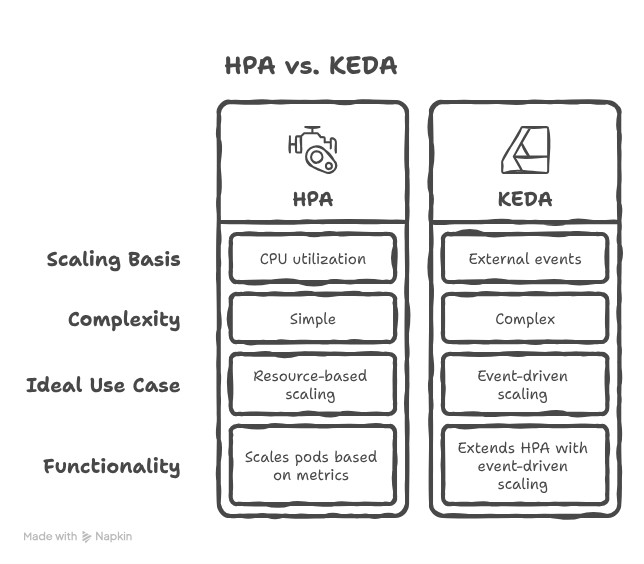
- Standard HPA: Typically cannot scale below one replica.
- KEDA: Monitors the event source. When it detects a new event, it wakes up the deployment, scaling it to one, and then hands off further scaling logic to the HPA.
This is a massive cost-saver for intermittent batch jobs or internal automation tools.
Hands-On: Deploying KEDA
Following your workflow of using Helm for infrastructure components, installing KEDA is straightforward.
helm repo add kedacore https://kedacore.github.io/charts

helm repo update

helm upgrade --install keda kedacore/keda \
  --namespace keda \
  --create-namespace
Defining a Scaled Object
To tell KEDA how to scale your application, define a ScaledObject custom resource. The example below configures autoscaling based on the number of messages in an AWS SQS queue.
apiVersion: keda.sh/v1alpha1
kind: ScaledObject

metadata:
  name: sqs-scaledobject
  namespace: default

spec:
  scaleTargetRef:
    name: worker-deployment

  minReplicaCount: 0
  maxReplicaCount: 20

  triggers:
    - type: aws-sqs-queue
      metadata:
        queueURL: https://sqs.us-east-1.amazonaws.com/123456789/my-queue
        queueLength: "5"
        region: us-east-1
Real-World Use Case: Automated Marathon Registration
Consider an automation workflow that processes registrations from a Google Sheet and sends notifications via WhatsApp.
- A new entry is added to the sheet.
- A script pushes a message to a queue (e.g., Redis or SQS).
- KEDA detects the message, scales your Notification Worker from 0 to 1.
- Once the message is processed and the queue is empty, KEDA scales the worker back to 0, ensuring you aren’t paying for idle compute.
HPA vs. KEDA: Which should you use?
FAQs
1. Does KEDA replace the Horizontal Pod Autoscaler?
No, KEDA works alongside it. KEDA handles the “0-to-1” and “1-to-0” transitions and feeds metrics to the HPA to handle 1-to-n scaling.
2. Can KEDA scale Kubernetes Jobs instead of Deployments?
Yes. You can use a Scaled Job resource to trigger a new job for each event, which is perfect for long-running tasks that shouldn’t be interrupted.
3. Is KEDA compatible with Managed Kubernetes like EKS or Azure?
Absolutely. It is vendor-agnostic and frequently used in EKS, AKS, and GKE environments to bridge cloud-native services with Kubernetes workloads.
4. How do I handle authentication for event sources?
KEDA provides a Trigger Authentication CRD that allows you to securely provide credentials via environment variables, Kubernetes Secrets, or cloud-native identity (like IAM roles for Service Accounts).
Related Searches
- A Quick Overview of Kubernetes Architecture!
- AI-Powered Kubernetes Management for Enterprise Teams
- What Is DevSecOps?