

HashiCorp Vault is a comprehensive secrets management platform designed to enable organizations to securely store, generate, access, and manage their sensitive information. This includes critical elements such as API keys, database credentials, encryption keys, and digital certificates. With the help of Vault, teams can efficiently control access to secrets across various environments, including cloud settings, Kubernetes clusters, microservices, and on-premises infrastructure.
For DevOps and security teams, HashiCorp Vault is a highly useful tool. It helps reduce reliance on hardcoded credentials, enforce ‘least-privilege access and monitor the entire lifecycle of sensitive data. Its various ‘secrets engines’ cater to a wide range of needs, such as storing static secrets, generating temporary database credentials, and performing encryption-related tasks.
In this guide, you will learn how HashiCorp Vault works, the secret engines available within it, practical examples of its implementation, options for Kubernetes integration, best practices for production security, and how Vault compares to other cloud-native secrets management solutions.
What is HashiCorp Vault?
HashiCorp Vault is an open-source tool designed to secure, store, and tightly control access to secrets across distributed infrastructure. It helps you manage secrets dynamically, reduce the blast radius of breaches, and automate access control without hardcoding secrets in your apps. Vault is a cornerstone of the Zero Trust Security model where every access request must be authenticated, authorized, and encrypted.
Core Features of Vault Secrets
1. Secret Storage
Vault stores sensitive data such as API keys, passwords, and configuration settings in a centralized encrypted storage. You can store static secrets (like AWS keys) or dynamic secrets (like time-bound database credentials).
2. Dynamic Secrets
One of Vault’s most powerful features. Instead of hardcoding secrets, Vaul can generate secrets on-the-fly for databases, cloud providers, or message queues with TTLs (Time-To-Live). After the TTL expires, the credentials are revoked automatically.
3. Identity-Based Access Control (ACL)
Using Vault’s policy-based access control, you can ensure that apps, users, or systems only get access to the secrets they’re authorized for—least privilege enforced.
4. Audit Logs
Every access, request, or secret retrieval is audited, enabling traceability and compliance for standards like GDPR, HIPAA, or SOC2.
5. Encryption-as-a-Service
Vault offers encryption/decryption APIs for developers who want to offload encryption logic without storing the data itself.
6. Pluggable Authentication
Vault supports multiple auth methods:
- GitHub
- LDAP
- Kubernetes
- AWS IAM
- Azure AD
- JWT and more
Looking for a reliable Cybersecurity Posture Management Solution?
How Do HashiCorp Vault Secrets Engines Work?
HashiCorp Vault uses ‘secrets engines’ to securely store, generate, and manage sensitive data. Each secrets engine is designed with specific functionality, which can be accessed via dedicated API routes. For example, the Key/Value (KV) engine is used to store application secrets, the database engine generates database credentials, and the transit engine handles encryption and decryption services.
A typical secrets engine workflow involves five steps:
- Enable the engine: Activate the required secrets engine at a designated path.
- Configure the engine: Connect it to the relevant database, cloud provider, or other service when required.
- Define access policies: Restrict which users and applications can access particular secrets and operations.
- Request secrets: An authenticated application retrieves a stored value or requests dynamically generated credentials.
- Manage the lifecycle: Renew or revoke leased credentials when appropriate and monitor access through audit logs.
For example, a database secrets engine can generate temporary PostgreSQL credentials for an application. The application uses these credentials for the duration of the lease, and Vault can revoke them once the lease period expires.
How Does HashiCorp Vault Work?
Here’s a simplified breakdown:
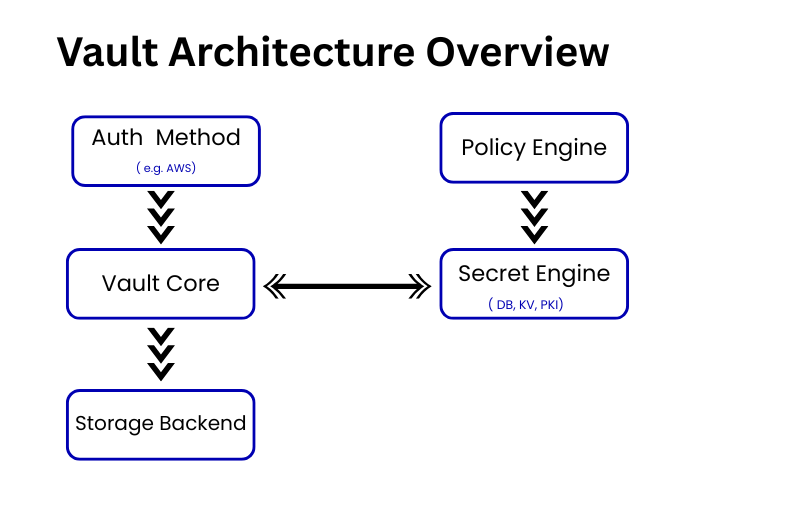
- Initialize Vault: The storage backend (Consul, S3, etc.) is set up, and a master key is generated.
- Unseal Vault: Vault is locked until it’s “unsealed” using key shares (Shamir’s Secret Sharing).
- Authentication: Users/apps authenticate using a supported method (e.g., token, Kubernetes).
- Authorization: Vault checks the policies and grants access if allowed.
- Secret Retrieval/Generation: Vault returns the secret—either static or dynamically generated.
- Audit Logging: Every operation is logged securely for audit.
Common HashiCorp Vault Use Cases
| Use Case | Description |
| Secrets Management | Securely store and manage API keys, passwords, SSH keys, etc. |
| Dynamic DB Credentials | Rotate DB creds for MySQL, PostgreSQL, MongoDB on-the-fly |
| PKI/Certificate Authority | Generate and manage short-lived TLS certs |
| Encryption-as-a-Service | Perform envelope encryption using Vault APIs |
| Multi-cloud Auth | Use Vault to manage identity across AWS, Azure, GCP |
| Kubernetes Secrets Injection | Inject secrets into pods securely without mounting them |
How to Generate Dynamic PostgreSQL Credentials with Vault
One of the most useful capabilities of HashiCorp Vault is that it generates temporary database credentials, rather than relying on shared, long-lived passwords.
To implement this workflow, an administrator configures Vault’s database secrets engine, establishes a connection to PostgreSQL, and defines a database role with the necessary permissions and credential lifetimes.
First, enable the database secrets engine:
Let’s say you want to generate temporary PostgreSQL credentials:
vault secrets enable database
vault write database/config/my-postgres \
  plugin_name=postgresql-database-plugin \
  allowed_roles="readonly" \
  connection_url="postgresql://{{username}}:{{password}}@db.example.com:5432/mydb?sslmode=disable" \
  username="vaultadmin" \
  password="vaultpass"

vault write database/roles/readonly \
  db_name=my-postgres \
  creation_statements="CREATE ROLE \"{{name}}\" WITH LOGIN PASSWORD '{{password}}' VALID UNTIL '{{expiration}}'; GRANT SELECT ON ALL TABLES IN SCHEMA public TO \"{{name}}\";" \
  default_ttl="1h" \
  max_ttl="24h"

vault read database/creds/readonly
This way, apps get a unique user with limited scope, valid only for a short time.
vault secrets enable databaseNext, configure the database connection and define a role with appropriate SQL permissions, a default time-to-live (TTL), and a maximum TTL. The exact configuration depends on your database setup and the Vault version.
Once the connection and role have been configured, request credentials:
vault read database/creds/readonlyVault provides a generated username and password, along with lease information. These credentials allow an application to connect to PostgreSQL, based on the permissions granted to the associated role.
‘Time to Live’ (TTL) determines how long a lease remains valid. Depending on your setup, you can renew credentials before their maximum duration expires, or explicitly revoke them if necessary.
An important security recommendation: Always use TLS with proper certificate verification for database connections. Avoid sharing actual database passwords, access tokens, or any other sensitive credentials in your code examples.
How HashiCorp Vault Architecture Works
HashiCorp Vault Best Practices for Production
- Use Integrated Storage or Consul in HA mode
- Always enable audit logging
- Use TLS encryption everywhere
- Use Vault Agent + Templates for secrets injection
- Periodically rotate root/token credentials
- Leverage dynamic secrets wherever possible
- Use sentinel policies for advanced governance
HashiCorp Vault Deployment Options
- Self-Hosted (Open Source)
- Vault Enterprise (HA, namespaces, MFA, DR)
- HashiCorp Cloud Platform (HCP Vault)
[ Also Read: Security-as-code implementation ]
HashiCorp Vault vs AWS Secrets Manager vs Azure Key Vault
| Feature | HashiCorp Vault | AWS Secrets Manager | Azure Key Vault | CyberArk |
|---|---|---|---|---|
| Open Source | ✅ Yes | ❌ No | ❌ No | ❌ No |
| Dynamic Secrets | ✅ Native Support | ⚠️ Limited | ❌ Not Supported | ⚠️ Limited |
| Multi-Cloud Support | ✅ AWS, Azure, GCP & On-Prem | ❌ AWS Only | ❌ Azure Only | ✅ Multi-Cloud |
| Encryption-as-a-Service | ✅ Transit Secrets Engine | ❌ No | ✅ Available | ❌ No |
| Flexible Storage Backends | ✅ Consul, Raft, DynamoDB, S3 & More | ❌ AWS Managed Only | ❌ Azure Managed Only | ❌ Proprietary |
Conclusion
HashiCorp Vault is more than just a password manager—it’s a modern-day secrets operating system for secure automation. If your infrastructure spans cloud, containers, and microservices, Vault ensures that secrets don’t become your weakest link. “Secrets should be dynamic, short-lived, and access-controlled—Vault helps you achieve just that.”
you can learn more about how to activate venv in vscode.
FAQs
1.What is HashiCorp Vault used for?
A. HashiCorp Vault is a secrets management tool that securely stores, manages, and controls access to sensitive data like API keys, passwords, certificates, and dynamic credentials across cloud and on-prem environments.
2.How does Vault handle dynamic secrets?
A. Vault generates short-lived, on-demand credentials (e.g., database passwords, cloud IAM roles) with a Time-To-Live (TTL), automatically revoking them after expiry to minimize exposure.
3.What authentication methods does Vault support?
A. Vault supports multiple auth methods, including Kubernetes, AWS IAM, LDAP, GitHub, Azure AD, and JWT/OIDC, enabling flexible identity-based access control.
4.How does Vault ensure security in production?
A. Best practices include enabling audit logging, using TLS encryption, deploying in High Availability (HA) mode, rotating root tokens, and leveraging dynamic secrets over static ones. 5. How is Vault different from AWS Secrets Manager or Azure Key Vault? A. Unlike cloud-native solutions (AWS/Azure-only), Vault is open-source, supports multi-cloud, offers dynamic secrets, and integrates with diverse backends (Consul, S3, etc.) for flexibility.