
Table of Contents
What is AWS CloudFormation
AWS CloudFormation is an Infrastructure as Code (IaC) service provided by Amazon Web Services that enables developers and system administrators to define, provision and manage cloud infrastructure using code templates. These templates describe the required AWS resources and their configurations in JSON or YAML format.
Why we Use AWS CloudFormation
AWS CloudFormation is used to automate the creation and management of AWS infrastructure using code instead of manually configuring resources through the AWS Management Console. In traditional cloud management, developers need to create resources such as EC2 instances, S3 buckets, databases, and networking components one by one, which can be time-consuming and prone to human errors.
By using CloudFormation, all infrastructure components can be defined in a template file (JSON or YAML). Once the template is executed, CloudFormation automatically provisions and configures all the required resources in the correct order.
Components of AWS CloudFormation
1. Templates
A template is the main component of CloudFormation. It is a file written in JSON or YAML format that defines the AWS resources and their configurations.
2. Stacks
A stack is a collection of AWS resources that are created and managed together using a CloudFormation template.
When a template is executed, CloudFormation creates a stack that includes all the resources defined in the template. Users can create, update, or delete stacks to manage infrastructure.
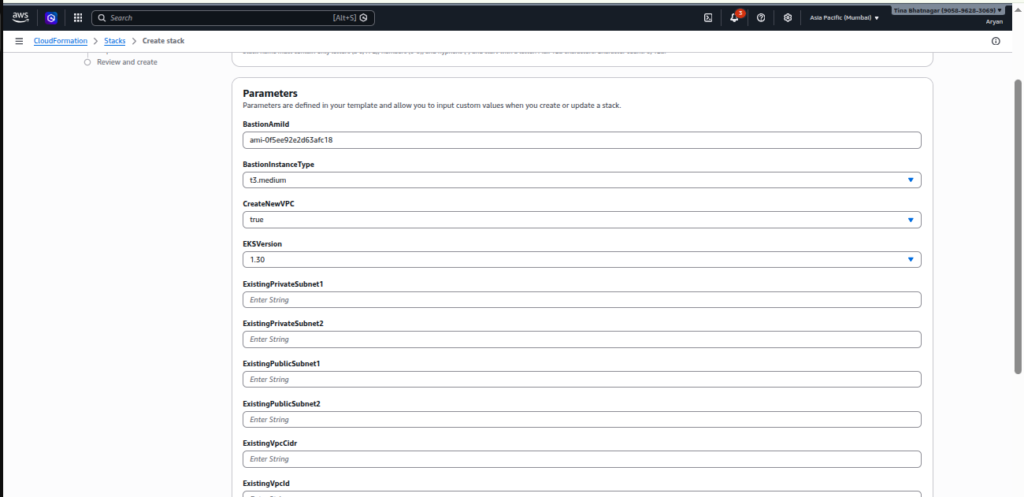
3. Parameters
Parameters allow users to pass input values into templates when creating or updating stacks.
4. Resources:
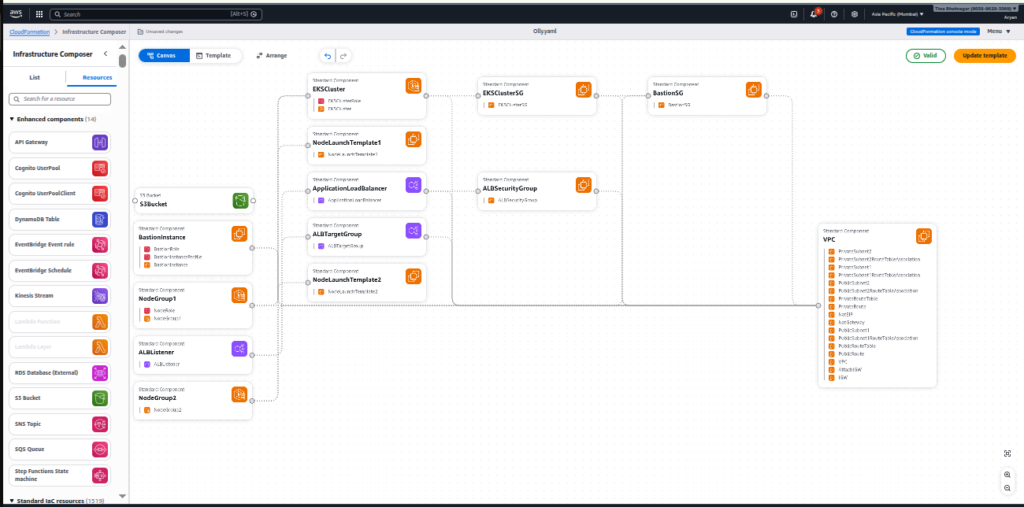
The Resources section defines the actual AWS services that will be created by the stack.
Examples include:
- VPC networks
- EC2 instances
- S3 buckets
- RDS databases
5. Outputs
Outputs allow users to display or export useful information after the stack is created.
For example:
- Public IP of an EC2 instance
- Website URL of an S3 bucket
- Database endpoint
What is Rollback in AWS CloudFormation?
Rollback in AWS CloudFormation is a feature that automatically reverts the stack to its previous stable state if stack creation or update fails. This helps prevent partially created or broken infrastructure.
During stack creation or update, CloudFormation provisions multiple AWS resources such as EC2 instances, S3 buckets, databases, and networking components. If any resource fails to be created or configured correctly, CloudFormation automatically initiates a rollback process.
CloudFormation vs Terraform
| Feature | AWS CloudFormation | Terraform |
|---|---|---|
| Provider | Amazon Web Services | HashiCorp |
| Cloud Support | AWS only | Multi-cloud (AWS, Azure, GCP, etc.) |
| Configuration Language | JSON, YAML | HCL (HashiCorp Configuration Language) |
| State Management | Managed by AWS automatically | Uses a state file (terraform.tfstate) |
| Open Source | No | Yes (Open-source tool) |
| Deployment | Uses stacks to deploy resources | Uses plans and apply commands |
| Integration | Deep integration with AWS services | Supports many providers and tools |
| Best For | AWS-only environments | Multi-cloud infrastructure |
Limitations of AWS CloudFormation
- AWS-Only Support CloudFormation works only with AWS services and cannot manage infrastructure in other cloud platforms like Azure or Google Cloud.
- Complex Templates For large infrastructures, templates can become very long and difficult to manage.
- Slow Stack Operations Creating or updating large stacks may take more time compared to some other Infrastructure as Code tools.
- Difficult Debugging Error messages are sometimes not very clear, making troubleshooting harder.
- Limited Flexibility Some advanced configurations or new AWS services may not be immediately supported.
How to Setup?
Step-1
AWS Console → Search → CloudFormation

Step-2
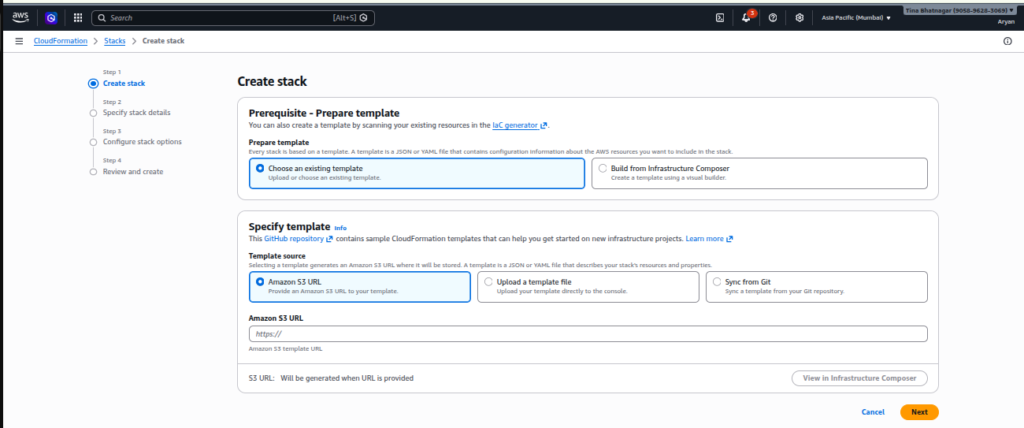
CloudFormation → Create Stack

Step-3
Upload Template
1. Amazon S3 URL
2. Upload a template file
3. Sync from Git
Step-4
Enter the Name of Stack

Step-5:
Review and Submit
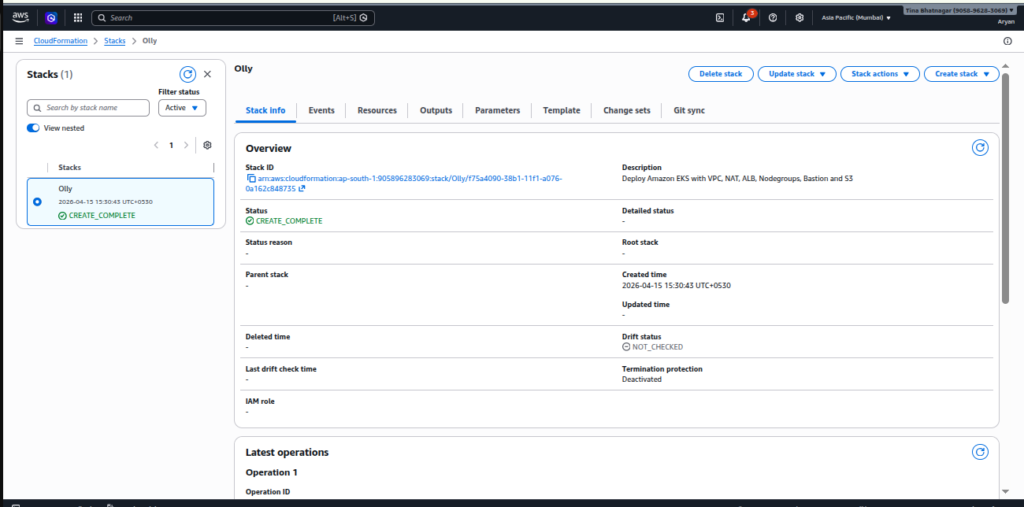
Template resource:
Conclusion
AWS CloudFormation helps automate the creation and management of cloud resources using templates. It ensures consistent and efficient deployment of infrastructure. By using stacks and features like rollback and parameters, it simplifies cloud management. Overall, it plays an important role in building scalable cloud systems in Amazon Web Services.