


If you’re starting your journey into databases, you’ve probably heard names like MySQL, PostgreSQL and MongoDB. While all of them help store data, they work in different ways.
In this article, we’ll explore what MongoDB is, how it differs from traditional SQL databases and why it’s one of the most popular databases for modern applications.
What You’ll Learn
- What MongoDB Is
- SQL vs NoSQL Databases
- Why MongoDB Was Created
- JSON vs BSON
- Why Developers Love MongoDB
- Common MongoDB Use Cases
- The
_idField and Its Behavior - Basic MongoDB Architecture
- MongoDB Server Components:
mongod,mongosh, andmongos
SQL vs NoSQL: What’s the Difference?
Before diving deeper into MongoDB, it’s important to understand the two major types of databases: SQL (Relational Databases) and NoSQL (Non-Relational Databases).
Both are used to store and manage data, but they differ in how they organize, store, and retrieve information.
What is a SQL Database?
A SQL (Structured Query Language) database stores data in tables made up of rows and columns. Each table has a predefined structure, known as a schema, which defines what type of data each column can store.
Popular SQL databases include:
For example, a Products table might look like this:
| Product ID | Product Name | Price | Warranty |
|---|---|---|---|
| 101 | Laptop | ₹64,999 | 2 Years |
| 102 | Mouse | ₹799 | NULL |
Notice that every product must have the same columns. If a product doesn’t have a warranty, the value is stored as NULL.
Advantages of SQL Databases
- Well-suited for structured data.
- Strong data consistency using ACID transactions.
- Excellent for complex relationships between tables.
- Mature ecosystem with decades of development.
Limitations of SQL Databases
- Schema changes require database migrations.
- New columns must be added before storing new types of data.
- Many unused (NULL) fields can appear.
- Scaling horizontally can be more complex.
What is a NoSQL Database?
A NoSQL (Not Only SQL) database stores data in a more flexible format. Instead of tables, MongoDB stores data as documents.
Each document is similar to a JSON object and can have its own structure.
For example, one product document may contain only basic information:
{
  "productName": "Laptop",
  "brand": "Dell",
  "price": 64999
}
Another product in the same collection can include additional details:
{
  "productName": "Smartphone",
  "brand": "Samsung",
  "price": 32999,
  "color": "Black",
  "storage": "256GB",
  "warranty": "2 Years",
  "ratings": 4.8
}
Notice that both documents belong to the same collection, yet they don’t have identical fields. This flexibility allows applications to evolve without constantly modifying the database structure.
Advantages of NoSQL Databases
NoSQL databases are designed for modern applications that deal with changing and diverse data.
Some key advantages include:
- Flexible schema
- Easy to modify document structure
- Better horizontal scalability
- Faster development
- Excellent support for semi-structured and unstructured data
- Ideal for cloud-native applications
Modernize your data infrastructure with OpsTree Data Engineering Services to solve complex data scalability, performance, integration and reliability challenges while building a secure, scalable and future-ready data platform
Flexible Schema ≠ No Schema
This is an important point
Many beginners misunderstand MongoDB and think:
MongoDB has no schema.
Instead, MongoDB uses a flexible schema, which means documents in the same collection do not have to contain exactly the same fields. However, applications can still enforce a defined structure using schema validation.
What is MongoDB?
In the digital world, applications generate and process vast amounts of data every second. Whether it’s an online shopping website, a social media platform, or a banking application, all of them need a reliable database to store and manage information efficiently.
MongoDB is a NoSQL (Non-Relational) database that stores data in flexible, JSON-like documents instead of traditional tables and rows. Unlike relational databases, where every record must follow the same fixed structure, MongoDB allows each document to have its own set of fields. This flexibility makes it easier to handle real-world data, which often changes over time.
For example, consider an online shopping application. One product might have only a name and price, while another product also includes color, storage capacity, warranty and customer ratings. In MongoDB, both products can exist in the same collection without requiring additional columns or schema changes.
{
  "productName": "Laptop",
  "brand": "Dell",
  "price": 64999
}

{
  "productName": "Smartphone",
  "brand": "Samsung",
  "price": 32999,
  "color": "Black",
  "storage": "256GB",
  "warranty": "2 Years",
  "ratings": 4.8
}
This flexibility is one of the biggest reasons developers choose MongoDB for modern applications.
Why is MongoDB Popular?
MongoDB is designed to support applications that need to scale quickly and handle different types of data. It offers:
- Flexible document model that adapts to changing business requirements.
- High performance for reading and writing large volumes of data.
- Horizontal scalability through sharding, allowing data to be distributed across multiple servers.
- High availability with Replica Sets that automatically provide failover if a server goes down.
- Powerful indexing and querying for fast data retrieval.
- Cloud-native support with MongoDB Atlas for easy deployment and management.
- Built-in support for AI applications, including Vector Search for semantic search and recommendation systems.
MongoDB Atlas is MongoDB’s fully managed cloud database service. It allows developers to create, deploy, monitor and scale MongoDB clusters without managing the underlying database infrastructure.
Where is MongoDB Used?
MongoDB is widely used across industries because of its flexibility and scalability. Some common use cases include:
- Web applications
- Mobile applications
- E-commerce platforms
- Analytics and reporting systems
- Content Management Systems (CMS)
- Log and event management
- Internet of Things (IoT) applications
- Artificial Intelligence (AI) and Machine Learning (ML) applications
Understanding the _id Field
Every document stored in MongoDB must contain an _id field.
The _id field acts as the primary key of a document, ensuring that every document within a collection has a unique identifier.
If you don’t specify an _id value while inserting a document, MongoDB automatically generates one.
Example
db.products.insertOne({
  productName: "Laptop",
  price: 64999
});
MongoDB automatically stores id:
{
  "_id": ObjectId("66d0012a9a3b9a2bcb87e211"),
  "productName": "Laptop",
  "price": 64999
}
Important Characteristics of _id
- Every document must have an _id field.
- MongoDB automatically creates a unique index on _id.
- Duplicate _id values are not allowed.
- The _id field is always stored as the first field in a document.
- If MongoDB receives a document where _id is not the first field, it automatically moves it to the beginning.
MongoDB Architecture
In production we use Primary-Secondary-Hidden-Secondary-Arbiter (P S HS A).
Primary Node: it is the main node in a replica set that handles all write operations and provides strong consistent reads.
Secondary Node: It is replicate data from the primary asynchronously and can serve read operations depending on the read preference; if the primary node fails, the replica set automatically elects one of the secondary nodes to become the new primary
Hidden Secondary:
- A hidden member maintains a copy of the primary data set but is invisible to client applications.
- It is used for analytics, backups, or workload isolation to avoid impacting primary database performance.
- Hidden members may vote in replica set elections, but we must hide it from voting
- You can only read from a hidden member if you directly connect to the node. If you connect to a cluster without directly connecting to the hidden node, you cannot run queries on the hidden node.
- hidden: true → Makes the member invisible to client queries.
- priority: 0 → Prevents it from becoming the primary.
Arbiter Node:
- A MongoDB Arbiter is a lightweight member of a Replica Set that participates in elections but does not store data. It helps elect a new primary when needed, ensuring high availability without additional data replication overhead.
- Does not handle client read or write operations.
- Helps maintain an odd number of voting members to prevent election ties.
Key Aspects of MongoDB
- Database: A MongoDB database contains collections, which in turn contain documents. Each database can hold a large number of collections.
- Collection: A collection is a group of MongoDB documents. It is equivalent to a table in relational databases.
- Document: A document is a set of key-value pairs. Documents are the basic unit of data in MongoDB. Every document requires an _id field, which acts as a primary key or unique identifier. If an inserted document doesn’t have an _id field, MongoDB automatically generates one.
- Field: A field is a key-value pair in a document. Fields in MongoDB are like columns in relational databases. Field can contain different data types
- Index: Indexes improve the speed of search operations in MongoDB. They are similar to indexes in relational databases.
- Replica Set: When you create a database in MongoDB, the system automatically creates at least two more copies of the data, referred to as a replica set. A replica set is a group of at least three MongoDB instances that continuously replicate data between them, offering redundancy and protection against downtime in the face of a system failure or planned maintenance.
- Sharding: Sharding is the process of distributing data across multiple servers (called shards) to improve performance and support large datasets. It enables MongoDB to scale horizontally by spreading data and workloads across multiple machines.
Just for the understanding I am comparing the Mongodb Terms with SQL
| SQL | MongoDB |
|---|---|
| Database | Database |
| Table | Collection |
| Row | Document |
| Column | Field |
| Primary Key | _id |
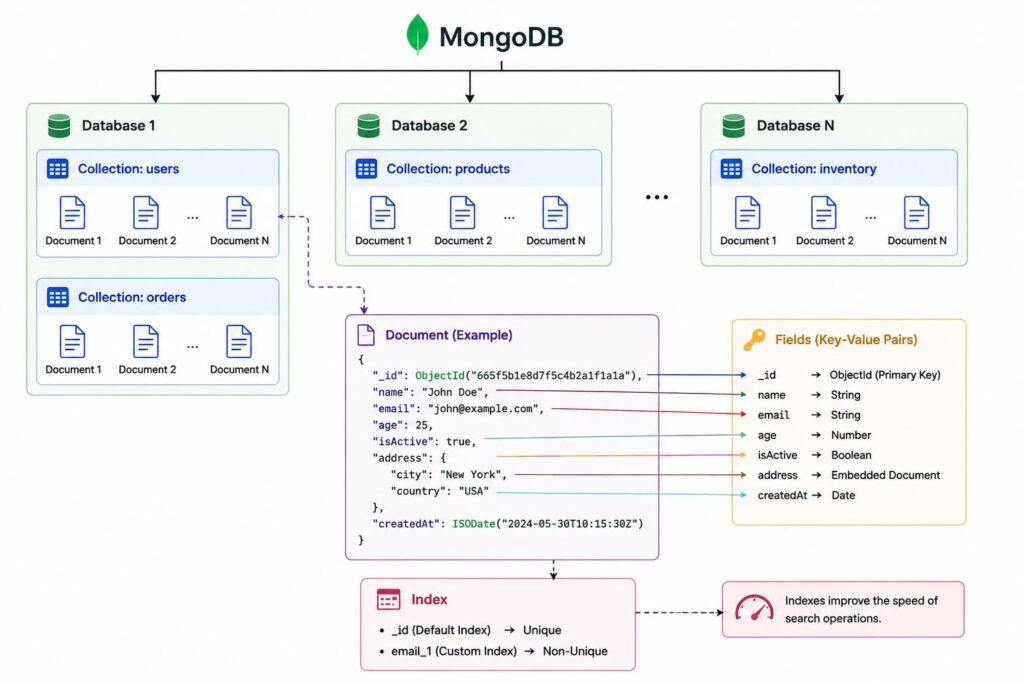
MongoDB Server Components
1. mongod
mongod is the MongoDB Database Server.
It is the core process responsible for:
- Storing data
- Managing collections
- Processing queries
- Managing indexes
- Performing replication
- Authentication
- Storage management
Whenever you start MongoDB, you are starting the mongod process.
2. mongosh
mongosh (MongoDB Shell) is the interactive command-line interface used to communicate with MongoDB.
Using mongosh, developers can:
- Create databases
- Create collections
- Insert documents
- Update documents
- Delete documents
- Execute queries
- Create users
- Monitor the server
Example:
use ecommerce
db.products.find()
3. mongos
mongos is used only in a Sharded Cluster.
It acts as a Query Router between the application and the shards.
Applications never communicate directly with individual shard servers. Instead, every request passes through mongos, which determines:
- Which shard contains the requested data.
- Where queries should be routed.
- How results from multiple shards should be combined.
4. Config Server
A Config Server is a special MongoDB server used only in a Sharded Cluster. It stores the cluster’s metadata, such as which data is stored on which shard and the overall cluster configuration. When a client sends a request through mongos, the Config Server helps determine the correct shard that contains the requested data. It does not store application data or process client queries directly; its primary role is to manage and coordinate the sharded cluster.
Key Points
- Stores metadata about the sharded cluster.
- Tracks the location of data across shards.
- Used only in sharded deployments.
- Does not store application data.
- Works together with mongos to route requests correctly.
In simple terms: Think of the Config Server as the directory or map of a sharded MongoDB cluster. It knows where every piece of data is stored but doesn’t store the actual data itself.
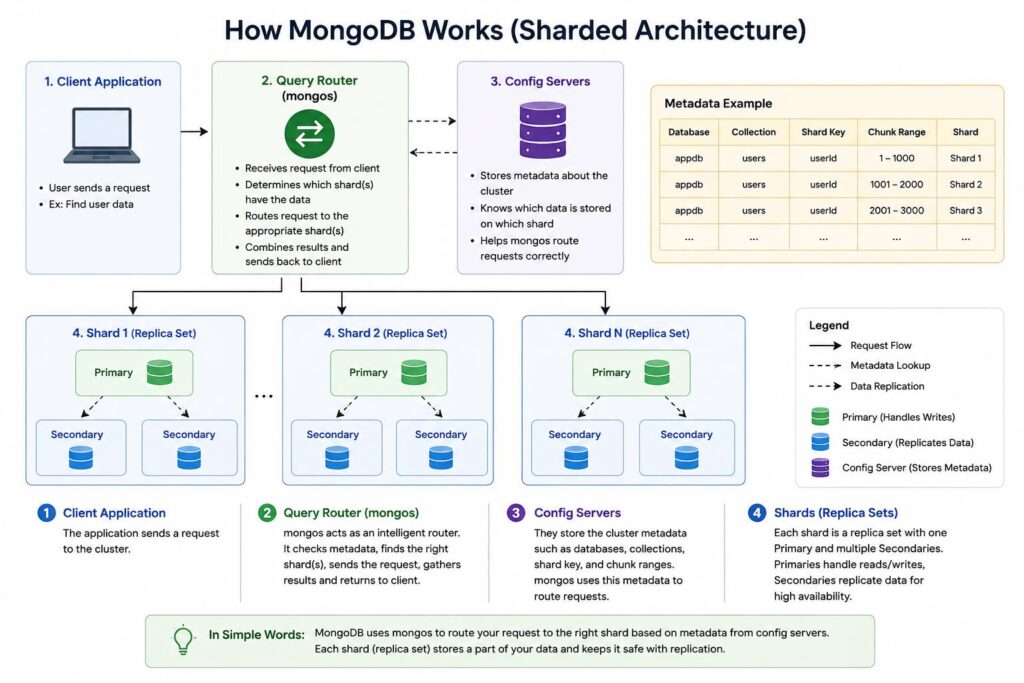
The goal of this part is to understand the basics of MongoDB, its key concepts, and its production architecture. Now that we have a clear understanding of how MongoDB works and how data is organized and managed, we’re ready to start working with MongoDB practically in the next part.
Conclusion
MongoDB provides a flexible and scalable approach to managing data for modern applications. Unlike traditional relational databases, it stores information as documents, allowing applications to work with changing and diverse data structures more easily. In this part, we covered the fundamentals of MongoDB, including SQL vs. NoSQL, documents and collections, the _id field, indexes, replica sets, sharding, and key MongoDB server components such as mongod, mongosh, mongos, and Config Servers. Understanding these concepts provides a strong foundation for working with MongoDB and its production architecture. In the next part, we’ll move from these fundamentals to practical MongoDB concepts and hands-on learning.
Related Searches
- A Leading Logistics Platform Achieved 30% Faster Incident Resolution with AI-Driven Observability
- Driving 40% Faster Resolution with AI Across One of Asia’s Largest Digital Businesses
- 3× Faster Issue Resolution Through Smarter Operational Intelligence
- What Is Agentic AI Data Engineering?- How AI Agents Automate ETL Pipelines