
GitHub Advanced Security (GHAS) prevents leaked secrets, detects vulnerabilities, scans code for security flaws, protects the supply chain, and automates DevSecOps, all inside GitHub.
Table of Contents
1. What is GHAS?
GitHub Advanced Security (GHAS) is a suite of built-in security capabilities designed to help software teams identify, prevent, and remediate security risks directly within GitHub.
It enhances the software development lifecycle by integrating automated security testing into the developer workflow, ensuring vulnerabilities are caught early and remediated quickly.
GHAS empowers organizations with advanced code analysis, secret exposure detection, and dependency vulnerability management – all without requiring additional external tools.
2. Why GHAS?
Modern applications rely heavily on open-source libraries, automation, cloud services, and complex CI/CD systems.
This increases the risk of:
- Vulnerable code entering production
- Hardcoded secrets getting exposed
- Using outdated or vulnerable dependencies
- Insecure GitHub Actions workflows
GHAS helps solve these problems by:
- Providing shift-left security
- Reducing reliance on multiple scattered tools
- Offering seamless GitHub integration
- Automating alerts, scanning, and remediation
- Improving developer productivity
Are you looking: Shift-left security solutions
3. Features of GHAS
GHAS provides the following major capabilities:
Code Scanning (via CodeQL)
- Performs static code analysis
- Detects vulnerabilities like SQL injection, XSS
- Runs via CLI, GitHub Actions, and API
Code Scanning PoC (CodeQL)
Understanding CodeQL
CodeQL is the static analysis engine used by GitHub Advanced Security to detect security vulnerabilities in codebases.
Developers can query code like a database, identifying patterns that could lead to:
- SQL injection
- XSS attacks
- Hardcoded secrets
- Lack of rate limiting
- Command injection & more
CodeQL scanning can be executed: Locally with CodeQL CLI
- On GitHub via CodeQL workflow
- Through GitHub API
Objective of This PoC
- Introduce vulnerable application code
- Configure CodeQL workflow in GitHub
- Trigger scan via push event
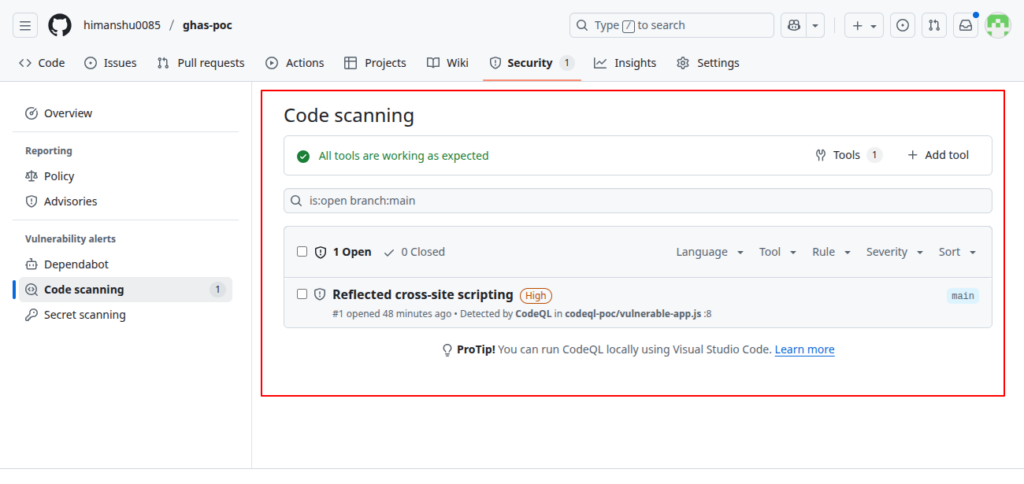
- Validate alerts shown in Security → Code Scanning
- Apply secure fixes
- Confirm alerts marked resolved after mitigation
Repository Setup
Folder structure added:
codeql-poc/ └── app.js
Initial vulnerable code committed to repo.
Repo: https://github.com/himanshu0085/ghas-poc
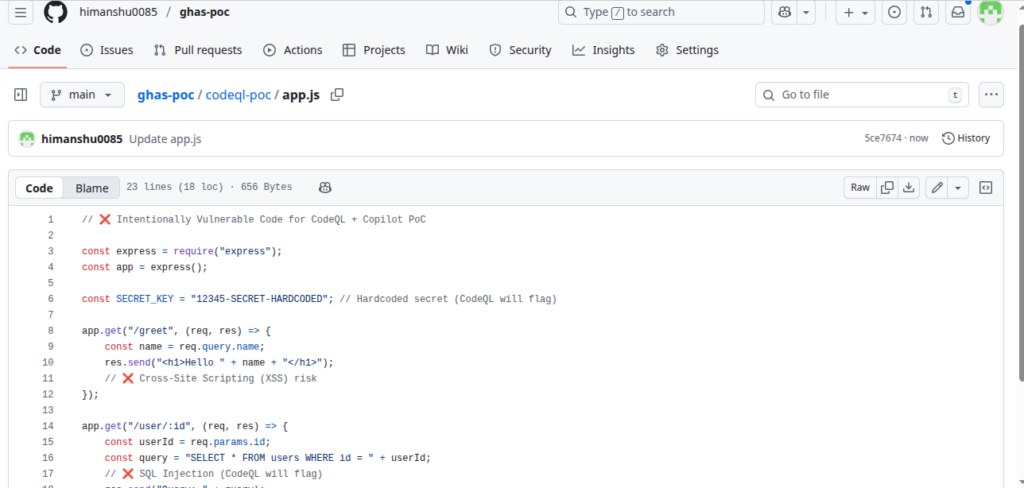
Introducing Vulnerabilities
codeql-poc/app.js — intentionally insecure:
- SQL Injection
- Cross-Site Scripting (XSS)
- Hardcoded secret
- Missing rate limiting
Enable CodeQL Code Scanning
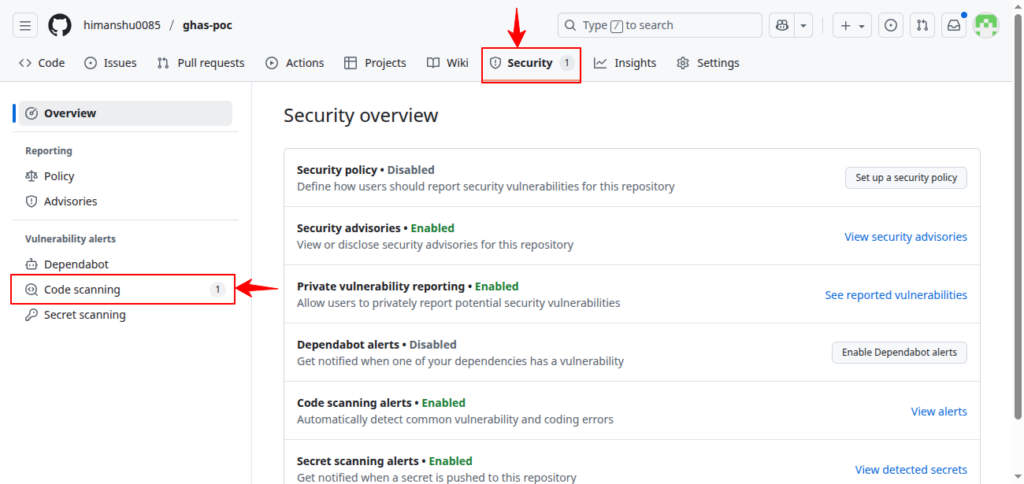
- Go to Security tab
- Under Code Scanning, Click Set up CodeQL
- Select Default Configuration
- Commit workflow file:
.github/workflows/codeql.yml
Expected Alerts
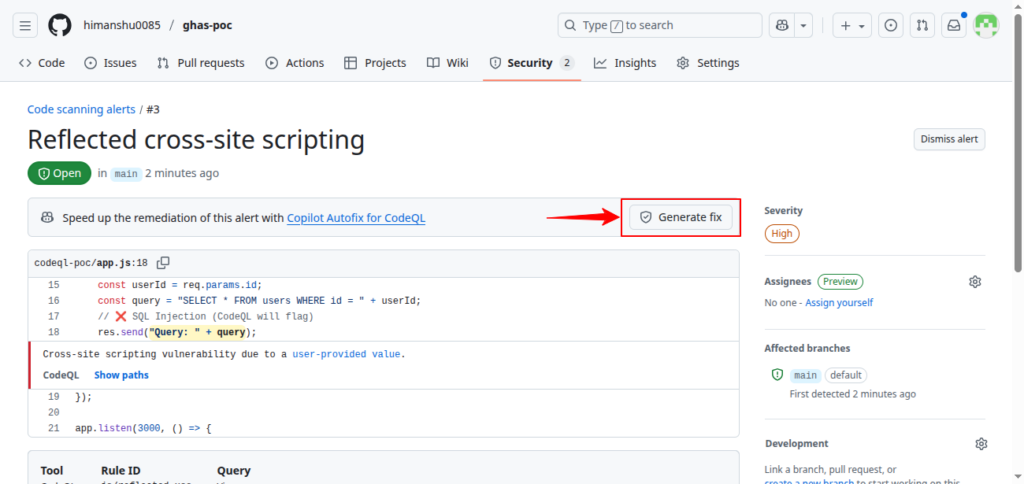
After workflow runs, CodeQL will report vulnerabilities:
| Vulnerability | Severity | Expected Alert |
|---|---|---|
| SQL Injection | High | Yes |
| XSS | Medium | Yes |
| Hardcoded Secret | High | Yes |
| Missing rate limiting | Medium | Yes |
Fixing Vulnerabilities
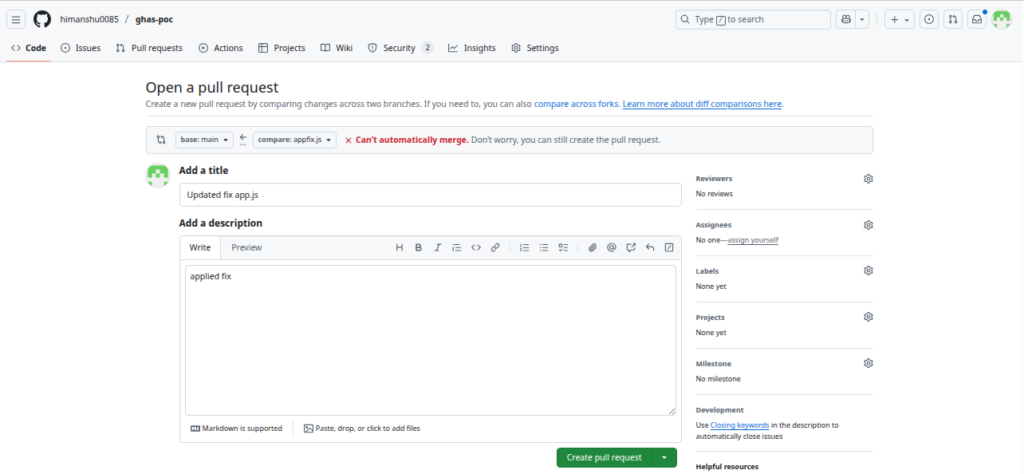
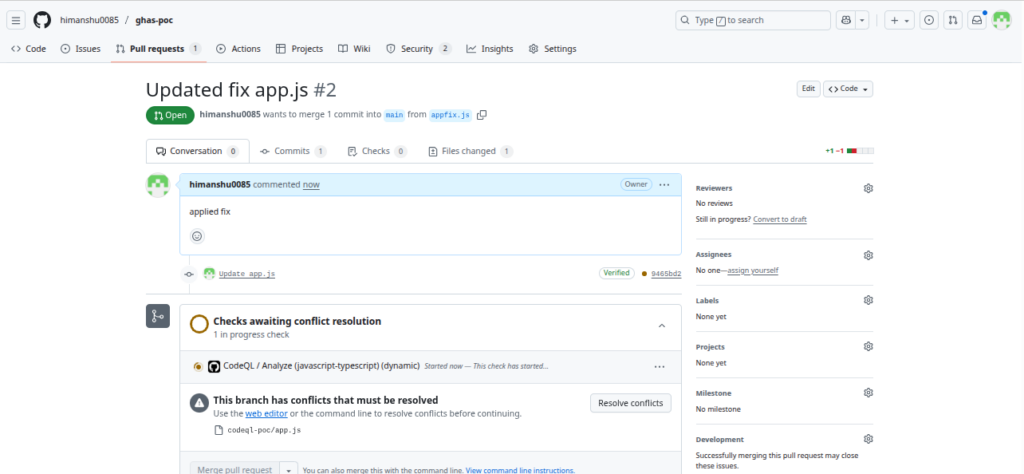
A secure version was created:
codeql-poc/app-secure.js
Mitigations included:
| Issue Fixed | Method Used |
|---|---|
| SQL Injection | Parameterized query |
| XSS | HTML input escaping |
| Hardcoded Secret | Environment variables |
| Missing Rate Limiting | Added global rate limiter |
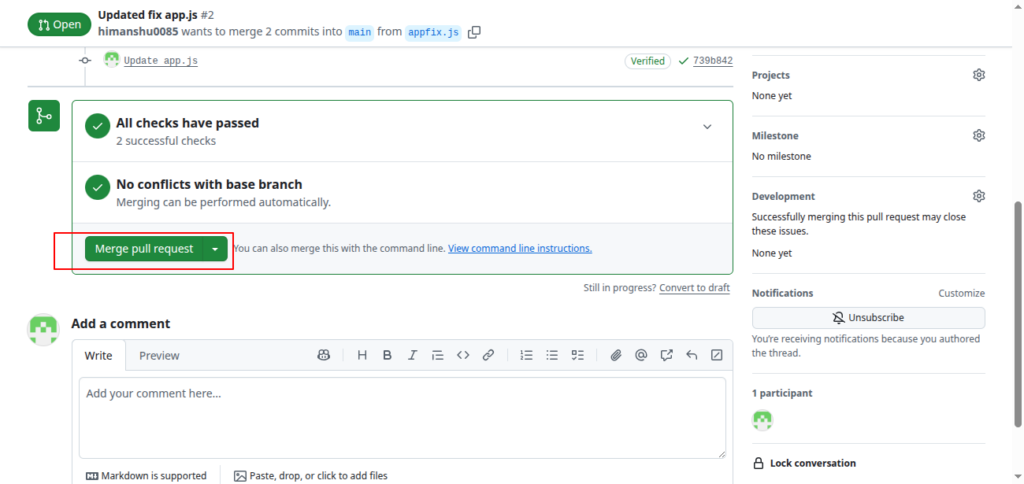
Alert Resolution
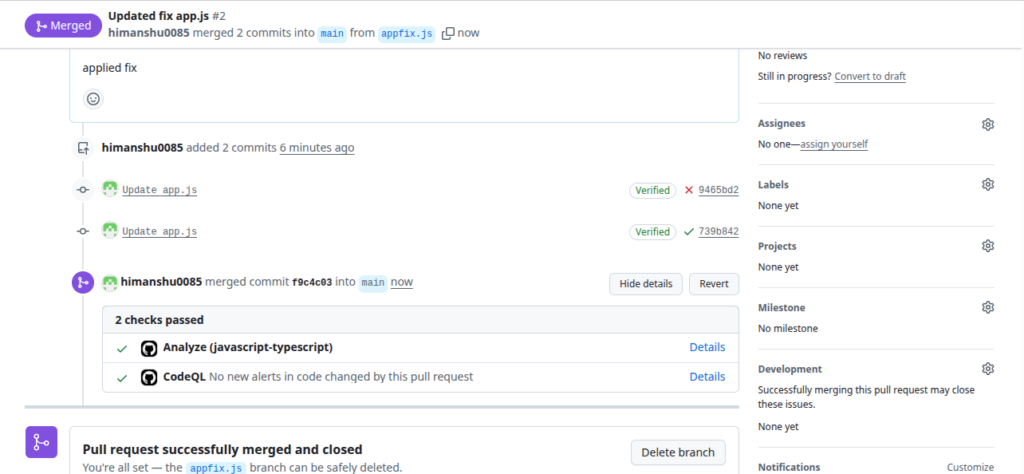
After remediation push:
- CodeQL rescans automatically
- Alerts update to Resolved or can be manually closed
- Select valid closure reason (e.g., “Fixed”)
Best Practices
- Enable branch protection rules to block merging vulnerable code
- Use Copilot Security to auto-fix common vulnerabilities
- Expand CodeQL queries for custom security rules
- Include CodeQL scans in all CI/CD pipelines
- Monitor Security dashboard for regression alerts
Secret Scanning
- Real-time detection of exposed credentials
- Flags secrets such as API keys, tokens, private keys
Secret Scanning PoC
Understanding Secret Scanning
Secret Scanning is a GitHub Advanced Security (GHAS) capability that automatically identifies exposed credentials inside a repository. GitHub scans:
- Commits
- Branches
- Pull Requests
- Issues
- Wikis
- Discussions
When a supported secret pattern is detected, GitHub generates an alert under:
- Security → Secret Scanning
This PoC demonstrates adding sample secrets, pushing them to GitHub, observing the alerts, and documenting the workflow.
Objective of This PoC
- Create a single file containing multiple credential patterns
- Push the file to a public repository
- Trigger secret-scanning alerts
- Validate and record alert details through screenshots
- Understand how alerts are reviewed and resolved
Repository Setup
- Create a dedicated folder in your repository:
secret-scanning-poc/
- Inside it, create one file:
secret-scanning.txt
Content for secret-scanning.txt
Paste the following sample secrets into the file:
ghp_FAKEPAT1234567890abcdefghijklmnopqrstuvwxyz12

AKIA1234567890FAKEKEY

sk_test_4eC39HqLyjWDarjtT1zdp7dc
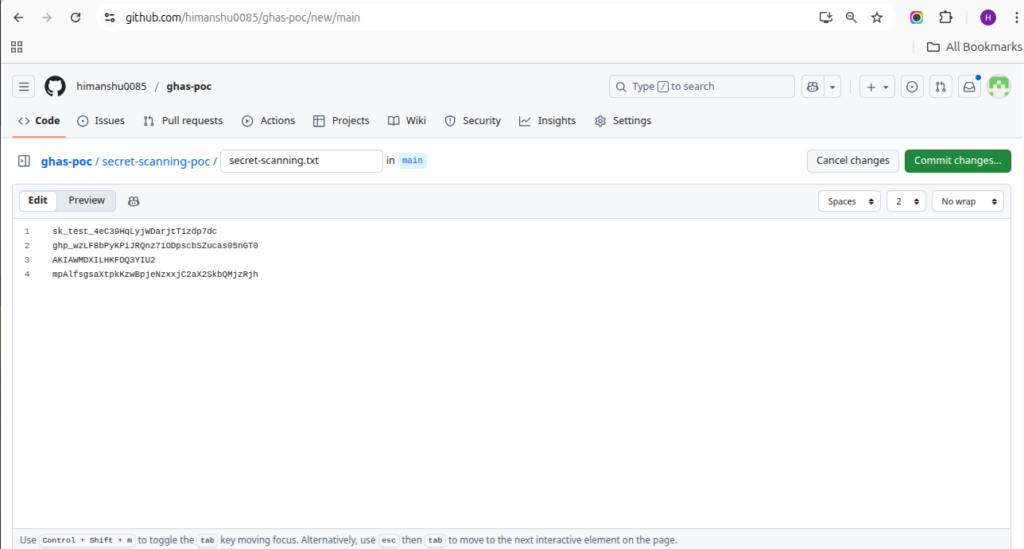
- Commit and push the file to the main branch.
- This file will be used to demonstrate GitHub’s Secret Scanning feature.
Enable Secret Scanning
- Before detection begins, ensure Secret Scanning is enabled for the repository.
-
Go to repository Settings
-
Navigate to “Code security and analysis” / “Advanced Security”
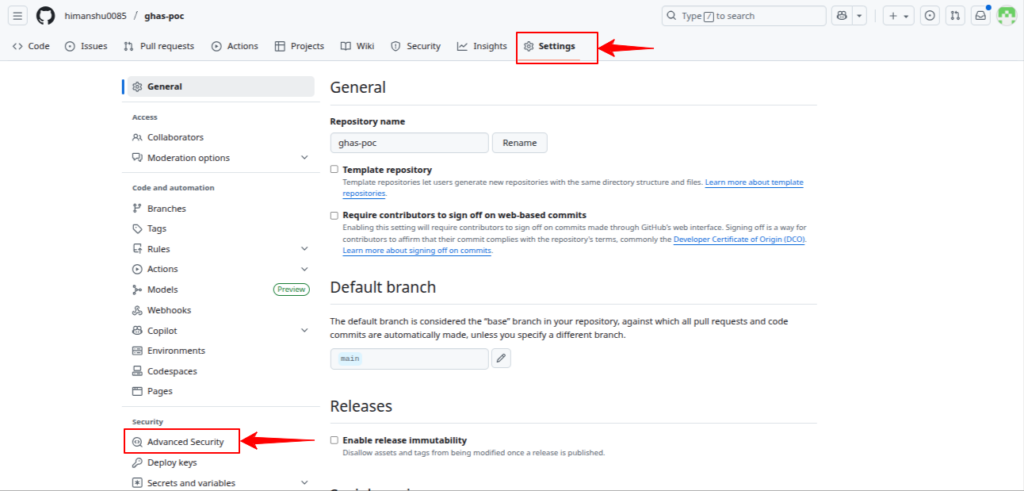
3. Under “Secret Protection”, enable:
- Secret scanning
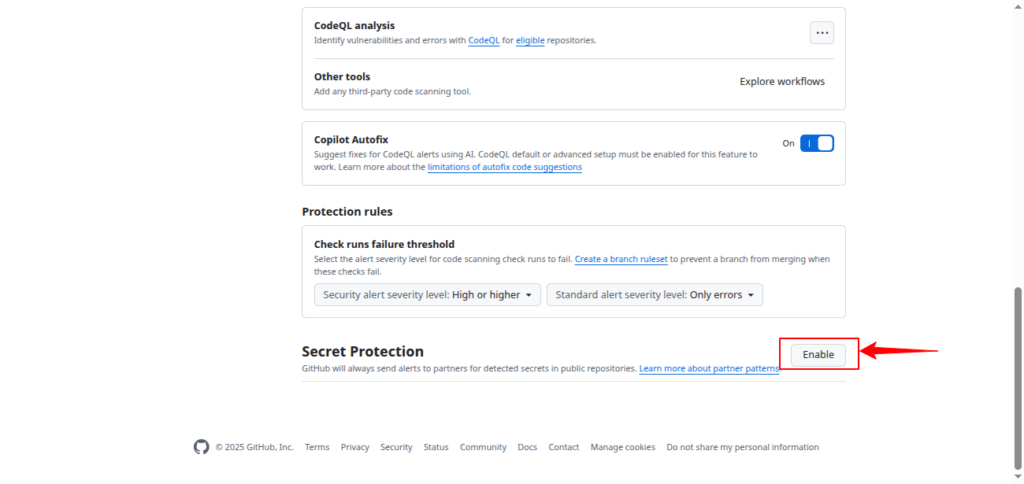
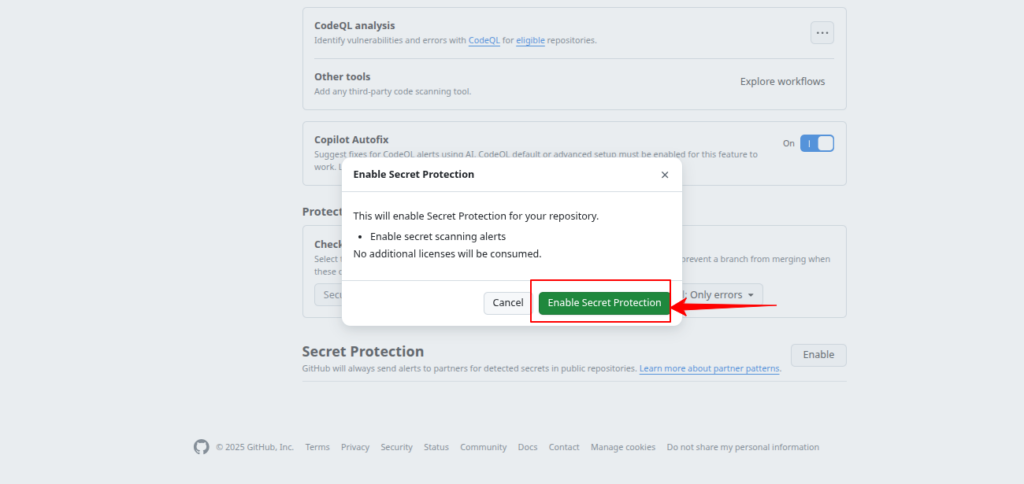
- (Optional) Push protection
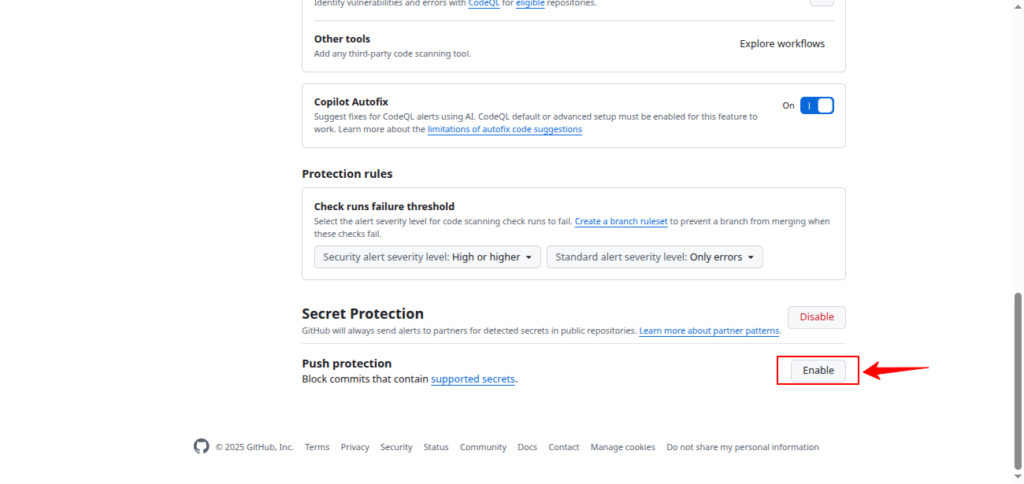
- Once enabled, GitHub will automatically scan new commits for exposed secrets.
Expected Flow
- After enabling the feature, go to the Security tab in your repository
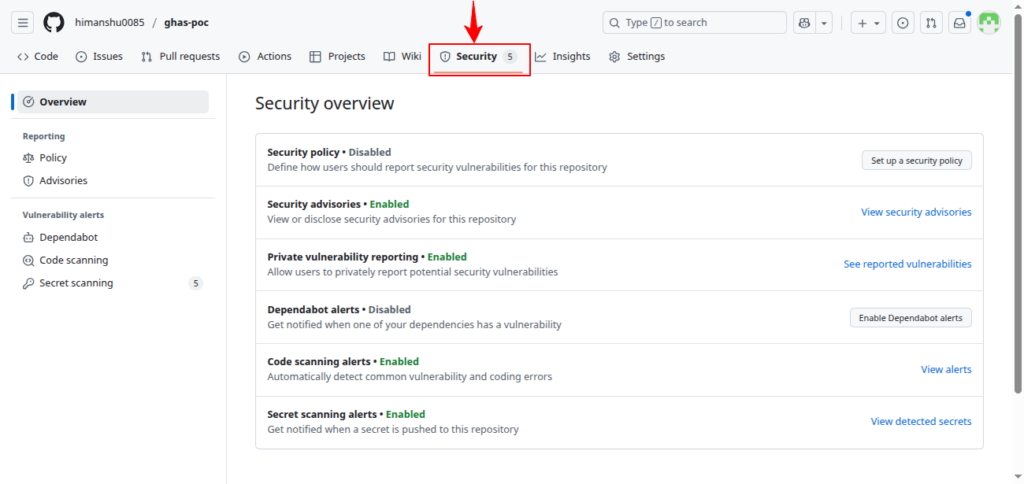
- GitHub scans the newly pushed content
- Secret alerts appear under Security → Secret Scanning
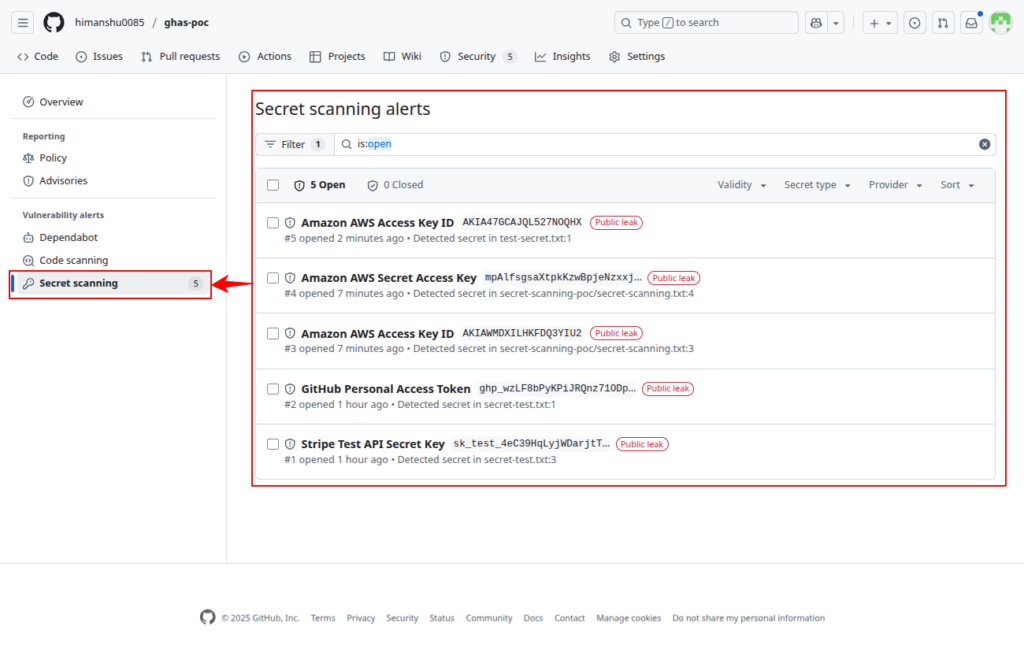
- You will validate alerts and capture screenshots
- Alerts can then be marked as resolved, revoked, or dismissed
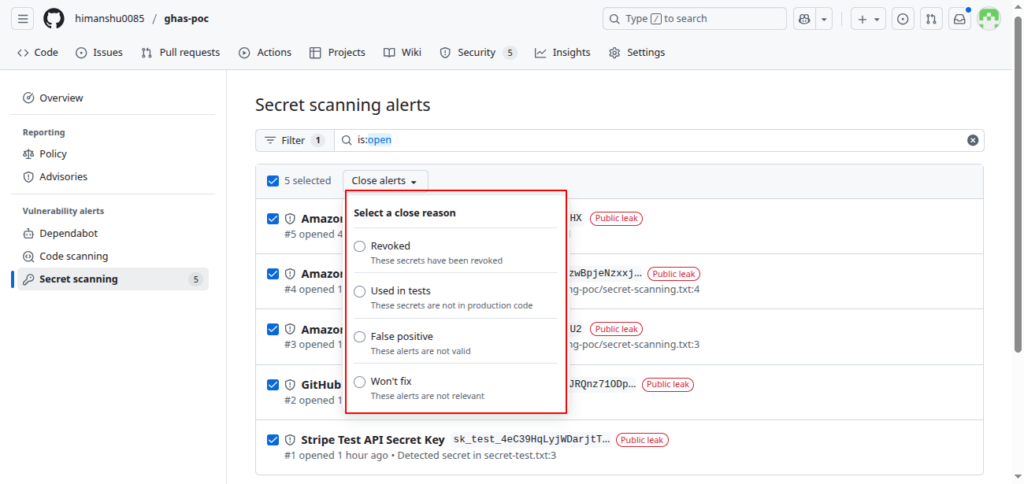
Closure Reasons Explained
GitHub requires selecting a valid reason before marking alerts as resolved:
-
Close Reason When to Use It What It Means Revoked When the leaked secret is invalidated or rotated Secret cannot be exploited anymore Used in tests Demo/sandbox/testing credentials only No real risk to production False positive Detection is incorrect Not actually a real secret Won’t fix Accepted risk in PoC/demo No remediation needed – but risky if used in production
Best Practices
- Always rotate real secrets immediately
- Use “Used in tests” only for intentionally fake/testing keys
- Use “False positive” only when 100% sure
- Avoid “Won’t fix” unless in a safe PoC environment
Dependency Management (Dependabot)
- Detects vulnerable dependencies
- Suggests or auto-generates PRs to update libraries
Dependabot (Dependency Scanning) PoC
What is Dependency Scanning?
GitHub Dependabot scans dependencies for known vulnerabilities using the GitHub Advisory Database.
It:
- Detects security vulnerabilities (CVEs)
- Alerts the developer in GitHub Security tab
- Suggests or auto-creates PRs to upgrade packages
Objective of This PoC
- Introduce vulnerable npm dependencies
- Trigger Dependabot alerts
- Apply recommended fixes via PR
- Validate remediation in GitHub UI
Repository Setup
- Create new folder inside repo:
- ghas-poc/ └── dependabot-poc/ ├── package.json └── index.js
- Initialize a basic Node.js project:
cd dependabot-poc

npm init -y
Add Vulnerable Dependencies
Edit – package.json:
- {
“name”: “dependabot-poc”,
“version”: “1.0.0”,
“dependencies”: {
“lodash”: “4.17.19”,
“axios”: “0.21.0”
}
}Create `index.js`:“`javascript
console.log(“Dependabot scanning PoC running…”); -
git add .
git commit -m "Added vulnerable dependencies for Dependabot PoC"
git push
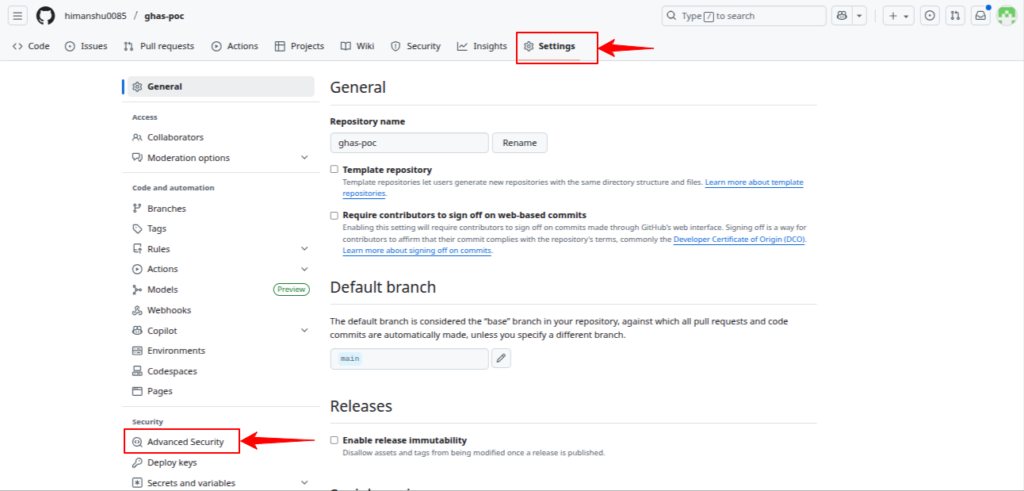
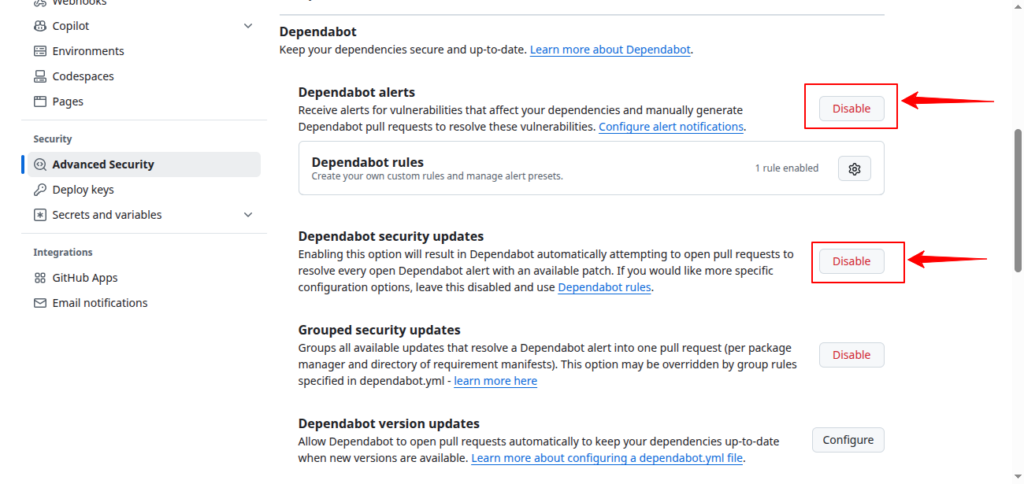
Enable Dependabot Security Updates
Go to: Settings → Code security and analysis
Enable:
- Dependabot alerts
- Dependabot security updates
Expected Alerts
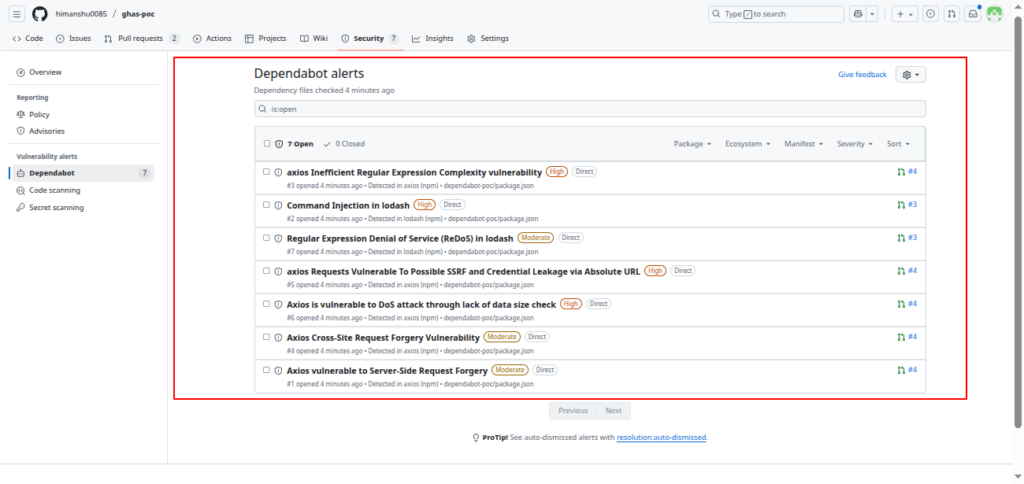
Dependabot will detect two vulnerabilities:
-
Package Version Issue Severity Fix lodash 4.17.19 Prototype Pollution ❌ High Upgrade to ≥ 4.17.21 axios 0.21.0 SSRF Vulnerability ❌ High Upgrade to ≥ 0.21.1
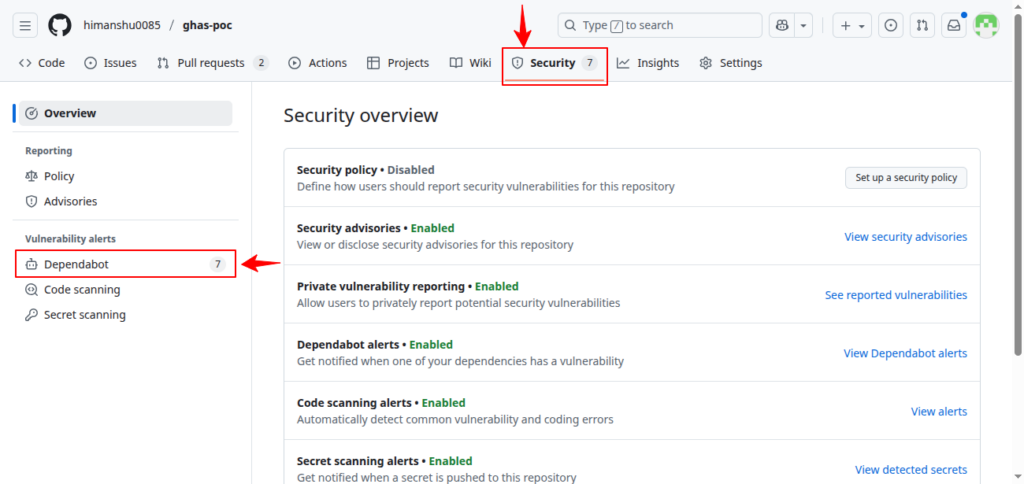
View them in:
Security → Dependabot → Alerts
Apply Auto-Fix via Dependabot PR
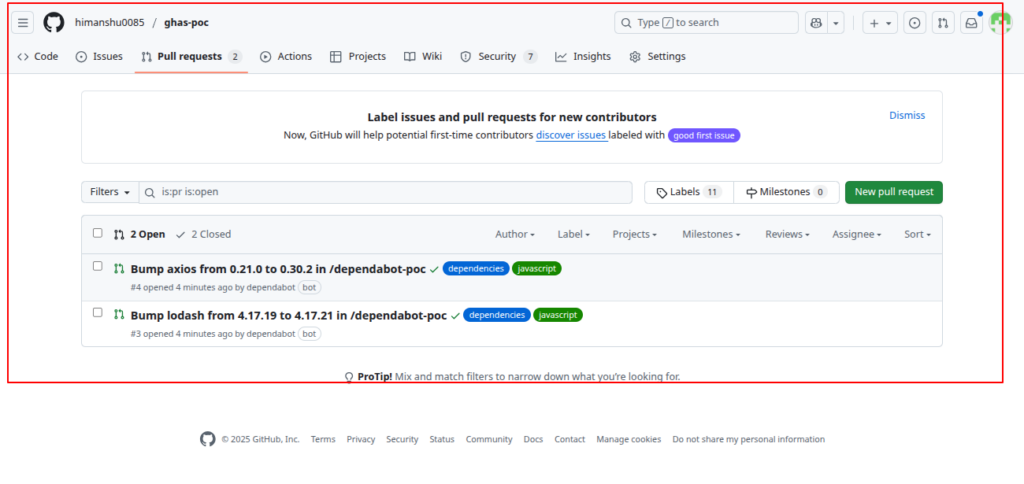
Dependabot will automatically generate:
- PR #1 – Upgrade lodash
- PR #2 – Upgrade axios
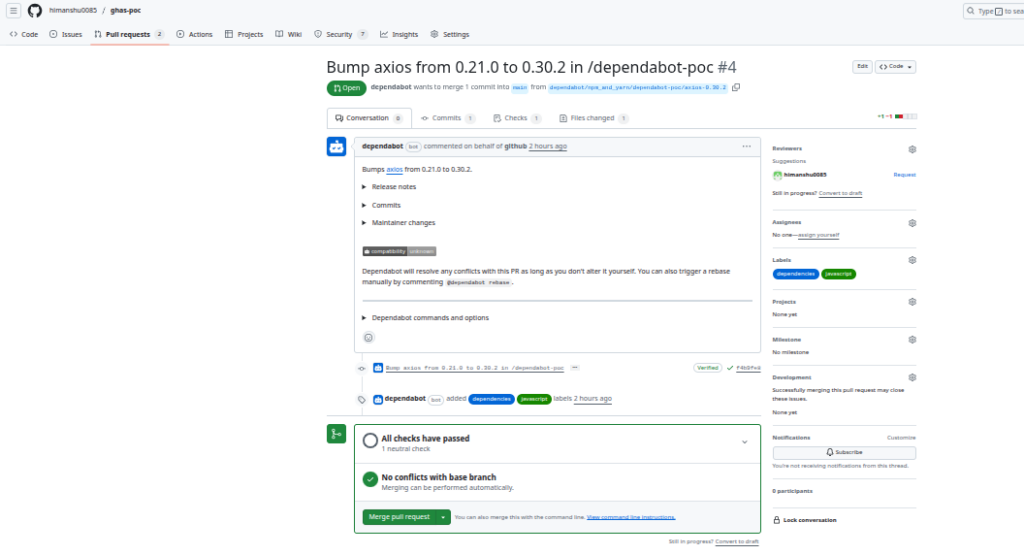
Your tasks:
- Review both PRs
- Merge to the main branch
- Confirm GitHub checks pass
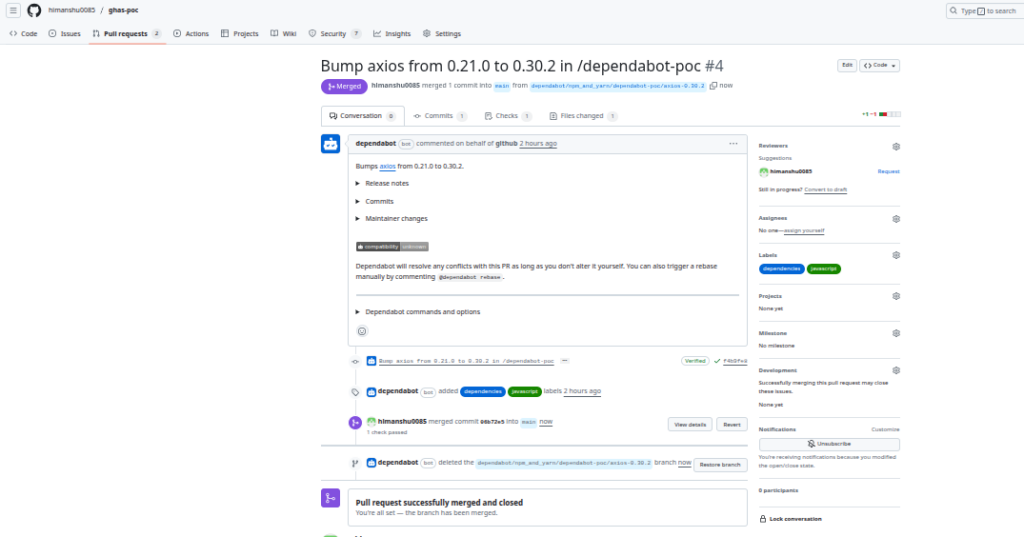
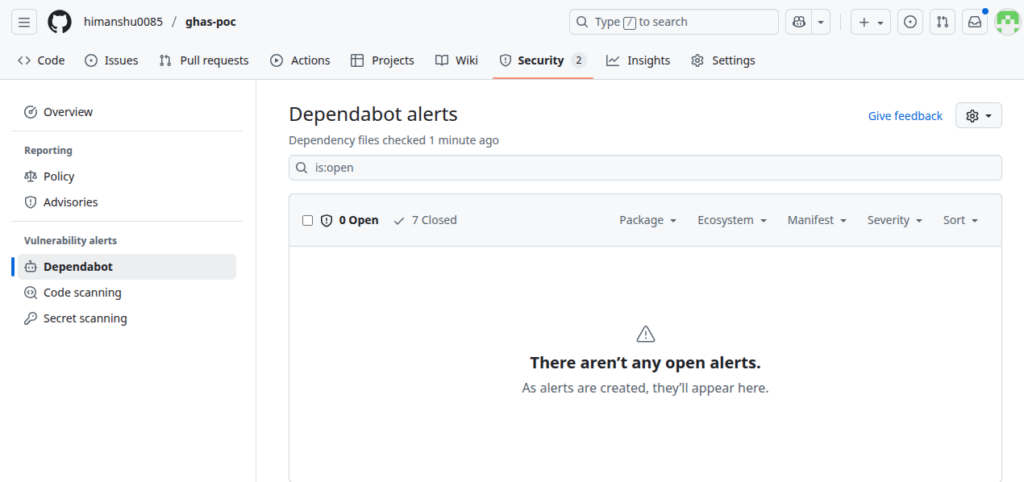
After merging:
- Alerts marked Resolved
- Dependency tree becomes secure
Best Practices
-
Best Practice Why Monitor alerts daily Faster remediation Enable auto-security updates Avoid outdated dependencies Apply least privilege to workflows Reduce dependency-based attacks Use version pinning Prevent unexpected breaking changes Combine with CodeQL + Secret Scanning Full SDLC protection
Conclusion
- This PoC confirms:
- Dependabot correctly identified vulnerable dependencies
- Alerts were visible inside GitHub Security Dashboard
- Auto-generated PRs patched vulnerabilities
- The application security posture improved
4. Components of GHAS
-
Component Description Key Capabilities Code Scanning (CodeQL) Static code analysis using semantic queries Finds vulnerabilities, supports multiple languages Secret Scanning Detects credentials committed to code Alerts developers, supports custom patterns Dependency Management (Dependabot) Scans for vulnerable libraries Creates automated PRs for fixes
5. Conclusion
GitHub Advanced Security (GHAS) provides a powerful, developer-friendly security solution natively integrated into GitHub.
By combining CodeQL scanning, secret detection, and dependency management, GHAS enables teams to secure their codebases efficiently and proactively.
- GHAS improves:
- Code quality
- Security posture
- Developer productivity
- Compliance readiness
It helps organizations implement true shift-left security and reduces dependency on external tools.
6. References
- GitHub Advanced Security Documentation https://docs.github.com/en/code-security
- CodeQL Documentation https://codeql.github.com/docs/
- GitHub REST API Security Docs https://docs.github.com/en/rest
- GitHub Actions Security Guide https://docs.github.com/en/actions/security-guides