

Table of Contents
- INTRODUCTION
- PROBLEM STATEMENT
- SOLUTION OVERVIEW
- ARCHITECTURE DIAGRAM
- END-TO-END WORKFLOW
- WHY S3 + LAMBDA + ATHENA
- STRUCTURED LOG FORMAT
- PARTITIONING STRATEGY
- COST OPTIMIZATION STRATEGY
- PRACTICAL IMPLEMENTATION GUIDE
- Step-by-Step Practical Implementation Guide
- REAL-WORLD USE CASE
- COMMON MISTAKES TO AVOID
- COST AND PERFORMANCE BENEFITS
- CONCLUSION
INTRODUCTION
It usually starts with a simple question.
“What exactly happened on this EC2 instance last night?”
The logs exist. Some where.Spread across files, folders, and buckets. But finding a clear answer means SSH access, grep commands, and hours of manual effort. This is the moment where logs stop being helpful and start becoming a problem.
In modern cloud environments, logs are generated everywhere applications, servers, automation scripts, and security tools continuously produce log data.
Most of these logs are:
- Unstructured or semi-structured
- Difficult to search
- Not analytics-friendly
- Scattered across systems
As log volume grows, manual analysis becomes impossible.
In this blog, we design a simple, production-ready, serverless workflow to convert messy logs into structured, queryable analytics using:
The objective is to transform logs into a reliable analytics and audit data source while keeping the solution highly cost-effective.
PROBLEM STATEMENT
As log volume grows, the real problem is not storage, it is visibility.Teams know the data is there, but answering even simple questions becomes painful.
Common challenges seen in production environments:
- Logs stored as plain text files
- Different formats across applications and services
- Manual searching using grep or scripts
- No SQL-based analytics
- Expensive centralized log platforms
We need a solution that:
- Preserves raw logs
- Structures data automatically
- Enables analytics without servers
- Scales efficiently with minimal cost
Looking for an AWS Partner to build secure, scalable and future-ready log analytics as part of your cloud modernization strategy? Let’s design your production-grade solution together.
SOLUTION OVERVIEW
Instead of introducing another logging platform or managing additional infrastructure, we rethought how logs should be handled
The problem was not log generation, logs already existed in abundance. The real challenge was making those logs usable, queryable, and cost-efficient.
To solve this, we designed a fully serverless architecture using Amazon S3, AWS Lambda, and Amazon Athena.
Raw logs are first stored in Amazon S3 exactly as they are received, without any modification. These raw files act as the system’s source of truth and are preserved for auditing and future reprocessing.
Whenever a new log file arrives, an AWS Lambda function is triggered automatically. The function parses the log content and extracts meaningful fields such as timestamp, log level, instance ID, and message, converting unstructured text into structured data.
The processed logs are then written back to Amazon S3 in a partitioned layout optimized for analytics. Finally, Amazon Athena queries this structured data directly from S3 using standard SQL, enabling fast log analysis without managing servers, databases, or long-running infrastructure
ARCHITECTURE DIAGRAM
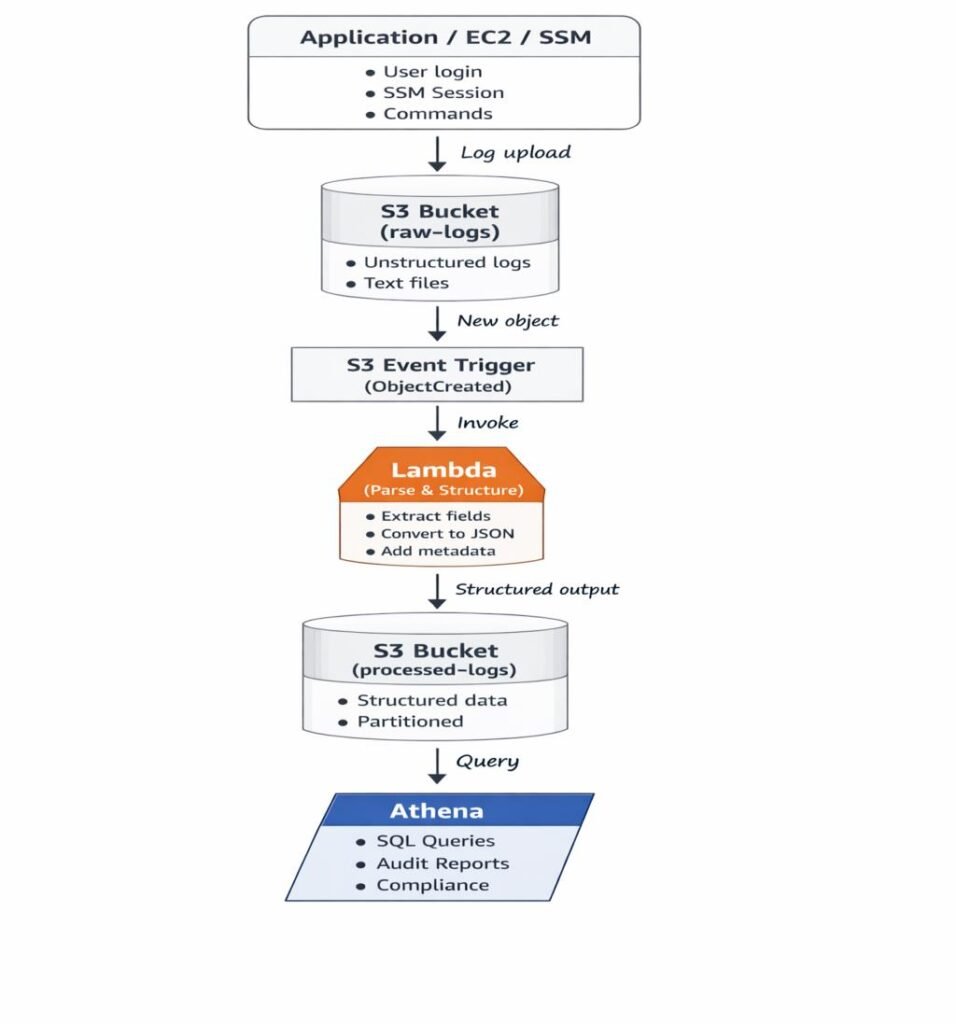
END-TO-END WORKFLOW
STEP 1: LOG GENERATION
Applications, EC2 instances, and SSM sessions generate logs.
STEP 2: RAW LOG INGESTION INTO S3
Logs are pushed to S3 exactly as received and never modified.
Example:
s3://log-analytics-bucket/raw-logs/log-2026-01-20.tx
STEP 3: S3 EVENT TRIGGERS LAMBDA
Each new log file triggers a Lambda function automatically.
STEP 4: LAMBDA PARSES AND STRUCTURES LOGS
Lambda extracts fields like timestamp, level, instance-id, and message.
STEP 5: STRUCTURED DATA STORED BACK TO S3
Logs are written to partitioned folders optimized for analytics.
STEP 6: ATHENA READS DATA FROM S3
Athena queries data directly from S3 without loading it into databases.
STEP 7: SQL ANALYTICS
Engineers analyze logs using standard SQL queries.
Get enterprise-grade data engineering solutions to unlock advanced analytics and AI readiness
WHY S3 + LAMBDA + ATHENA
Amazon S3:
- Low-cost, highly durable storage
- Ideal for raw and processed log data
S3 acts as the long-term memory and source of truth for all logs.
AWS Lambda:
- Event-driven execution model
- No infrastructure management
- Scales automatically with log volume
Lambda acts as the brain that reacts instantly when new data arrives.
Amazon Athena:
- Serverless SQL query engine
- Pay-per-query pricing
- No database maintenance overhead
Athena acts as the analyst, running SQL directly on stored logs.
STRUCTURED LOG FORMAT
Raw log lines are difficult to filter and aggregate.
Once converted into structured records, logs become analytics-friendly.
Example structured record:
{
  "timestamp": "2026-01-20T10:15:30Z",
  "level": "ERROR",
  "instance_id": "i-0abcd12345",
  "message": "Permission denied while executing command"
}
Structured data enables fast filtering, aggregation, and analytics at scale.
PARTITIONING STRATEGY
Processed logs are stored using:
year=YYYY/month=MM/day=DD
Partitioning:
- Minimizes Athena scan size
- Improves query performance
- Reduces overall query cost
COST OPTIMIZATION STRATEGY
At scale, even small inefficiencies multiply into significant cost.This architecture is designed to stay efficient even as log volume grows into terabytes.
This architecture is cost-efficient by design.
1. Fully Serverless Model
- No EC2 or always-on infrastructure
- Pay only when logs arrive or queries run
2. Raw vs Processed Data Separation
- Raw logs stored once and preserved
- Processed logs optimized for analytics
3. Athena Pay-Per-Query Pricing
- Charges based on data scanned
- Partitioning and Parquet significantly reduce cost
4. Optimized Lambda Execution
- Lambda runs only on S3 events
- Short-lived executions keep compute costs minimal
5. Storage Lifecycle Optimization
- Older logs can be archived to S3 Glacier tiers
This approach delivers enterprise-grade analytics at a fraction of traditional log analytics cost.
PRACTICAL IMPLEMENTATION GUIDE
This blog focuses on architecture, scalability, and cost-optimization aspects of the solution.
A complete hands-on, step-by-step implementation , including S3 setup, IAM roles, Lambda code, event triggers, and Athena queries is documented separately.
Step-by-Step Practical Implementation Guide:
Together, this blog and the practical guide provide a full design + execution walkthrough.
Step 1: Store Logs in Amazon S3
Configure your logging source to deliver log files into an Amazon S3 bucket. Logs are stored as plain .log files and act as the raw data source for further processing
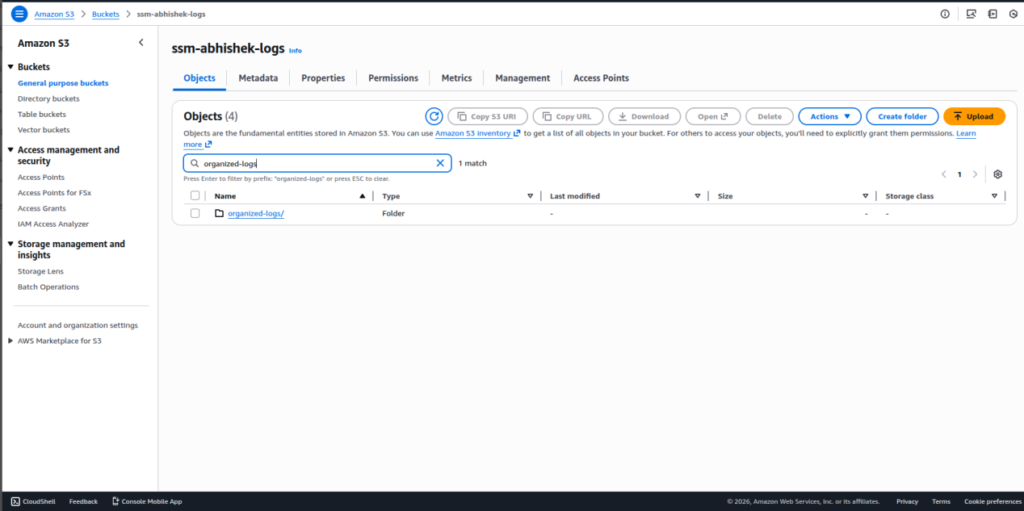
Step 2: Review Log File Naming and Content
Inspect the uploaded log files to understand:
- File extension (.log)
- Filename pattern (for example, username-based naming)
- Presence of EC2 instance ID inside log content
This information helps define the log organization logic
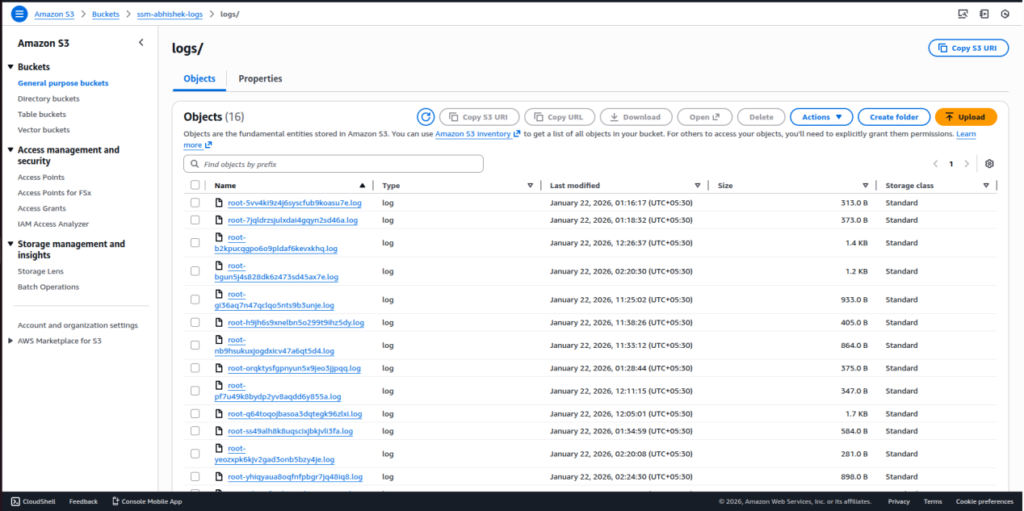
Step 3: Define the Target Log Structure
Design a structured S3 layout to organize logs by date and instance:
“organized-logs/year/month/day/instance-id/logfile.log”
Step 4: Create IAM Policy for Log Organization
Create an IAM policy that allows:
- Reading log objects from S3
- Reading object metadata
- Copying objects within the same bucket
- Writing execution logs to CloudWatch
This policy enables secure log processing.
Step 5: Create IAM Role for Lambda
- Create an IAM role for AWS Lambda and attach the policy created in the previous step.
- This role is used by the Lambda function during execution.
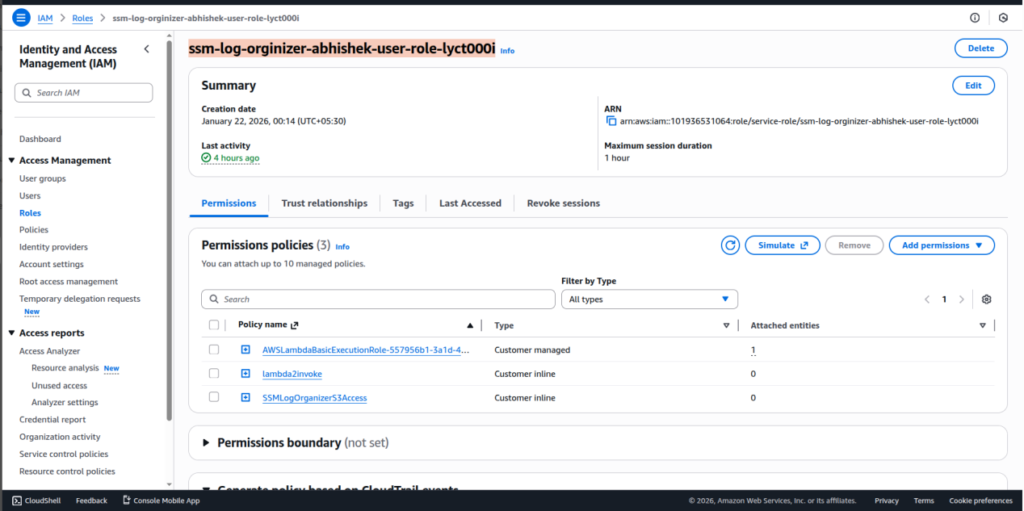
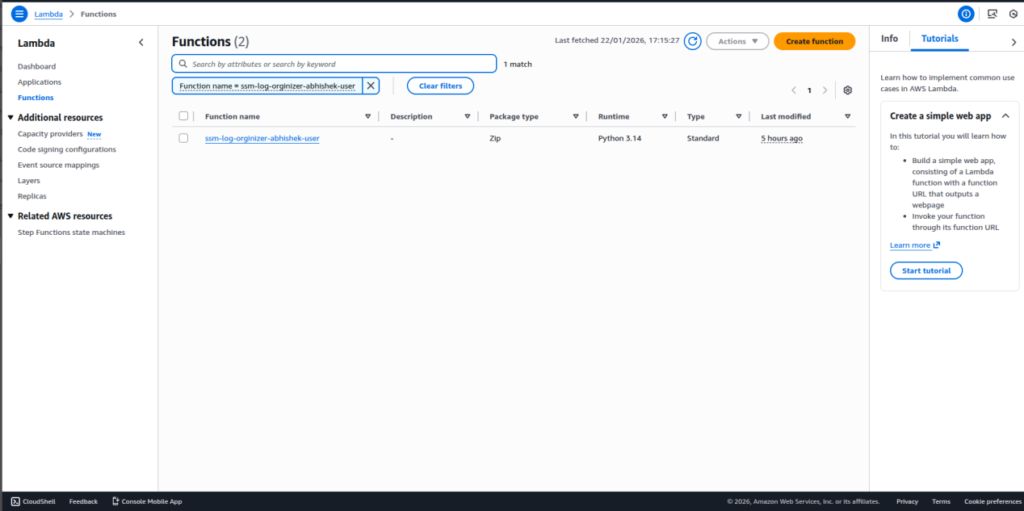
Step 6: Create the Lambda Function
- Create a new AWS Lambda function using the Python runtime.
- This function will be responsible for organizing log files in S3
Step 7: Add Lambda Code
Open the Lambda function and navigate to:
Code tab → lambda_function.py
Paste the log organization code that:
- Processes S3 event notifications
- Filters .log files
- Extracts instance ID from log content
- Determines log date using object metadata
- Builds a structured S3 path
- Copies the log into the organized location
This code performs the core automation.
import boto3
from datetime import timezone, timedelta
import urllib.parse
import re

s3 = boto3.client('s3')

def extract_instance_id_from_log(bucket, key):
    try:
        obj = s3.get_object(Bucket=bucket, Key=key)
        log_data = obj['Body'].read().decode('utf-8', errors='ignore')

        match = re.search(r'\bi-[0-9a-f]{8,17}\b', log_data)
        if match:
            return match.group(0)

    except Exception as e:
        print("Instance ID extraction failed:", e)

    return "unknown-instance"

def lambda_handler(event, context):
    record = event['Records'][0]
    bucket = record['s3']['bucket']['name']
    key = urllib.parse.unquote_plus(
        record['s3']['object']['key'] )

    if not key.endswith(".log"):
        print("Skipping non-log file:", key)
        return {"status": "skipped"}

    filename = key.split('/')[-1]
    username = filename.split('-')[0]

    head = s3.head_object(Bucket=bucket, Key=key)
    last_modified_utc = head['LastModified']

    ist = timezone(timedelta(hours=5, minutes=30))
    last_modified_ist = last_modified_utc.astimezone(ist)

    year = last_modified_ist.strftime('%Y')
    month = last_modified_ist.strftime('%m')
    day = last_modified_ist.strftime('%d')

    instance_id = extract_instance_id_from_log(bucket, key)

    new_key = (
        f"organized-logs/{year}/{month}/{day}/"
        f"{instance_id}/{filename}"
    )

    print("Copying to:", new_key)

    s3.copy_object(
        Bucket=bucket,
        CopySource={
            "Bucket": bucket,
            "Key": key
        },
        Key=new_key
    )

    return {
        "status": "success",
        "source": key,
        "organized_log": new_key,
        "instance_id": instance_id
    }
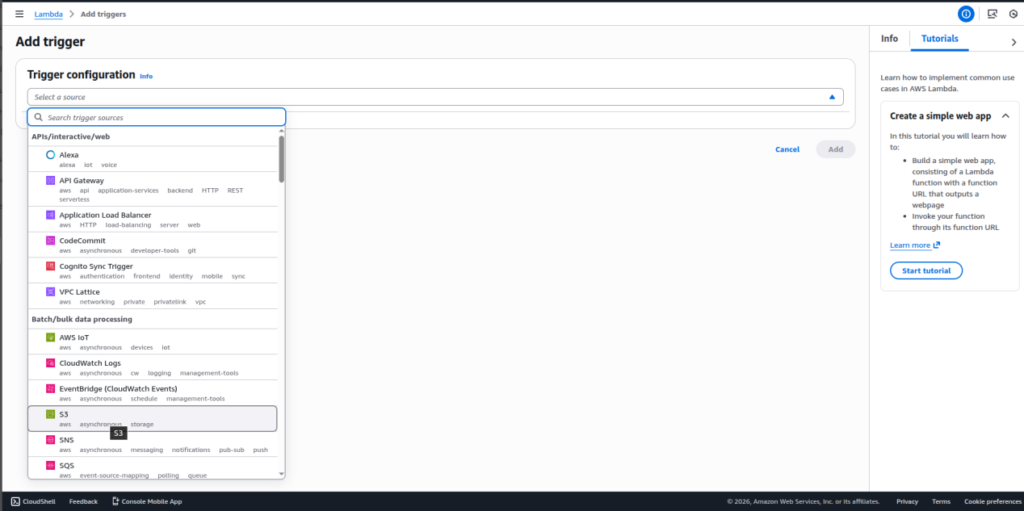
Step 8: Configure S3 Event Trigger
Add an S3 trigger to the Lambda function so it executes whenever a new .log file is uploaded.
This enables automatic log organization.
Step 9: Execute and Organize Logs Automatically
When a new log file is uploaded:
- Lambda is triggered
- The organized folder structure is created automatically
- Logs are copied into the correct location
No manual folder creation is required.
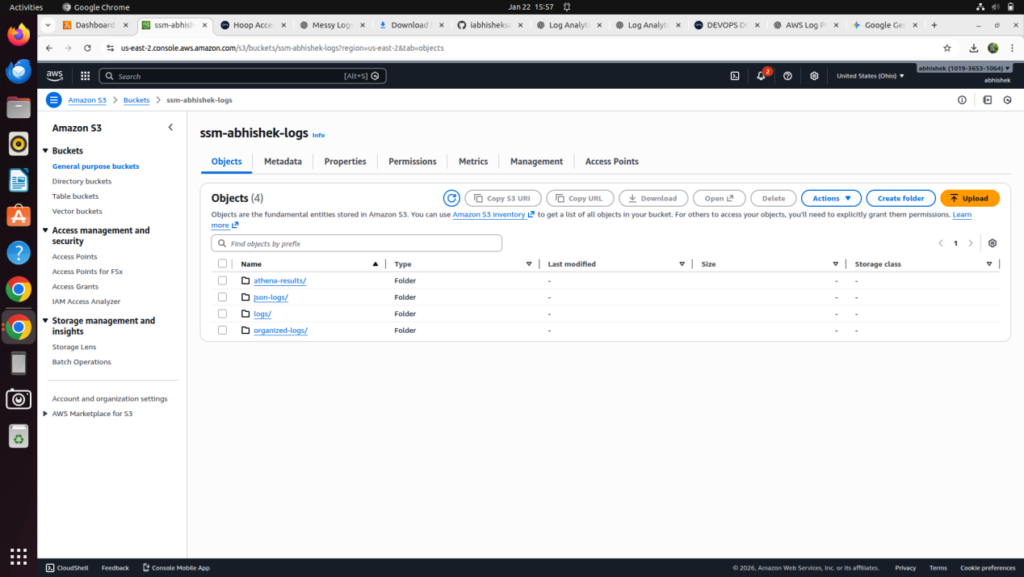
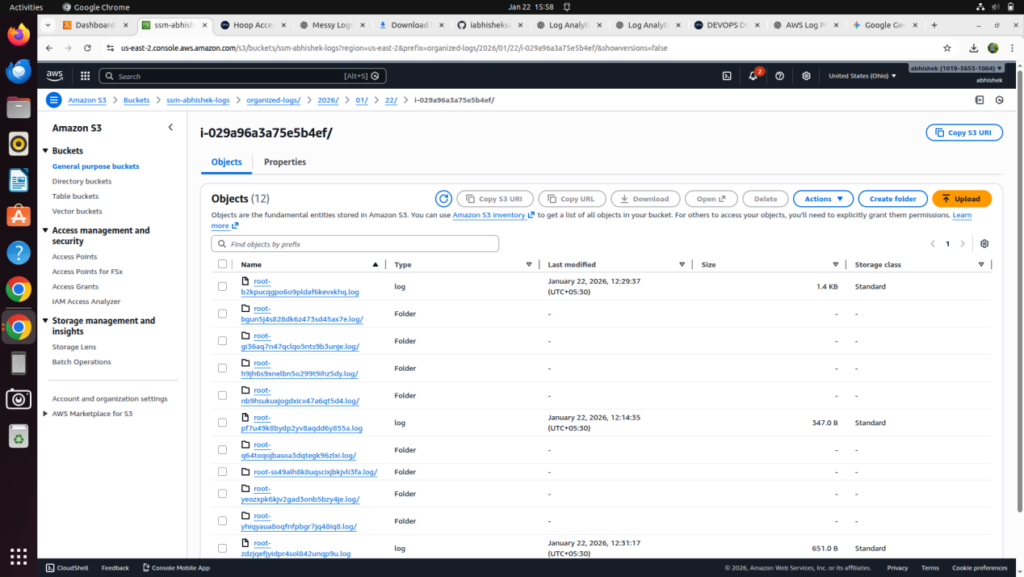
Step 10: Verify Organized Logs in S3
Navigate to the S3 bucket and confirm logs are stored under:
“organized-logs/YYYY/MM/DD/i-xxxx/”
Step 11: Create Athena Database
- Create an Athena database to manage log analytics.
- This database is used to store table definitions.
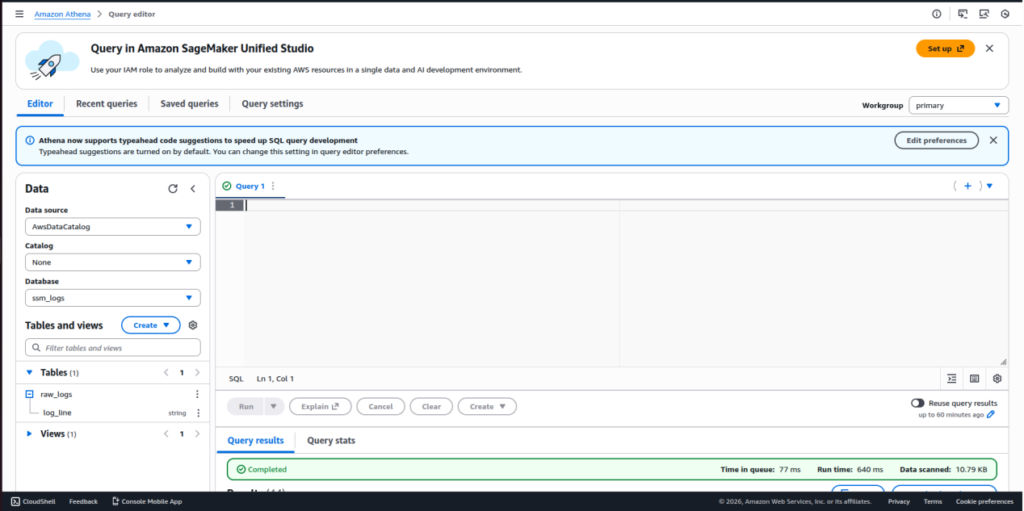
Step 12: Create Athena Table on Organized Logs
- Create an external Athena table pointing to the organized-logs S3 path.
- Partition columns should align with year, month, and day.
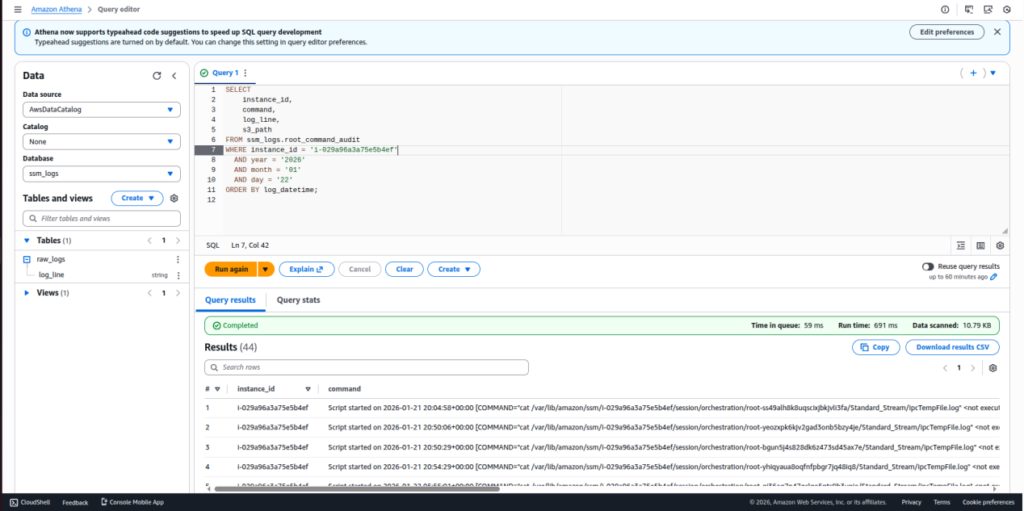
Step 13: Query Logs Using Athena
Run SQL queries to:
- Filter logs by instance ID
- Analyze activity by date
- Perform audit and troubleshooting
Queries execute directly on data stored in S3.
Step 14: Secure and Maintain the Setup
- Review IAM permissions, S3 access policies, and Lambda execution logs periodically.
- This ensures security, stability, and predictable cost
REAL-WORLD USE CASE
This solution works effectively for:
- SSM session activity auditing
- Root / sudo command tracking
- Vendor access monitoring
- EC2 instance-wise activity analysis
- Security and compliance reporting
Logs evolve from raw noise into a trusted audit source.
COMMON MISTAKES TO AVOID
- Querying raw logs directly in Athena
- Skipping partitions
- Missing error handling in Lambda
- Modifying or overwriting raw logs
- Ignoring Lambda timeout and memory limits
COST AND PERFORMANCE BENEFITS
- No servers running 24/7
- No expensive log platforms
- Pay only for: S3 storage, Lambda execution, Athena queries
Partitioning, compression, and Parquet further optimize performance and cost.
CONCLUSION
Messy logs do not have to remain messy.
By combining serverless services with partitioned storage and pay-per-query analytics, this solution transforms unstructured logs into structured, analytics-ready data in a scalable and cost-effective manner.
Logs are no longer just for debugging , they become a powerful analytics and security asset.
Related Searches – DevOps Automation Solutions | AWS Consulting Services | Cybersecurity Posture Management