

Table of Contents
Introduction
Large files inside Git repositories are a silent problem. They increase clone times, inflate repository size, and in platforms like Bitbucket Cloud, can completely block pushes once files exceed 100MB.
During a migration exercise, we encountered multiple repositories containing large binary files embedded directly in Git history. Some were intentionally added during testing; others were legacy artifacts. Regardless of origin, the impact was the same: repository growth, push failures, and migration risk.
We needed a scalable, production-safe solution to:
- Identify files larger than 100MB
- Preserve those files safely
- Remove them from Git history
- Maintain traceability
- Avoid Git LFS
- Process multiple repositories in batch
This article explains the approach, implementation, and verification process.
The Problem with Large Files in Git
Git is optimized for source code, not large binaries. When a file larger than 100MB is committed:
- It becomes part of Git object history.
- Even if later deleted, the blob remains in history.
- Every clone downloads that blob.
- Bitbucket Cloud blocks pushes containing files ≥100MB.
- Repository size increases permanently unless history is rewritten.
Deleting the file in a new commit is not enough. The blob must be removed from the entire commit graph.
Are you ready for limitless expansion? Take advantage of seamless cloud migration services designed to accelerate your business growth today.
Requirements
We defined clear technical requirements:
- Scan multiple repositories under a parent directory.
- Detect files larger than 100MB in:
- Working directory
- Full Git history
- Generate a detailed CSV audit report.
- Back up repositories before modification.
- Archive large blobs to S3 before removal.
- Rewrite Git history safely.
- Force push cleaned repositories.
- Verify that no large blobs remain.
Architecture Overview
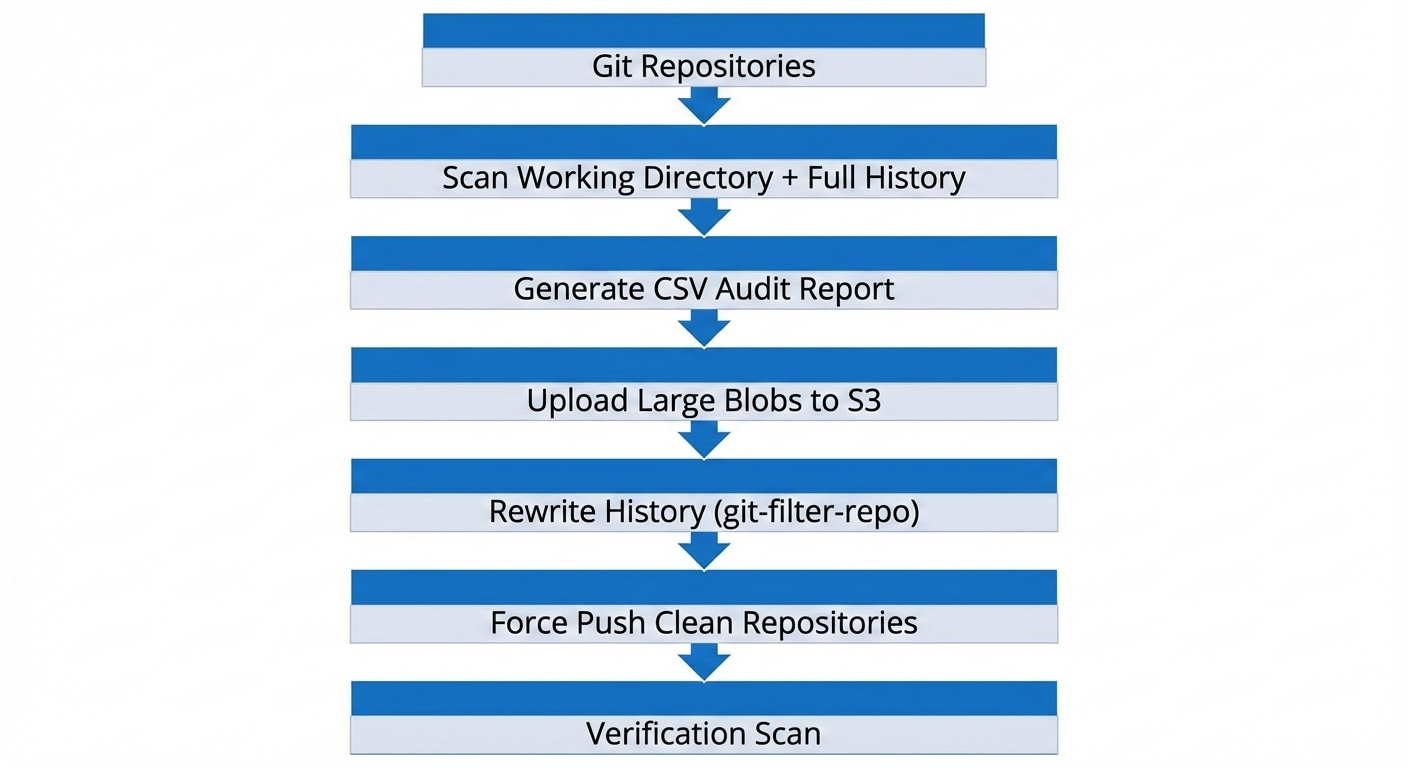
The cleanup workflow followed this structure:
Implementation Strategy
1. Repository Discovery
All repositories were discovered under a specified parent directory by locating .git folders. This allowed batch processing without hardcoding repository names.
2. Scanning Git History
To detect large blobs in history, we relied on Git’s object database:
git rev-list --objects --all \
| git cat-file --batch-check='%(objecttype) %(objectname) %(objectsize) %(rest)'
We filtered for blobs larger than 100MB (104857600 bytes). This approach ensures that even deleted historical files are detected.
3. CSV Report Generation
For traceability, a consolidated CSV report was generated containing:
- Repository name
- File path
- File size (bytes + human-readable)
- Blob hash
- Commit hash
- Target S3 path
This report served as:
- A dry-run validation artifact
- An audit record
- A mapping between Git history and S3 storage
4. S3 Archival Before Deletion
Before rewriting history, large blobs were extracted using:
git cat-file -p <blob-hash>
They were uploaded to S3 using a structured path:
s3://<bucket>/<repo-name>/<commit-hash>/<file-name>
This ensured:
- No data loss
- Full traceability
- Commit-level mapping
- Easy retrieval if required
5. Safe History Rewrite
We used git-filter-repo, which is the modern, recommended alternative to git filter-branch.
For each repository:
- Paths to remove were collected from the CSV report.
git-filter-repo --invert-pathswas used to remove those paths from all commits.- A full backup tarball was created before execution.
- A confirmation prompt prevented accidental execution.
This resulted in a new, clean commit graph with large blobs removed.
6. Force Push and Remote Restoration
Since history was rewritten:
- All commit hashes changed.
- A force push was required.
- Team members were instructed to re-clone repositories.
Remote URLs were preserved or restored automatically to ensure push continuity.
Verification Method
Cleanup was verified using a direct scan of Git objects:
git rev-list--objects--all \
|git cat-file--batch-check='%(objecttype) %(objectname) %(objectsize)' \
|awk'$1 == "blob" && $3 >= 104857600'
If the command returned no output, it confirmed:
- No blob ≥100MB remained
- History rewrite was successful
- Repository was safe to push and clone
This verification step is critical and should never be skipped.
Results
- 10 repositories processed
- ~3GB of large blobs identified
- All large files archived to S3
- Git history rewritten safely
- Force push completed
- No remaining blobs ≥100MB in any repository
- Repositories ready for clean migration
Lessons Learned
- Deleting files in a commit does not remove them from history.
- Always run a dry-run before destructive operations.
- Always create a full backup before rewriting history.
- Always verify using Git’s object database.
- Separate source code storage from binary artifact storage.
- Avoid large binary commits unless using Git LFS intentionally.
Best Practices for Production
- Keep repositories focused on source code.
- Use external storage (S3, artifact repositories) for large binaries.
- Automate detection of large files in CI pipelines.
- Add pre-commit or pre-receive hooks to block oversized files.
- Regularly audit repository object sizes.
Conclusion
Rewriting Git history at scale is a high-impact, high-risk operation if not handled properly. However, with a structured approach, proper backups, archival strategy, and verification, it becomes a controlled and repeatable process.
By combining Git object analysis, S3 archival, and git-filter-repo, we successfully removed large files from multiple repositories without data loss and without relying on Git LFS.
This approach provides a scalable blueprint for teams facing similar migration or repository health challenges.
Related Searches
- AWS Consulting Service
- From Messy Logs to Structured Analytics using AWS S3, Lambda, and Athena
- AWS For Beginners: What Is It, How It Works, and Key Benefits