

Amazon ECR Container Images Across Accounts or Regions

Want to implement an AWS Elastic Container Registry Replication practice in your DevOps solution? But don’t know how to start and where to go. Folks, now you are on the right path.

We’re pursuing this to safeguard our production resources in the ap-south-1 (Mumbai) region from potential disasters and connectivity issues. Ensuring resource distribution across other AWS regions is critical. Our microservices-driven applications rely on Docker images, including custom ones crucial for disaster recovery. AWS Container Registry offers a secure, efficient solution for storing and managing Docker images, simplifying image storage, and enabling seamless sharing across private or public environments.

So, here you may wonder how we can replicate the same images from its registry to another AWS Account(cross-accounts) or in the same account in different regions(cross-region).

Pre-requisite: 

  1. Need two AWS Accounts with admin access to Amazon ECR service and programmatic access for it(to pull/push images).
  2. Login/Signup:  https://aws.amazon.com/console/

Note: 1st AWS Account: Source account

2nd AWS Account: Destination account
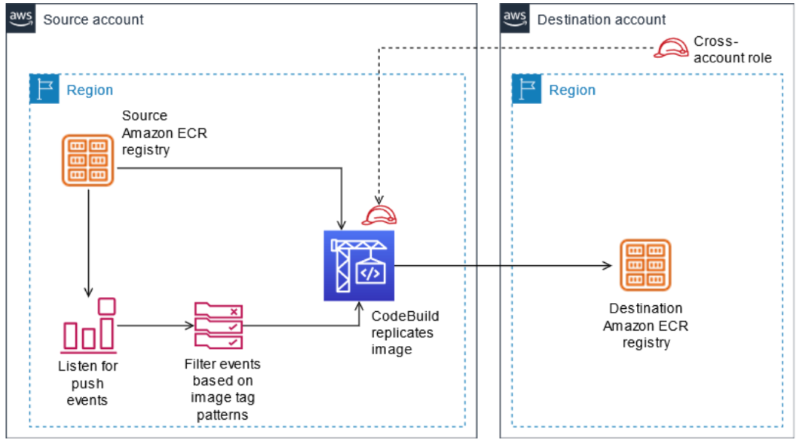
The architecture

Enough theory part let’s take action for this,

Continue reading “Amazon ECR Container Images Across Accounts or Regions”

Unpacking Our Findings From Assessing Numerous Infrastructures – Part 2

When superior performance comes at a higher price tag, innovation makes it accessible. Quite evident from the way AWS has been evolving its services –

  •  gp3, the successor of gp2 volumes – Offers the same durability, supported volume size, max IOPS per volume, and max IOPS per instance. The main difference between gp2 and gp3 is gp3’s decoupling of IOPS, throughput, and volume size. This flexibility to configure each piece independently – is where the savings come in.
  • AWS Graviton3 processors – Offers 25% better computing, double the floating-point, and improved cryptographic performance compared to its predecessors. It’s 3x faster than Graviton 2 and supports DDR5 memory, providing 50% more bandwidth than DDR4 (Graviton 2). 

To be better at assessing your core infrastructure needs, knowing the AWS services is just half the battle. In my previous blog, I’ve discussed numerous areas where engineering teams often falter. Do give it a read! >>> Unpacking Our Findings From Assessing Numerous Infrastructures – Part 1

What we’ll be discussing here are –

  • Are your systems truly reliable?
  • How do you respond to a security incident?
  • How do you reduce defects, ease remediation, and improve flow into production? (Operational Excellence)
Continue reading “Unpacking Our Findings From Assessing Numerous Infrastructures – Part 2”

Exploring the Power of IAM Roles Anywhere for Secure Access Management

Introduction:

In a cloud-driven environment, flexibility and security remain the top priorities for modern businesses. AWS (Amazon Web Services) provides IAM (Identity and Access Management) roles to manage access permissions inside the AWS ecosystem. But what happens when workloads, servers, applications, or containers, run outside AWS?

This is where IAM Roles Anywhere becomes a game-changer. It enables secure, temporary access for external workloads without relying on long-term credentials. This blog explores how IAM Roles Anywhere works and why it is essential for today’s distributed architectures. Continue reading “Exploring the Power of IAM Roles Anywhere for Secure Access Management”

Unpacking Our Findings From Assessing Numerous Infrastructures – Part 1

AWS Well-Architected framework can help you streamline your approach to ensure resilient, consistent, and scalable outcomes.


You can’t improve what you don’t measure. 

When things are not analyzed, changes become responses to hefty cloud bills or security breaches. AWS Well-Architected framework can help you identify issues early and streamline your approach to ensure resilient, consistent, and scalable outcomes. Continue reading “Unpacking Our Findings From Assessing Numerous Infrastructures – Part 1”

Applications Hosting on ECS

Introduction

Applications hosting on Amazon Elastic Container Service (ECS) is a cloud computing solution provided by AWS that enables organizations to manage, scale, and deploy containerized applications with ease. ECS simplifies container deployment and management, enabling developers to concentrate on creating and running their applications.

In this blog, we will create a repository, copy an image to Amazon Elastic Container Registry (ECR), define a task, and set up an ECS cluster to host an application on Amazon ECS. Continue reading “Applications Hosting on ECS”