

Table of Contents
What Is Kafka and Why Use It?
Apache Kafka is a powerful distributed event streaming platform that has become a cornerstone in modern data architectures. Designed for high-throughput and low-latency data pipelines, Kafka enables organizations to handle real-time data feeds efficiently. Its versatility makes it applicable across diverse industries, including finance, eCommerce, IoT, and system monitoring, where the ability to process and react to data in real-time is critical.
This document will explore the fundamental concepts of Kafka and delve into the reasons why it is the preferred choice for real-time streaming applications.
Key Concepts of Kafka
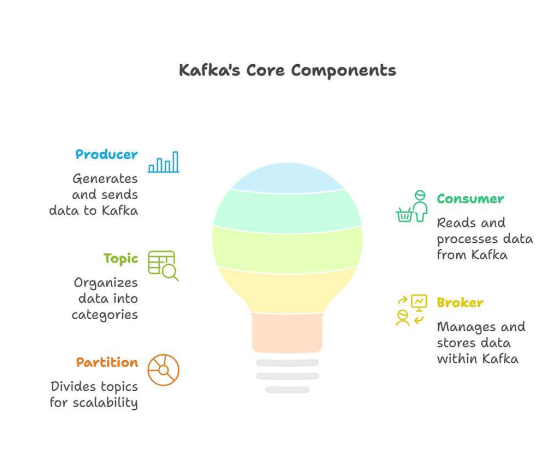
To understand the power and utility of Kafka, it’s essential to grasp its core components and how they interact. These components work together to create a robust and scalable system for handling real-time data streams.
Producer
A producer is an application or system that sends data, often referred to as events or messages, to Kafka topics. Producers are responsible for serializing data and sending it to the appropriate topic. They don’t need to know anything about the consumers or how the data will be used, which promotes decoupling and flexibility in the system. Producers can be configured to send data synchronously or asynchronously, depending on the application’s requirements for reliability and performance.
Consumer
A consumer is an application or system that reads data from Kafka topics. Consumers subscribe to one or more topics and receive messages as they are published. Like producers, consumers are decoupled from the rest of the system and can process data independently. Consumers can be grouped together to form consumer groups, which allow for parallel processing of data within a topic. Each consumer within a group is assigned a subset of the topic’s partitions, ensuring that each message is processed by only one consumer in the group.
Topic
A topic is a named stream where messages are published and categorized. Think of it as a folder in a file system, but instead of files, it contains messages. Topics are the fundamental unit of organization in Kafka, allowing producers to send data to specific streams and consumers to subscribe to the streams they are interested in. Topics can have multiple partitions, which enable parallelism and scalability.
Broker
A broker is a Kafka server that stores and serves messages. Kafka clusters consist of one or more brokers, which work together to manage the data and handle requests from producers and consumers. Brokers are responsible for storing messages, replicating data across the cluster for fault tolerance, and handling requests from producers and consumers. Each broker in the cluster stores a portion of the data for each topic, and the cluster as a whole provides a unified view of the data.
Partition
Partitions are the key to Kafka’s scalability and parallelism. A topic is divided into one or more partitions, each of which is an ordered, immutable sequence of messages. Each partition is stored on one or more brokers in the Kafka cluster. Producers send messages to specific partitions within a topic, and consumers read messages from specific partitions. By dividing a topic into multiple partitions, Kafka can distribute the load across multiple brokers, allowing for higher throughput and lower latency. Partitions also enable parallel processing of data by allowing multiple consumers to read from different partitions simultaneously.
Why Kafka for Real-Time Streaming?
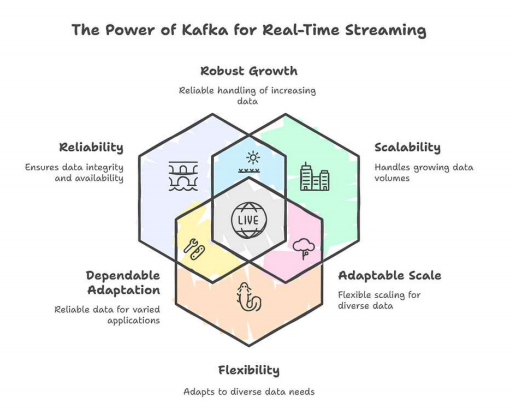
Kafka has emerged as the go-to solution for real-time streaming applications due to its unique combination of features and capabilities. It addresses the challenges of handling high-volume, high-velocity data streams with reliability, scalability, and flexibility.
Scalability
Kafka is designed to handle massive amounts of data with ease. Its distributed architecture allows it to scale horizontally by adding more brokers to the cluster. Each broker can handle a portion of the overall load, allowing Kafka to handle millions of messages per second. The partitioning of topics further enhances scalability by allowing multiple consumers to process data in parallel. This scalability makes Kafka suitable for applications that need to handle large volumes of data, such as social media feeds, IoT sensor data, and financial transactions.
Durability
Data durability is a critical requirement for many real-time streaming applications. Kafka ensures durability by persisting messages to disk and replicating them across multiple brokers. This means that even if one or more brokers fail, the data is still available and can be recovered. The replication factor determines the number of copies of each message that are stored in the cluster. A higher replication factor provides greater durability but also requires more storage space. Kafka’s durability features make it suitable for applications that cannot afford to lose data, such as financial transactions and critical infrastructure monitoring.
Decoupling
Kafka promotes decoupling between producers and consumers, which makes the system more flexible and resilient. Producers and consumers operate independently and do not need to know anything about each other. Producers simply send messages to Kafka topics, and consumers subscribe to the topics they are interested in. This decoupling allows producers and consumers to evolve independently without affecting each other. It also makes it easier to add or remove producers and consumers from the system without disrupting the flow of data.
Low Latency
Low latency is essential for real-time applications that need to react to events quickly. Kafka is designed for low-latency data delivery, with typical end-to-end latencies of just a few milliseconds. This low latency is achieved through a combination of factors, including its efficient storage format, its use of zero-copy data transfer, and its ability to process data in parallel. Kafka’s low latency makes it suitable for applications such as fraud detection, real-time analytics, and live dashboards.
A Brief Thought Before We Begin
In today’s digital world, users expect instant feedback, whether they’re watching a show, tracking a delivery, or monitoring a system. Real-time updates aren’t just a luxury anymore; they’re a baseline expectation.
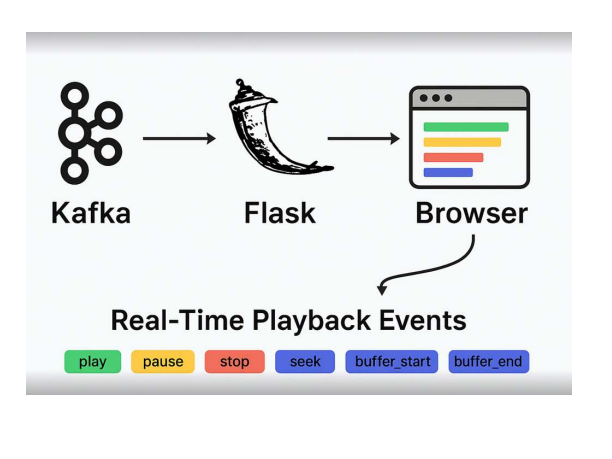
Before we explore how Netflix handles playback events, I want to walk you through a simple yet powerful setup I built using Flask, Kafka, and Socket.IO, a lightweight stack that delivers real-time updates straight to the browser.
Case Study : Accelerating a Global Tech Leader’s Ads Platform with Strategic DevOps, Platform, and Data Engineering
Real-Time Playback Events
The Netflix Inspiration
Netflix tracks every playback event pause, play, seek, stop to improve user experience, monitor performance, and personalize recommendations. These events are streamed in real time using a robust data pipeline powered by Kafka. Inspired by this, I built a minimal version of this system to understand the mechanics behind it.
Tech Stack Overview
Flask : Lightweight Python web framework for serving the backend
Kafka : Distributed event streaming platform for handling playback events
Socket.IO : Enables real-time, bidirectional communication between server and browser
What Is Flask?
Flask is a micro web framework written in Python. It’s designed to be simple and flexible, making it ideal for small projects and quick prototypes. In this setup, Flask serves the HTML page and integrates with Socket.IO to push updates to the browser.
- Minimal setup, easy to learn
- Great for REST APIs and real-time apps
- Extensible with plugins like Flask-SocketIO
What Is Socket.IO?
Socket.IO is a library that enables real-time, bidirectional communication between the server and browser. It uses WebSockets under the hood but adds features like:
- Automatic reconnection
- Event-based messaging
- Fallbacks for older browsers
Real-Time Playback Event Dashboard
The UI displays live playback events streamed from Kafka to the browser using Flask and Socket.IO. Each event, whether it’s a pause, play, buffer_start, or buffer_end—is instantly reflected in the UI.
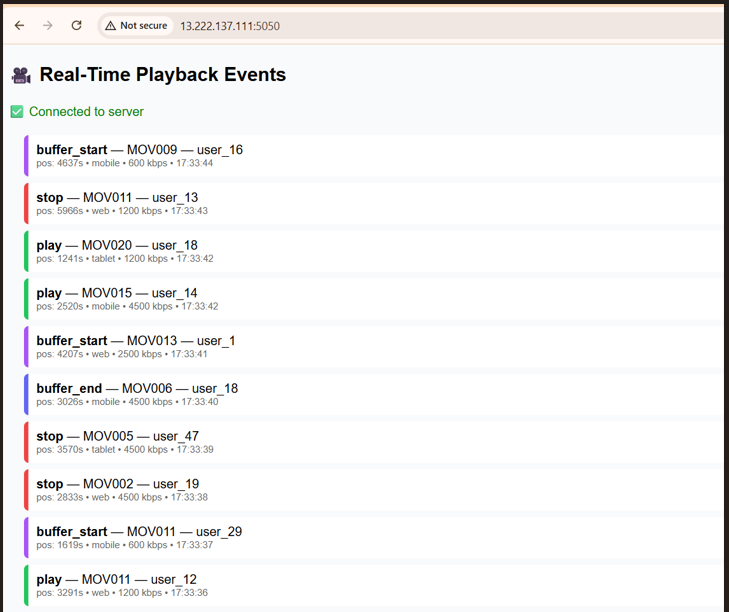
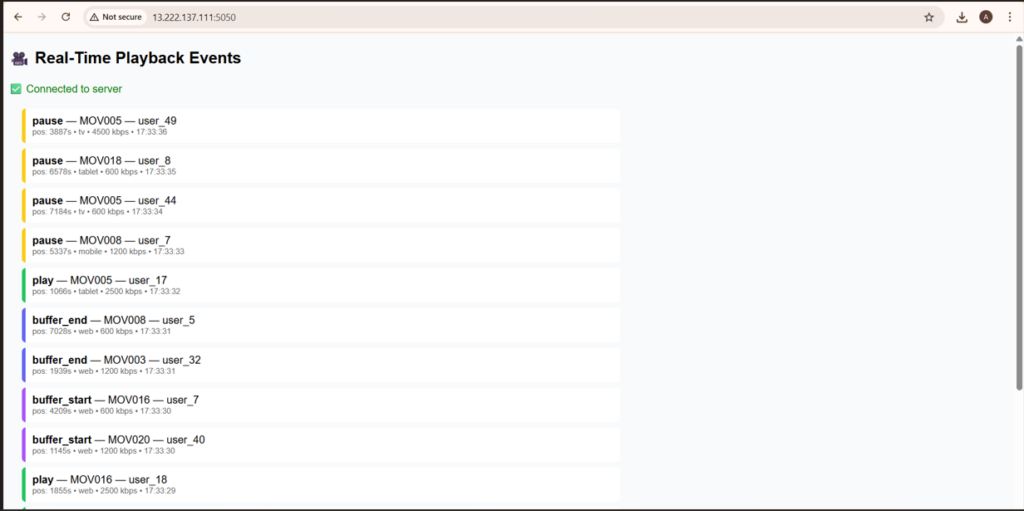
This dashboard displays live playback events streamed from Kafka to the browser using Flask and Socket.IO. Each row represents a unique event—such as play, pause, or seek and includes metadata like:
- Movie ID
- User ID (
- Playback Position in seconds
producer.py
from kafka import KafkaProducer
import json
import random
import time
from datetime import datetime

# Create Kafka producer
producer = KafkaProducer(
    bootstrap_servers=['localhost:9092'],
    value_serializer=lambda v: json.dumps(v).encode('utf-8')
)

# Sample data
movies = [f"MOV{i:03d}" for i in range(1, 21)]
events = ["play", "pause", "stop", "seek", "buffer_start", "buffer_end"]
devices = ["web", "tv", "mobile"]
bitrates = [600, 1200, 2400, 4800]

def random_event():
    return {
        "event_id": f"evt-{int(time.time() * 1000)}",
        "user_id": f"user_{random.randint(1, 50)}",
        "movie_id": random.choice(movies),
        "event_type": random.choice(events),
        "position_seconds": random.randint(0, 7200),
        "bitrate_kbps": random.choice(bitrates),
        "device": random.choice(devices),
        "ts": datetime.utcnow().isoformat() + "Z"
    }

# Continuously send events
while True:
    evt = random_event()
    producer.send("playback-events", evt)
    print("Sent:", evt["event_type"], evt["movie_id"])
    time.sleep(random.choice([0.2, 0.5, 1]))
consumer_server.py
import json
from threading import Thread
from kafka import KafkaConsumer
from flask import Flask, render_template
from flask_socketio import SocketIO

app = Flask(__name__, template_folder='templates')
socketio = SocketIO(app, cors_allowed_origins="*")

KAFKA_TOPIC = "playback-events"
KAFKA_BOOTSTRAP = "localhost:9092"

def kafka_listener():
    consumer = KafkaConsumer(
        KAFKA_TOPIC,
        bootstrap_servers=[KAFKA_BOOTSTRAP],
        value_deserializer=lambda m: json.loads(m.decode('utf-8')),
        auto_offset_reset='latest',
        enable_auto_commit=True,
        group_id="realtime-demo"
    )

    print("Kafka consumer started listening on", KAFKA_TOPIC)

    for msg in consumer:
        event = msg.value
        print("Received:", event)
        socketio.emit('new_event', event)

@app.route('/')
def index():
    return render_template('index.html')

if __name__ == "__main__":
    Thread(target=kafka_listener, daemon=True).start()
    socketio.run(app, host='0.0.0.0', port=5050)
templates/index.html
<!doctype html>
<html>
<head>
<meta charset="utf-8">
<title>Real-Time Playback Events</title>

<style>
body {
  font-family: sans-serif;
  background: #f4f4f4;
  padding: 20px;
}

#events {
  display: flex;
  flex-direction: column;
}

.evt {
  background: #fff;
  padding: 10px;
  margin-bottom: 8px;
  border-left: 6px solid #333;
}

.play { border-color: #22c55e; }
.pause { border-color: #facc15; }
.stop { border-color: #ef4444; }
.seek { border-color: #3b82f6; }
.buffer_start { border-color: #a855f7; }
.buffer_end { border-color: #6366f1; }

.meta {
  font-size: 12px;
  color: #666;
}
</style>
</head>

<body>
<h2>Real-Time Playback Events</h2>
<div id="status">Connecting...</div>
<div id="events"></div>

<script src="https://cdn.socket.io/4.6.1/socket.io.min.js"></script>
<script>
const socket = io();
const status = document.getElementById('status');
const eventsDiv = document.getElementById('events');

socket.on('connect', () => {
  status.textContent = 'Connected to server';
  status.style.color = 'green';
});

socket.on('disconnect', () => {
  status.textContent = 'Disconnected';
  status.style.color = 'red';
});

socket.on('new_event', (evt) => {
  const el = document.createElement('div');
  el.className = 'evt ' + evt.event_type;

  el.innerHTML = `
    <div><strong>${evt.event_type.toUpperCase()}</strong> – ${evt.movie_id}</div>
    <div class="meta">
      User: ${evt.user_id} |
      Position: ${evt.position_seconds}s |
      Device: ${evt.device}
    </div>
  `;

  eventsDiv.prepend(el);

  if (eventsDiv.children.length > 100) {
    eventsDiv.removeChild(eventsDiv.lastChild);
  }
});
</script>
</body>
</html>
1. Start Kafka locally
# Start Zookeeper
bin/zookeeper-server-start.sh config/zookeeper.properties

# Start Kafka broker
bin/kafka-server-start.sh config/server.properties

# Create topic
bin/kafka-topics.sh --create \
  --topic playback-events \
  --bootstrap-server localhost:9092 \
  --partitions 3 \
  --replication-factor 1
2. Run the Kafka Producer
python3 producer.py
3. Start the Flask Server
4. Open the UI
Visit https://localhost:5050 in your browser.
Real-World Use Case
In one of my internal monitoring dashboards, I used this setup to stream real-time logs from a Kafka topic to a browser-based UI. This allowed my team to visualize playback events and system behavior without refreshing the page, a huge win for observability and debugging.
Conclusion
Building a real-time playback monitoring system doesn’t require massive infrastructure or complex tooling. With just Kafka, Flask, and Socket.IO, you can simulate the same core mechanics used by large-scale platforms like Netflix. Kafka handles the event streaming, Flask acts as the lightweight backend, and Socket.IO ensures instant browser updates, together creating a seamless, reactive, and scalable pipeline.
This architecture not only helps you understand how modern streaming giants process billions of events but also gives you a practical foundation for building real-time dashboards, monitoring tools, or live analytics applications. As user experiences become increasingly interactive and time-sensitive, mastering event-driven, real-time systems is no longer optional, it’s essential.
By experimenting with this mini playback pipeline, you’ve taken a meaningful step into the world of real-time data engineering. Keep exploring, keep building, and keep pushing the boundaries of what can be done with streaming technologies.
Frequently Asked Questions
1. What is Kafka used for in this setup?
Kafka acts as a message broker that streams playback events from producers to consumers in real time.
2. Why use Flask instead of a heavier framework?
Flask is lightweight and easy to integrate with Socket.IO, making it ideal for quick prototyping and real-time apps.
3. Can this architecture scale for production?
Yes, with proper load balancing, Kafka partitioning, and a production-grade WSGI server like Gunicorn, this setup can scale.
4. How does Socket.IO differ from WebSockets?
Socket.IO builds on WebSockets but adds features like automatic reconnection, fallback options, and event-based communication.
5. What are some real-world use cases for this pattern?
Live dashboards, chat applications, collaborative tools, and real-time analytics platforms all benefit from this architecture.
Related Searches – AWS Database Migration Service | Best data engineering company in India | Data pipeline development services