The Concept Of Data At Rest Encryption In MySql

Word “data” is very crucial since early 2000 and within a span of these 2 decades is it becoming more crucial. According to Forbes Google believe that in future every organisation will lead to becoming a data company. Well, when it comes to data, security is one of the major concerns that we have to face. 

We have several common techniques to store data in today’s environment like MySql, Oracle, MsSql, Cassandra, Mongo etc and these techs will keep on changing in future. But according to DataAnyz, MySql Still has a 33% share of the market. So here we are with a technique to secure our MySQL data.

Before getting more into this article, let us know what are possible combined approaches to secure MySQL data 

  1. Mysql Server hardening
  2. Mysql Application-level hardening
  3. Mysql data encryption at transit
  4. Mysql data at rest encryption
  5. Mysql Disk Encryption

You may explore all the approaches but in this article, we will understand the concept of Mysql data at encryption and hands-on too.

The concept of  “Data at Rest Encryption”  in MySQL was introduced in Mysql 5.7 with the initial support of InnoDB storage engine only and with the period it has evolved significantly. So let’s understand about “Data at Rest Encryption” in MySQL 

What is “Data at Rest Encryption”  in MySql?

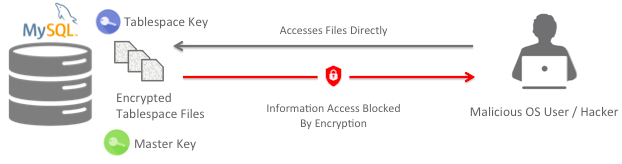
The concept of  “data at rest encryption” uses two-tier encryption key architecture, which used below two keys 

  1. Tablespace keys: This is an encrypted key which is stored  in the tablespace header 
  2. Master Key: the Master key is used to decrypt the tablespace keys

So let’s Understand its working

Let’s say we have a running MySQL with InnoDB storage engine and tablespace is encrypted using a key, referred as table space key. This key is then encrypted using a master key and stored in the tablespace header 

Now when a request is made to access MySQL data, InnoDB use master key to decrypt tablespace key present tablespace header. After getting decrypted tablespace key, the tablespace is decrypted and make is available to perform read/write operations

Note: The decrypted version of a tablespace key never changes, but the master key can be rotated.

Data at rest encryption implemented using keyring file plugin to manage and encrypt the master key

After understanding the concept of encryption and decryption below are few Pros and Cons for using  DRE

Pros:

  • A strong Encryption of AES 256 is used to encrypt the InnoDB tables
  • It is transparent to all applications as we don’t need any application code, schema, or data type changes
  • Key management is not done by DBA.
  • Keys can be securely stored away from the data and key rotation is very simple.

Cons:

  • Encrypts only  InnoDB tables
  • Can’t encrypt  binary logs, redo logs, relay logs on unencrypted slaves, slow log, error log, general log, and audit log

Though we can’t encrypt binary logs, redo logs, relay logs on Mysql 5.7 but MariaDB has implemented this with a mechanism to encrypt undo/redo logs, binary logs/relay logs, etc.  by enabling few flags in MariaDB Config File

innodb_sys_tablespace_encrypt=ON
innodb_temp_tablespace_encrypt=ON
innodb_parallel_dblwr_encrypt=ON
innodb_encrypt_online_alter_logs=ON
innodb_encrypt_tables=FORCE
encrypt_binlog=ON
encrypt_tmp_files=ON

However, there are some limitations 

Let’s Discuss its problem/solutions and few solutions to them

  1. Running MySQL on a host will have access from root user and the MySQL user and both of them may access key file(keyring file) present on the same system. For this problem, we may have our keys on mount/unmount drive which can be unmounted after restarting MySQL.
  2. Data will not be in encrypted form when it will get loaded onto the RAM and can be dumped and read
  3. If MySQL is restarted with skip-grant-tables then again it’s havoc but this can be eliminated using an unmounted drive for keyring
  4.  As tablespace key remains the same so our security relies on Master key rotation which can be used  to save our master key 

NOTE: Do not to lose the master key file, as we cant decrypt data and will suffer data loss

Doing Is Learning, so let’s try 

As a prerequisite, we need a machine with MySQL server up and running Now for data at rest encryption to work we need to enable 

Enable file per table on with the help of the configuration file.  

 
[root@mysql ~]#  vim /etc/my.cnf
[mysqld]

innodb_file_per_table=ON

Along with the above parameter, enable keyring plugin and keyring path. This parameter should always be on the top in configuration so that it will get load initially when MySQL starts up. Keyring plugin is already installed in MySQL server we just need to enable it. 

[root@mysql ~]#  vim /etc/my.cnf
[mysqld]
early-plugin-load=keyring_file.so
keyring_file_data=/var/lib/mysql/keyring-data/keyring
innodb_file_per_table=ON

And save the file with a restart to MySQL

[root@mysql ~]#  systemctl restart mysql

We can check for the enabled plugin and verify our configuration.

mysql> SELECT plugin_name, plugin_status FROM INFORMATION_SCHEMA.PLUGINS WHERE plugin_name LIKE 'keyring%';
+--------------+---------------+
| plugin_name  | plugin_status |
+--------------+---------------+
| keyring_file | ACTIVE        |
+--------------+---------------+
1 rows in set (0.00 sec)


verify that we have a running keyring plugin and its location

mysql>  show global variables like '%keyring%';
+--------------------+-------------------------------------+
| Variable_name      | Value                 |
+--------------------+-------------------------------------+
| keyring_file_data  | /var/lib/mysql/keyring-data/keyring |
| keyring_operations | ON                                  |
+--------------------+-------------------------------------+
2 rows in set (0.00 sec)

Verify that we have enabled file per table 

MariaDB [(none)]> show global variables like 'innodb_file_per_table';
+-----------------------+-------+
| Variable_name         | Value |
+-----------------------+-------+
| innodb_file_per_table | ON   |
+-----------------------+-------+
1 row in set (0.33 sec)

Now we will test our set up by creating a test DB with a table and insert some value to the table using below commands 

mysql> CREATE DATABASE test_db;
mysql> CREATE TABLE test_db.test_db_table (id int primary key auto_increment, payload varchar(256)) engine=innodb;
mysql> INSERT INTO test_db.test_db_table(payload) VALUES('Confidential Data');

After successful test data creation, run below command from the Linux shell to check whether you’re able to read InnoDB file for your created table i.e. Before encryption

Along with that, we see that our keyring file is also empty before encryption is enabled

[root@mysql ~]#  strings /var/lib/mysql/test_db/test_db_table.ibd
infimum
supremum
Confidential DATA


At this point of time if we try to check our keyring file we will not find anything

[root@mysql ~]#  cat /var/lib/mysql/keyring
[root@mysql ~]# 

Now let’s encrypt our table with below command and check our InnoDB file and keyring file content.

mysql> ALTER TABLE test_db.test_db_table encryption='Y';
[root@mysql ~] strings /var/lib/mysql/test_db/test_db_table.ibd
0094ca6d-7ba9-11e9-b0d0-0800275716d42QMw

The above content clear that file data is not readable and table space is encrypted. As previously oy keyring file data was absent/empty, so now it must be having some data.

 Note: Please look  master Key and time stamp(we will implement key rotation )

[root@mysql ~]  cat /var/lib/mysql/keyring-data/keyring
Keyring file version:1.0?0 INNODBKey-0094ca6d-7ba9-11e9-b0d0-0800275716d4-2AES???_gd?7m>0??nz??8M??7Yʹ:ll8@?0 INNODBKey-0094ca6d-7ba9-11e9-b0d0-0800275716d4-1AES}??x?$F?z??$???:??k?6y?YEOF
[root@mysql ~] ls -ltr /var/lib/mysql/keyring-data/keyring
-rw-r----- 1 mysql mysql 283 Sep 18 16:48 /var/lib/mysql/keyring-data/keyring

With known security concern for the compromised master key, we may use the master key rotation technique from time to time to save our key.

mysql> alter instance rotate innodb master key;
Query OK, 0 rows affected (0.00 sec)

After this command, we realise that our key timestamp is changed now and we have a new key. 

[root@mysql ~] ls -ltr /var/lib/mysql/keyring-data/keyring
-rw-r----- 1 mysql mysql 411 Sep 18 18:17 /var/lib/mysql/keyring-data/keyring

Some Useful Commands

Below are some helpful commands we may use in an encrypted system 

1. List All the tables with encryption enabled 

mysql> SELECT * FROM information_schema.tables WHERE create_options LIKE '%ENCRYPTION="Y"%' \G;
*************************** 1. row ***************************
TABLE_CATALOG: def
TABLE_SCHEMA: sample_db
TABLE_NAME: test_db_table
TABLE_TYPE: BASE TABLE
ENGINE: InnoDB
VERSION: 10
ROW_FORMAT: Dynamic
TABLE_ROWS: 0
AVG_ROW_LENGTH: 0
DATA_LENGTH: 16384
MAX_DATA_LENGTH: 0
INDEX_LENGTH: 0
DATA_FREE: 0
AUTO_INCREMENT: 2
CREATE_TIME: 2019-09-18 16:46:34
UPDATE_TIME: 2019-09-18 16:46:34
CHECK_TIME: NULL
TABLE_COLLATION: latin1_swedish_ci
CHECKSUM: NULL
CREATE_OPTIONS: ENCRYPTION="Y"
TABLE_COMMENT: 
1 row in set (0.02 sec)

ERROR: 
No query specified

2. Encrypt Tables in a Database 

mysql> ALTER TABLE db.t1 ENCRYPTION='Y';

3. Disable encryption for an InnoDB table

mysql> ALTER TABLE t1 ENCRYPTION='N';

Conclusion : 

You can encrypt data at rest by using keyring plugin and we can control and manage it by master key rotation. Creating an encrypted Mysql data file setup is as simple as firing a few simple commands. Using an encrypted system is also transparent to services, applications, and users with minimal impact of system resources. Further with Encryption of data at rest, we may also implement encryption in transit. 

I hope you found this article informative and interesting. I’d really appreciate any and all feedback.

Achieve SSO in Privately Hosted Jenkins

Introduction

Providing OAuth 2.0 user authentication directly or using Google+ Sign-in reduces your CI overhead. It also provides a trusted and secure login system that’s familiar to users, consistent across devices, and removes the burden of users having to remember another username and password. One of the hurdles in implementing a Gmail authentication is that Google developer console and your  Jenkins server should be in the same network or in simple terms they can talk to each other.

Resources Used

  • Privately Hosted Jenkins
  • Google developer console
  • Ngrok
In this blog, I’m trying to explain how to integrate Gmail authentication feature in your privately hosted Jenkins server so that you get free of filling the form by the time of creating a new user.

Setup 1: Setup Ngrok

NGROK
 
Ngrok is multiplatform tunneling, reverse proxy software that establishes secure tunnels from a public endpoint such as the internet to a locally running network service while capturing all traffic for detailed inspection and replay.
We are using Ngrok to host our Jenkins service (running on port 8080) to public IP.

 
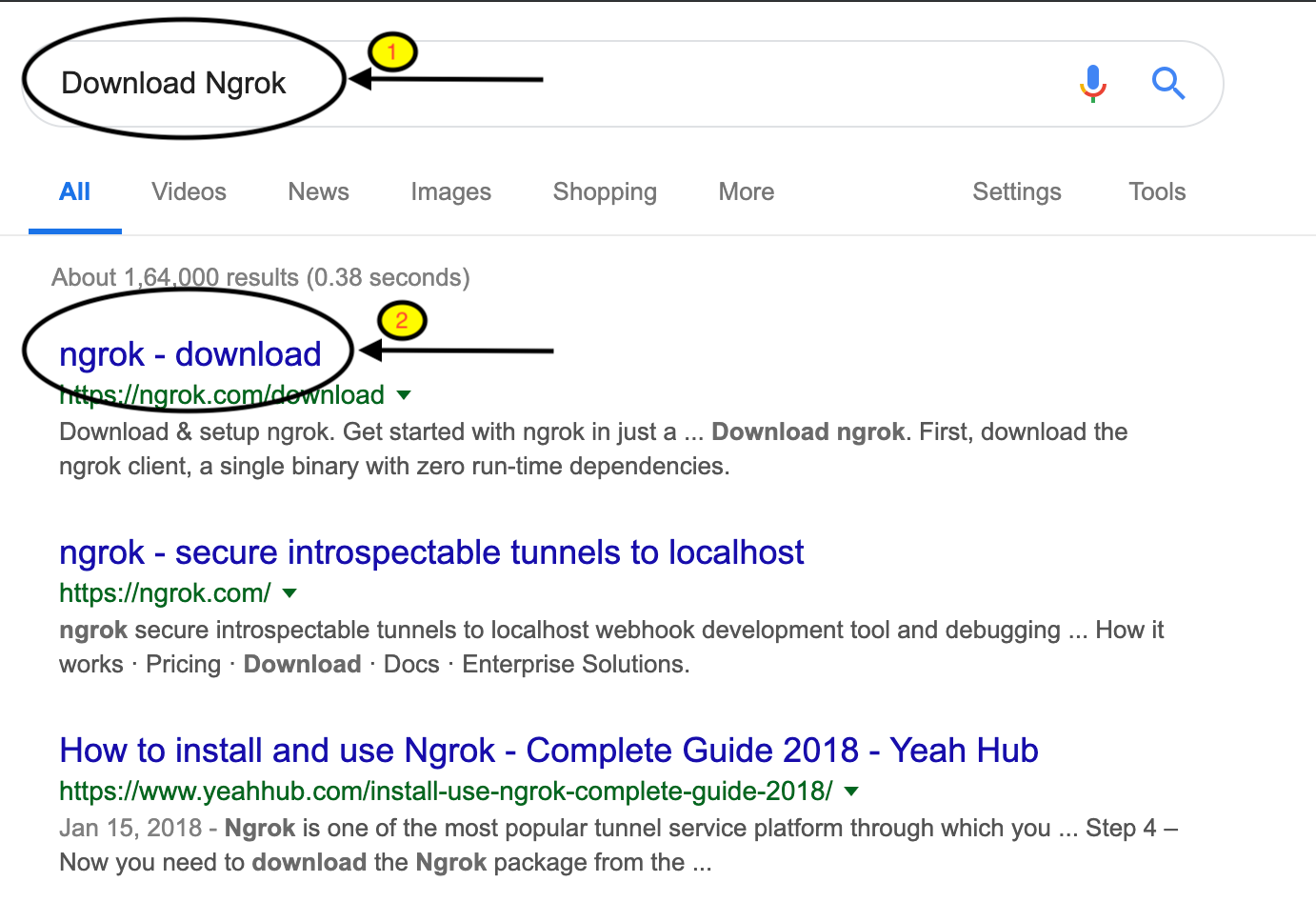
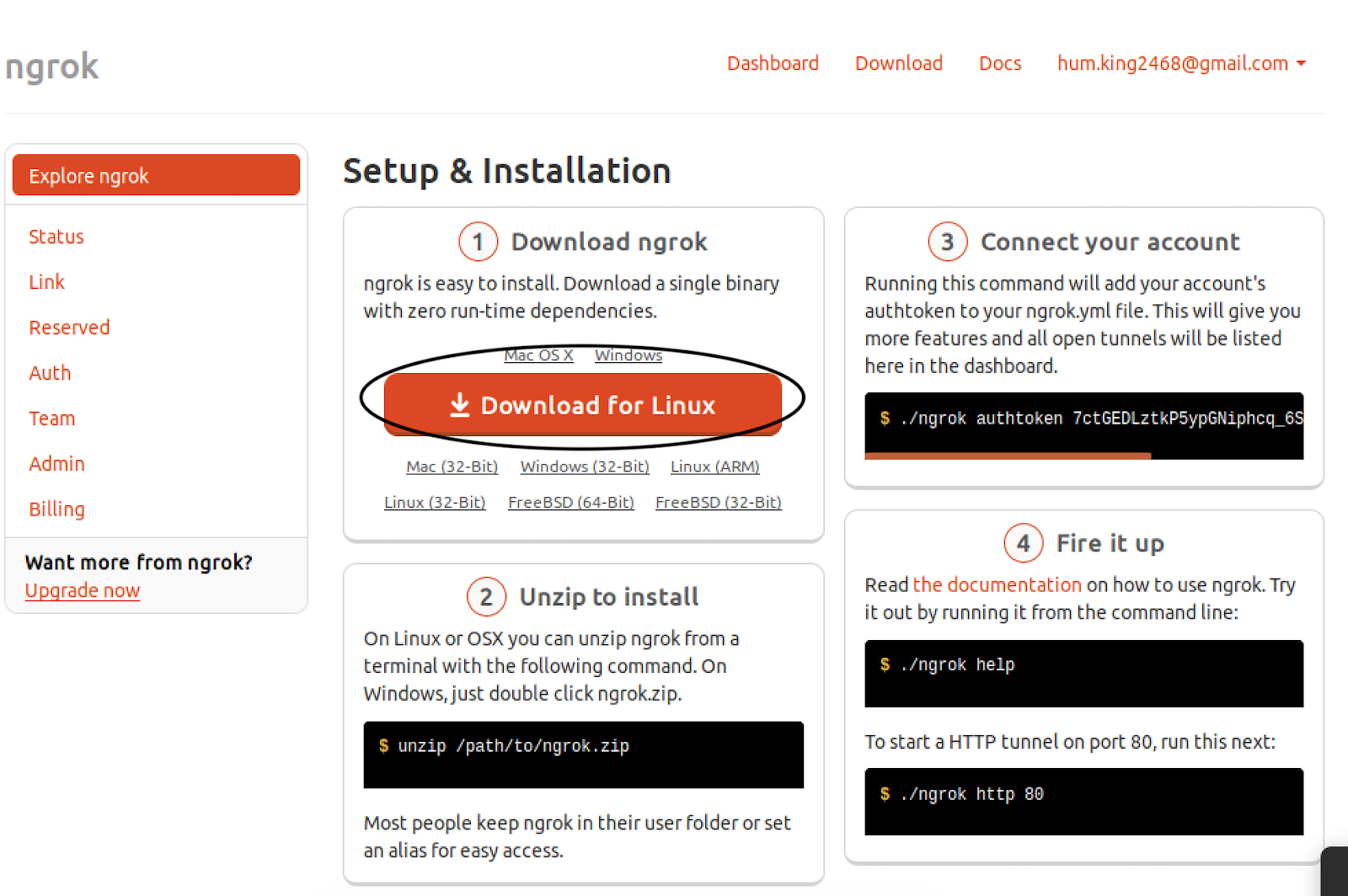
Go to google and search for Download Ngrok.


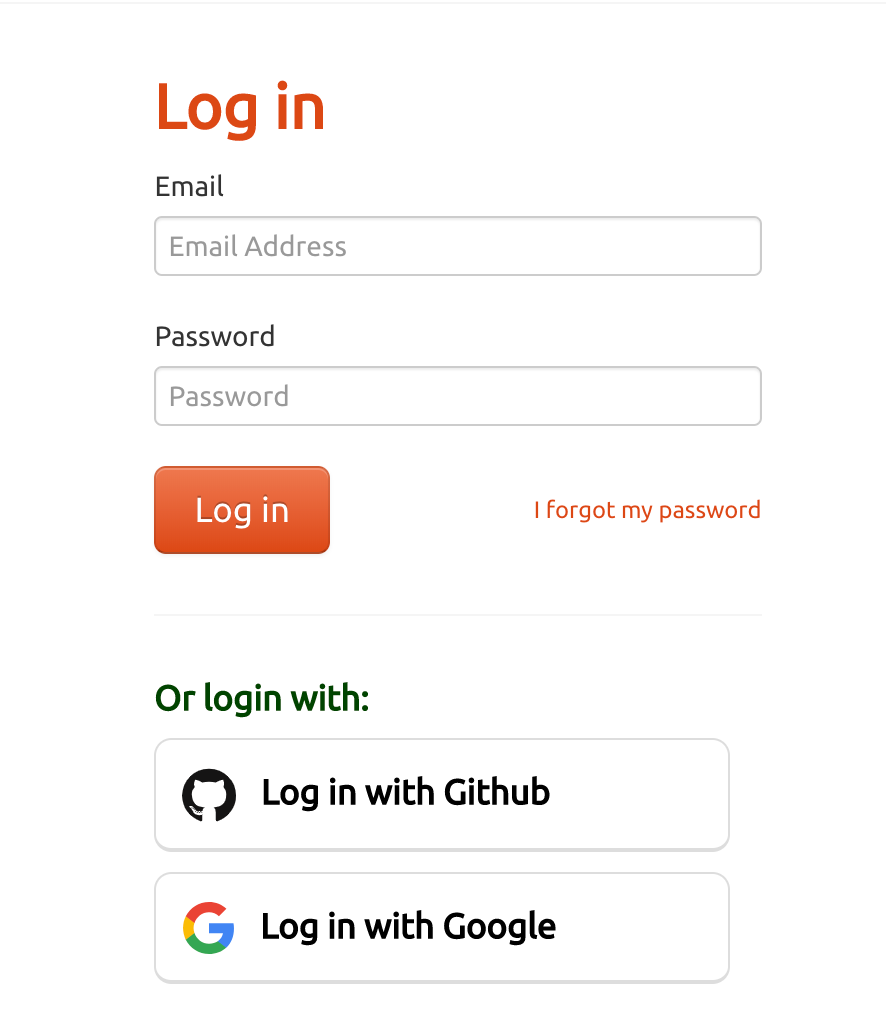
Either Login with google account or do Ngrok own signup.
 
 
After Logged in Ngrok Download it.
 
 
After Download Ngrok, Go to the console and unzip the downloaded zip file and then move it to /usr/local/bin.
Note: Moving part is optional, we do so for accessing ngrok from anywhere.


Go to ngrok UI page , copy the authentication key and paste it.
Note: Remove ” . / ” sign because we moved ngrok file to /usr/local/bin
 
 
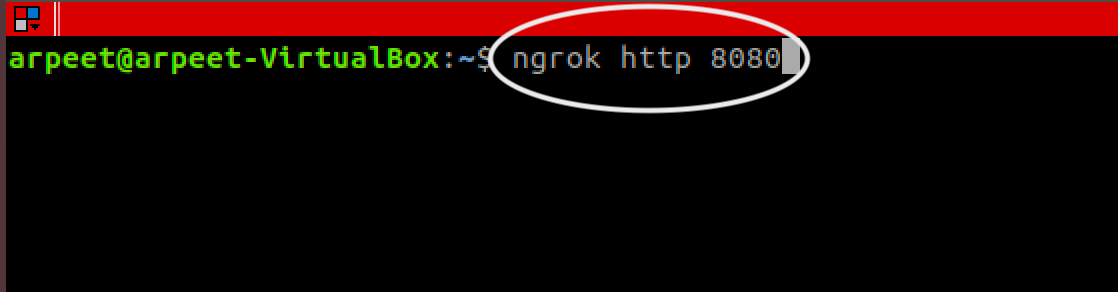
 Major configuration for Ngrok is done. Now type the command:
ngrok http 8080
 Assuming that Jenkins is running on port 8080.
 
 
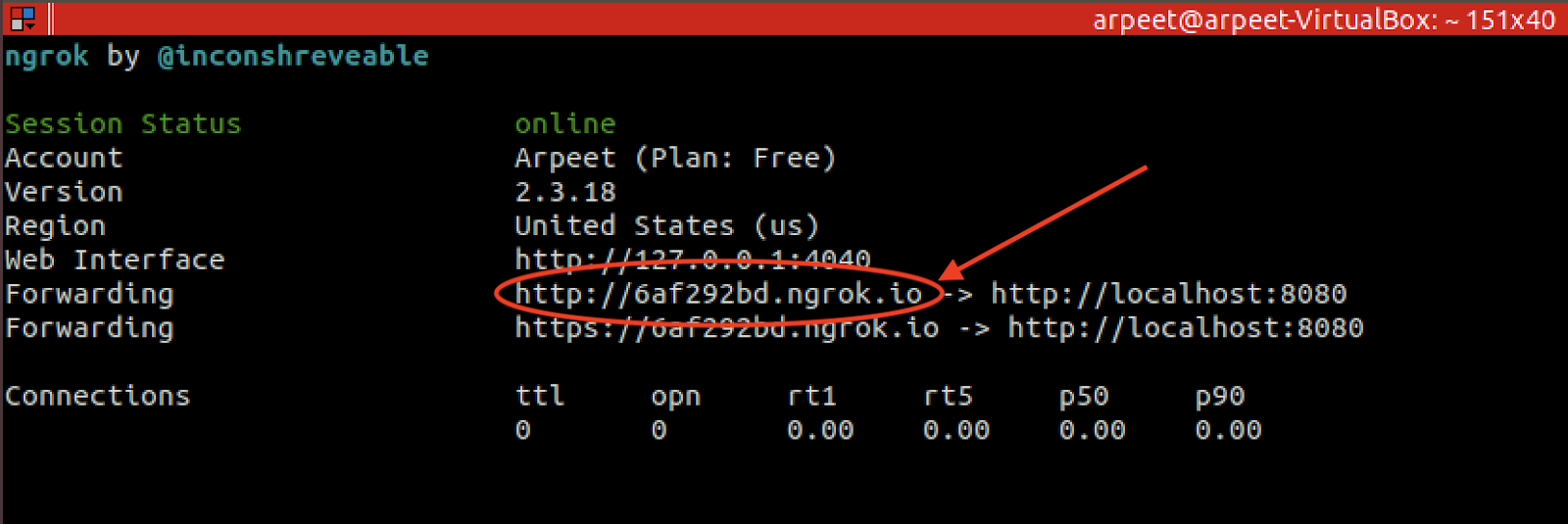
Now Ngrok Host our Jenkins Service to public IP.
 
Copy this IP, we will use it in the google developer console.
 
Note: Make this terminal up and running.(don’t do ctrl+c)

Step 2: Setup Google Developer Console

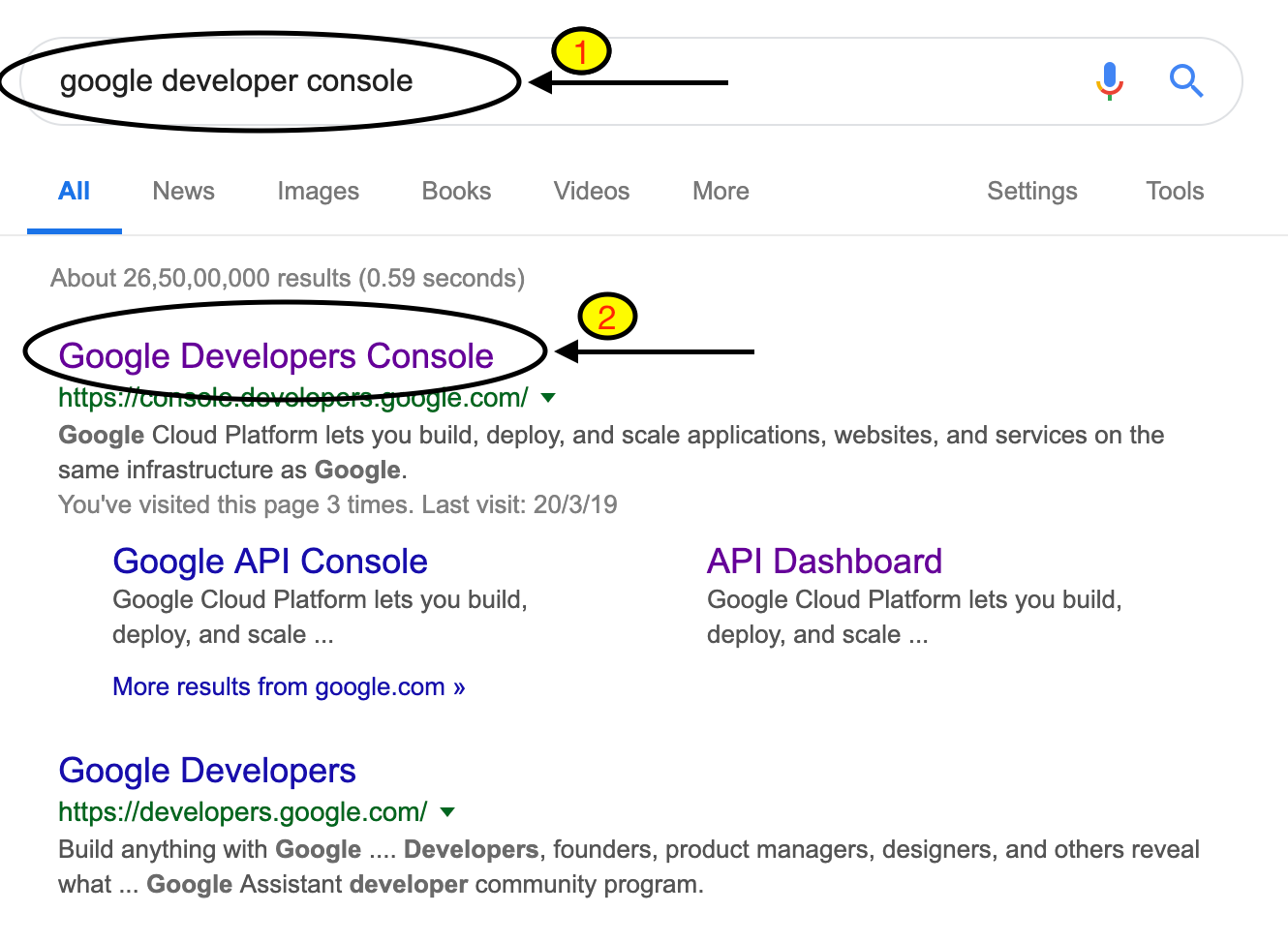
Go to google and search for google developer console.
 
 
After sign in into google developer console, we will redirect to Google developer console UI screen.
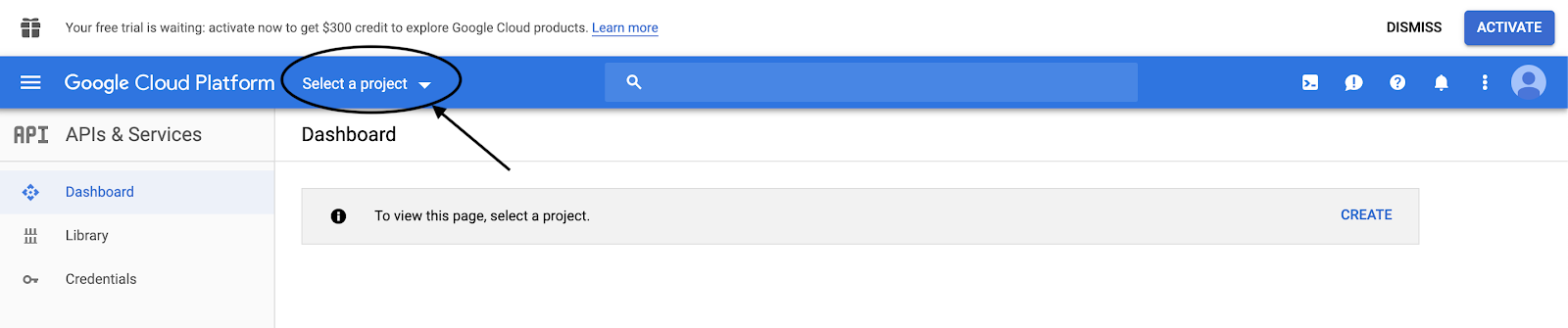
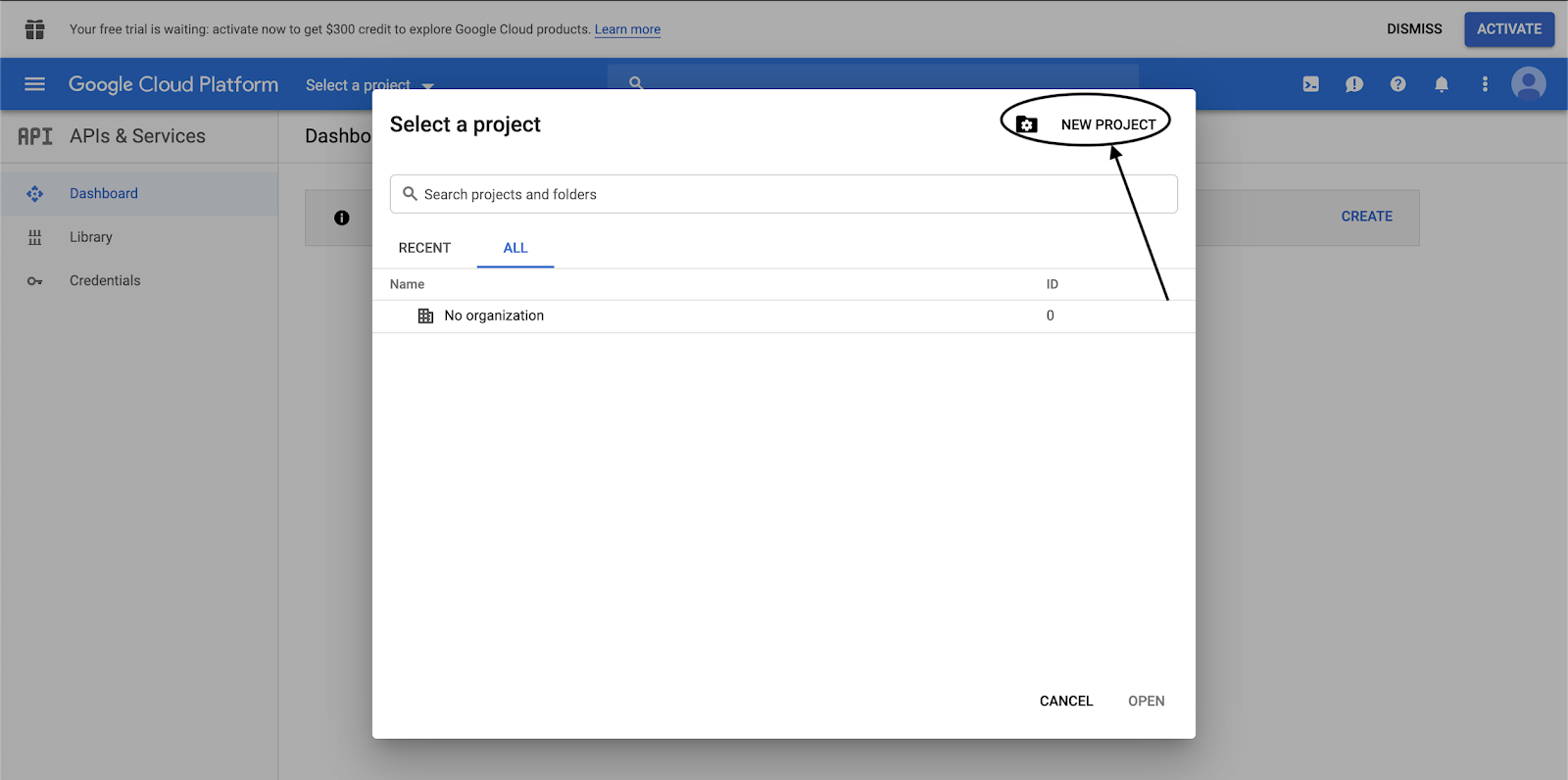
Go to Select a project  → New Project
 
 
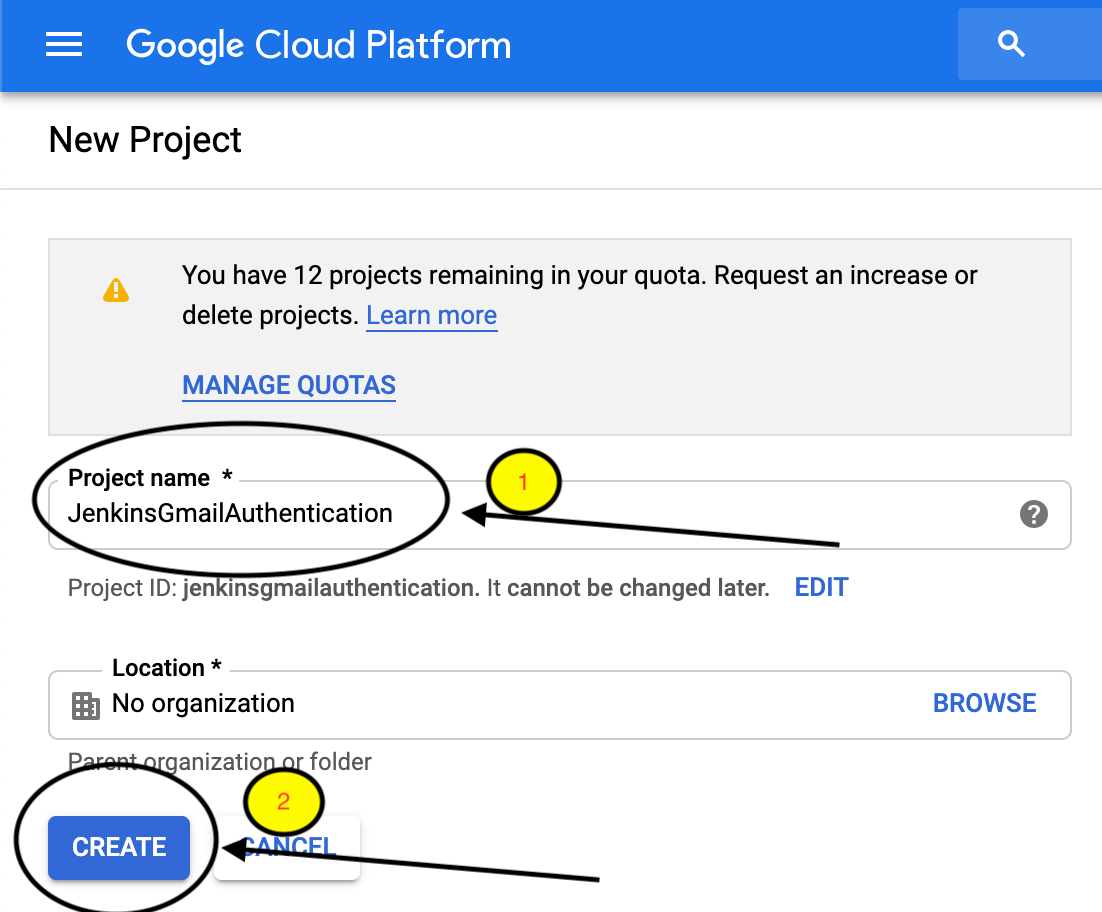
Give Project Name, here I will use “JenkinsGmailAuthentication” and create a project. Creating a project takes 1 or 2 minutes.
 
 
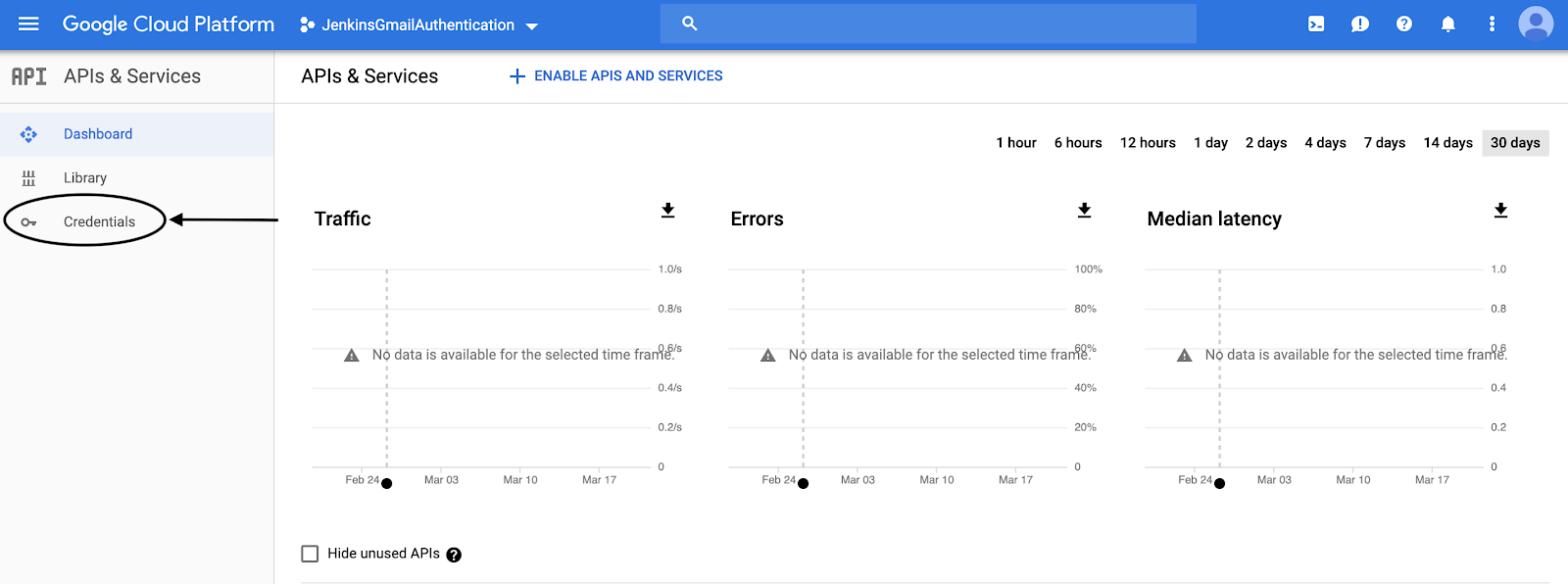
After Project created, we will be redirected to the UI page as shown below. Now click on on the “Credentials” Tab on the left slide bar.


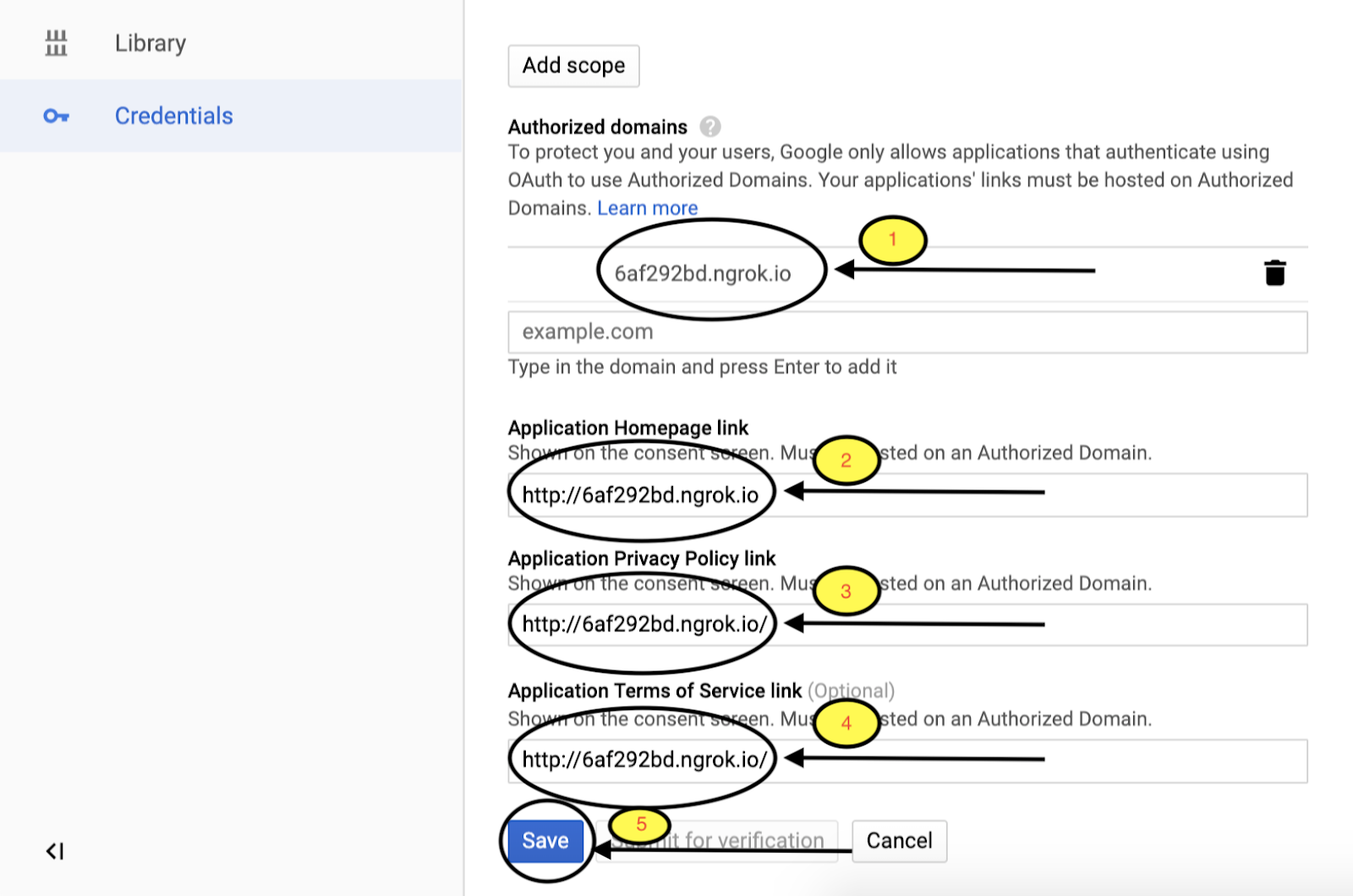
After Go to the OAuth consent screen tab and give the below entries. Here I will give Application name to “JenkinsGmailAuthentication”.
 
 
The important part of the Google developer console is Public IP we created using Ngrok. Copy Public IP in Authorized domains and note to remove ” http:// ” in Authorized domains.
 
 
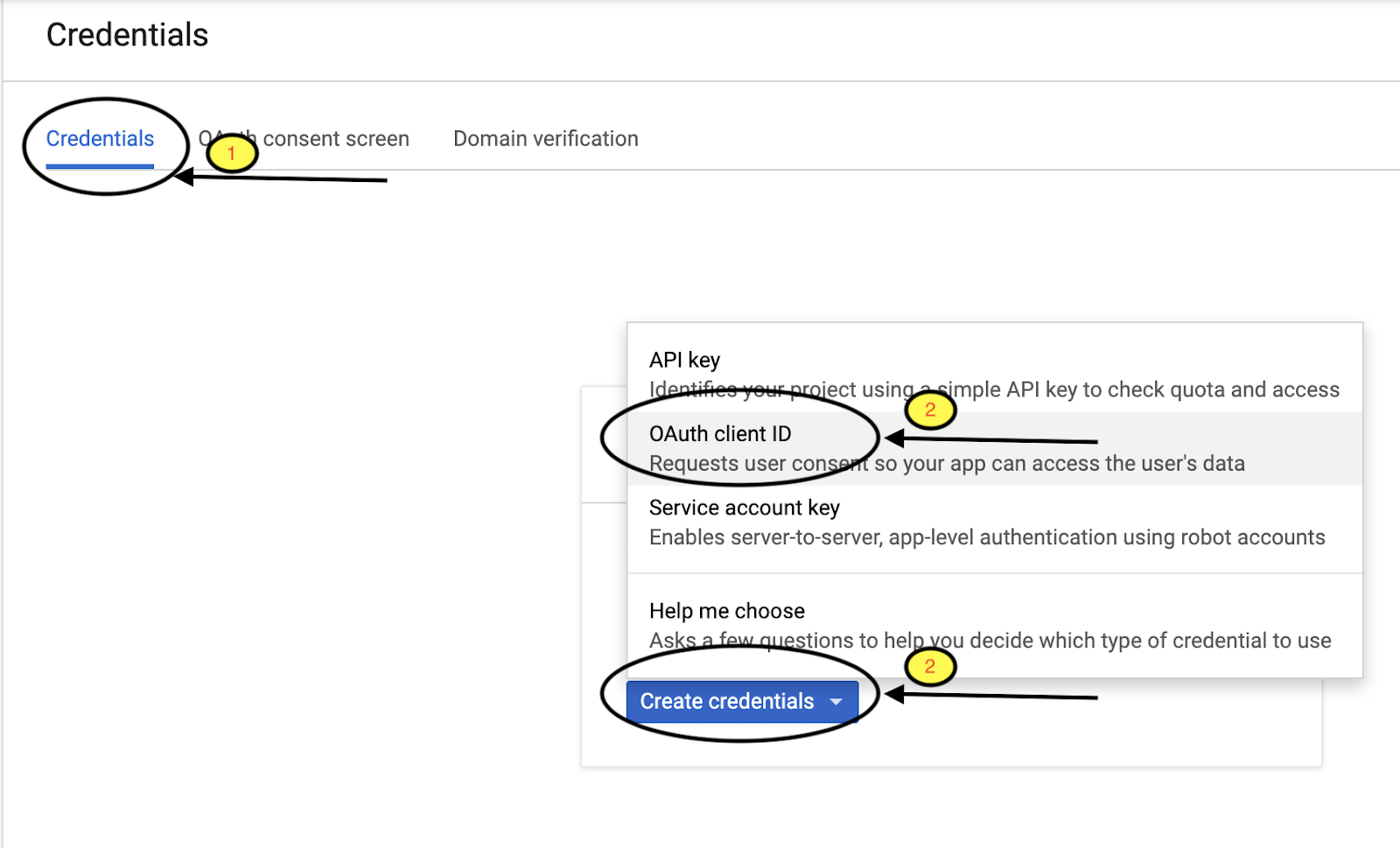
After Setting OAuth consent screen, Go to   “Credentials Tab”→ Create Credentials→OAuthClientID
 
 
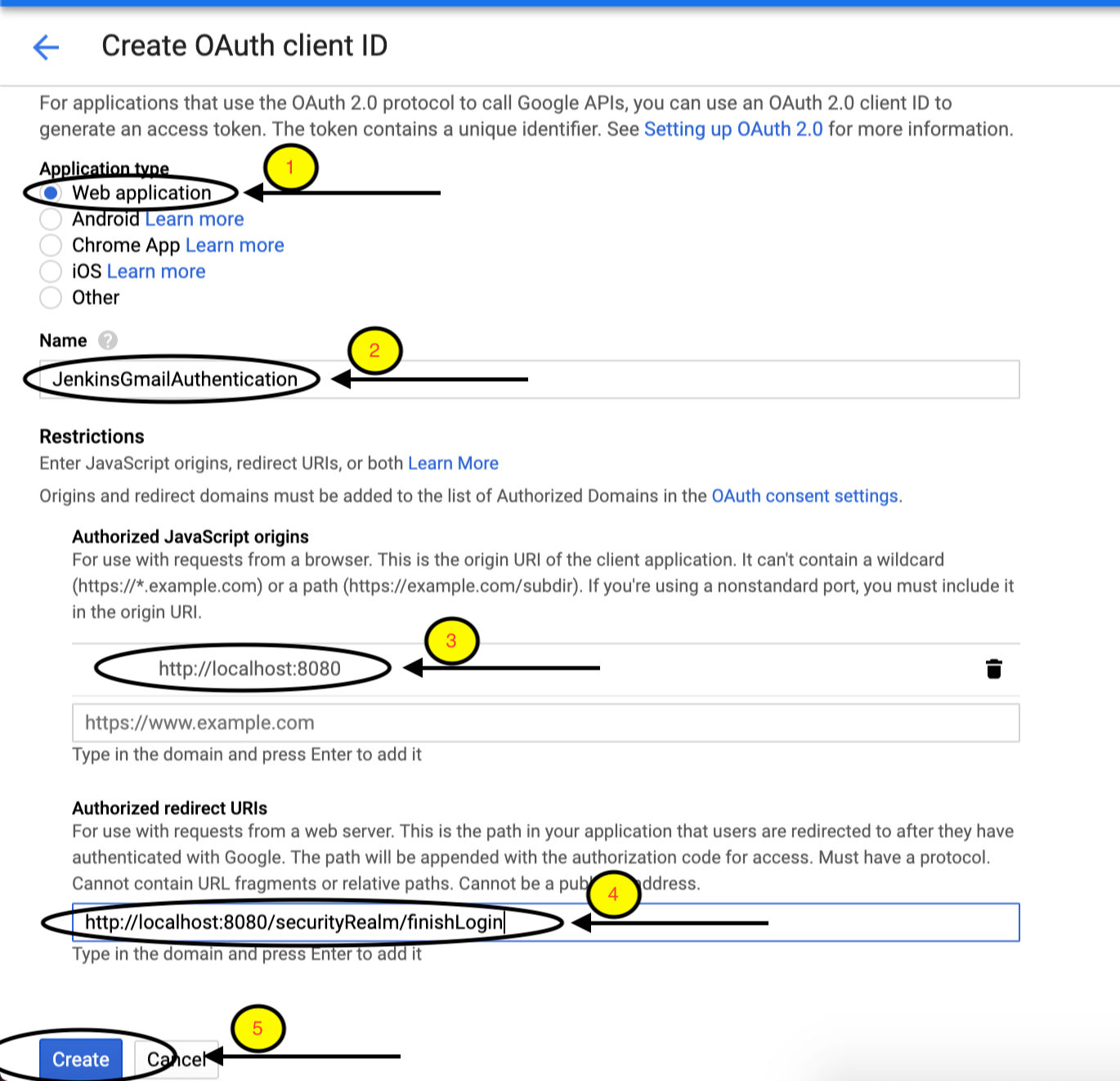
Select Application type as Web Application, give the name “JenkinsGmailAuthentication”.
Major Part of Create Credential has Authorized JavaScript origins and Authorized redirect URIs.
 
 
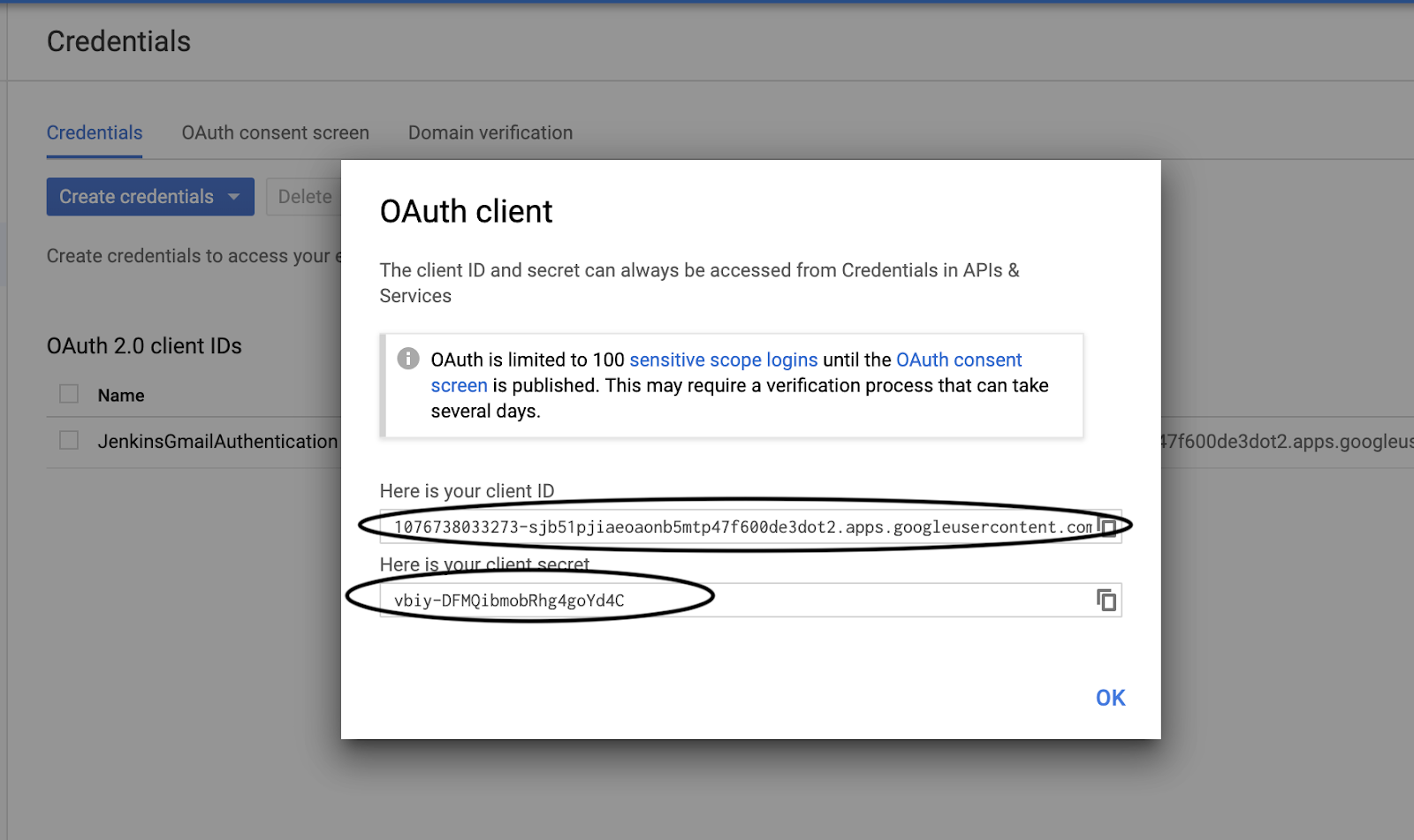
Copy Client ID and Client Secret because we are going to use these in Jenkins.
 

Step 3: Setup Jenkins

I am assuming that Jenkins is already installed in your system.
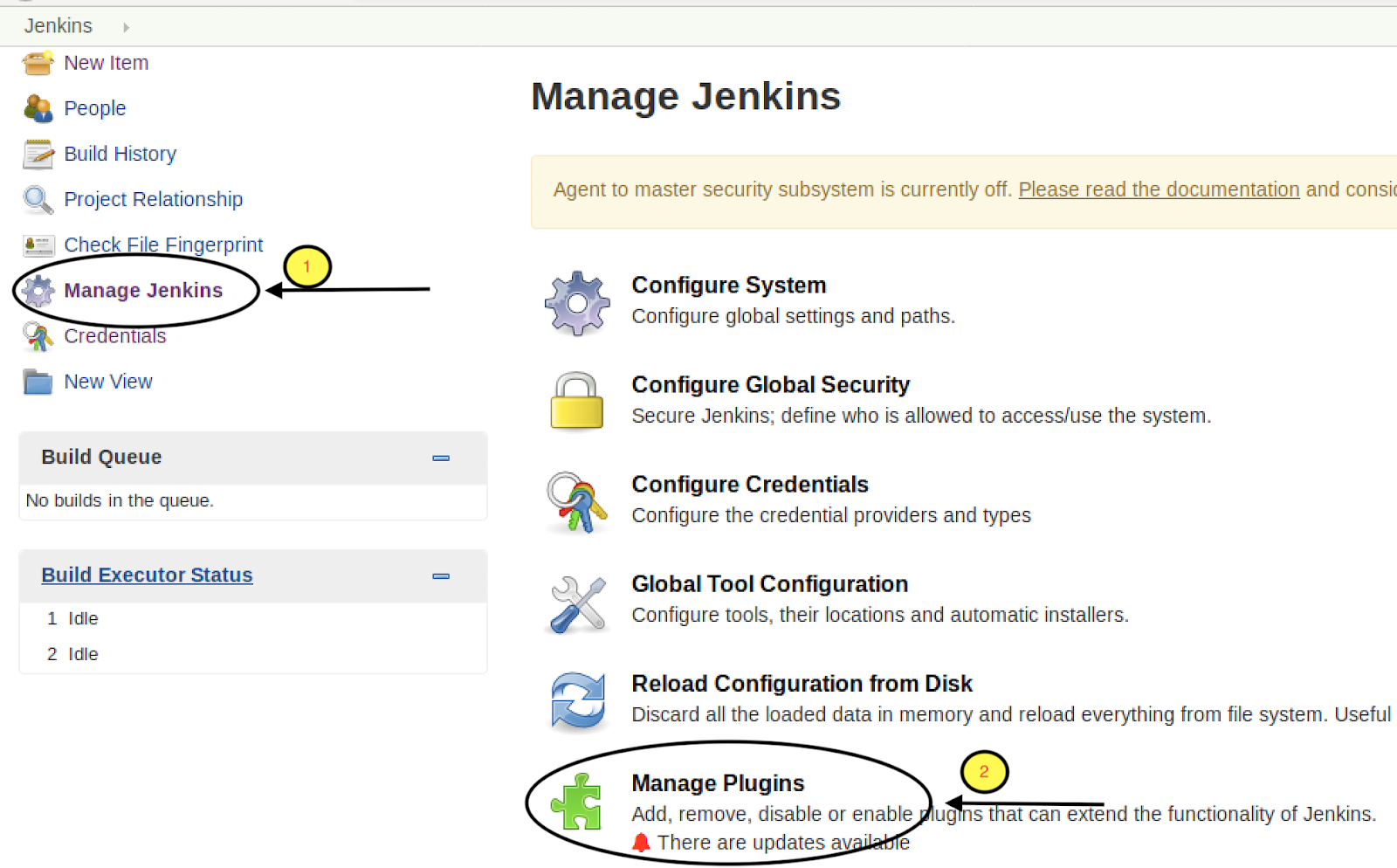
Go to Manage Jenkins → Manage Plugins→ Available
 
 
Search for “Google Login Plugin” and add it.
 
 
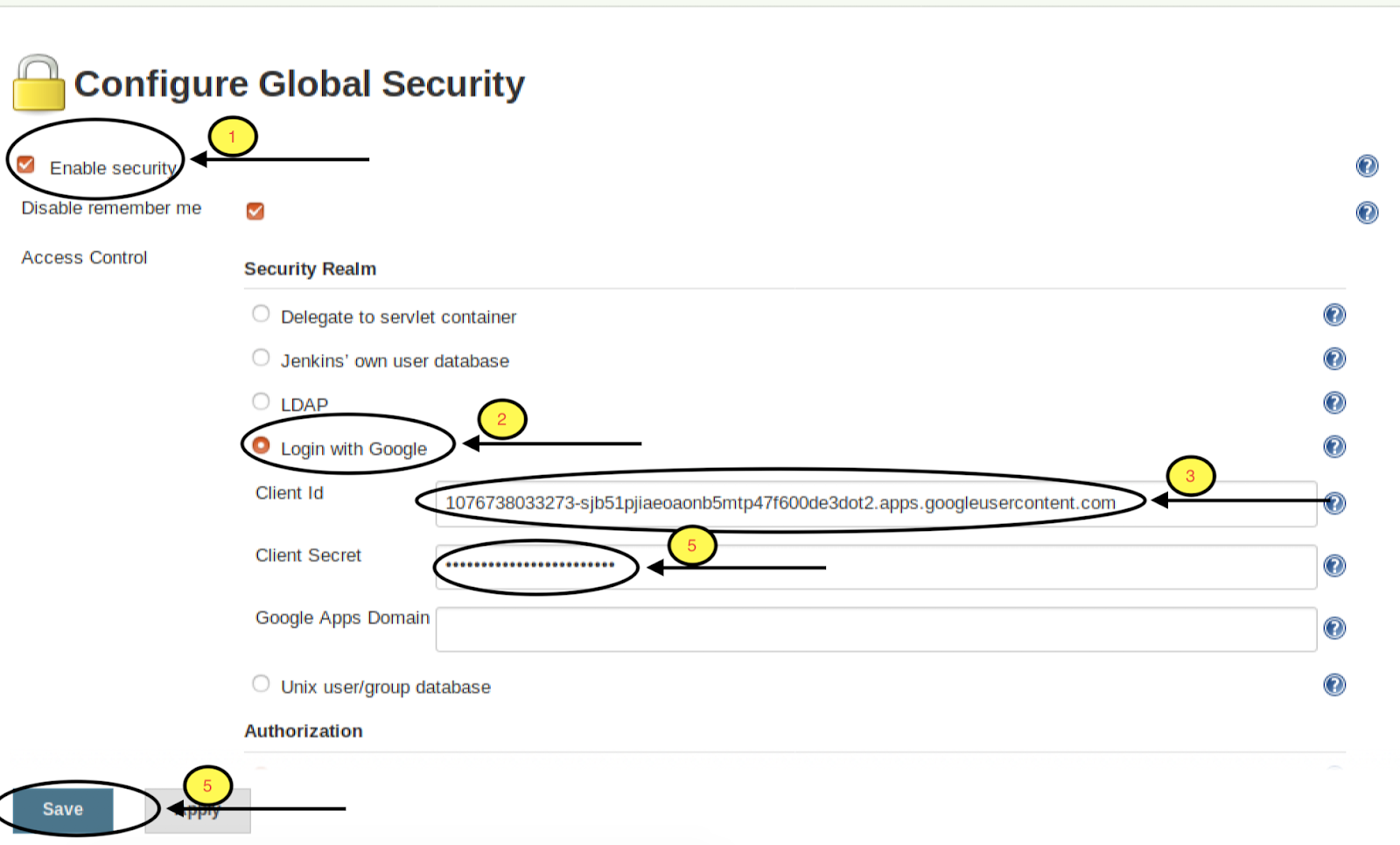
Go to Manage Jenkins → Configure Global Security
 
 
The major part of Jenkins Setup is to Configure Global Security.
Check the Enable security → Login with Google and Paste the Client ID and Client secret generated in Create Credential Step and Save.
 
 
Up to here, we are done with the Setup part.
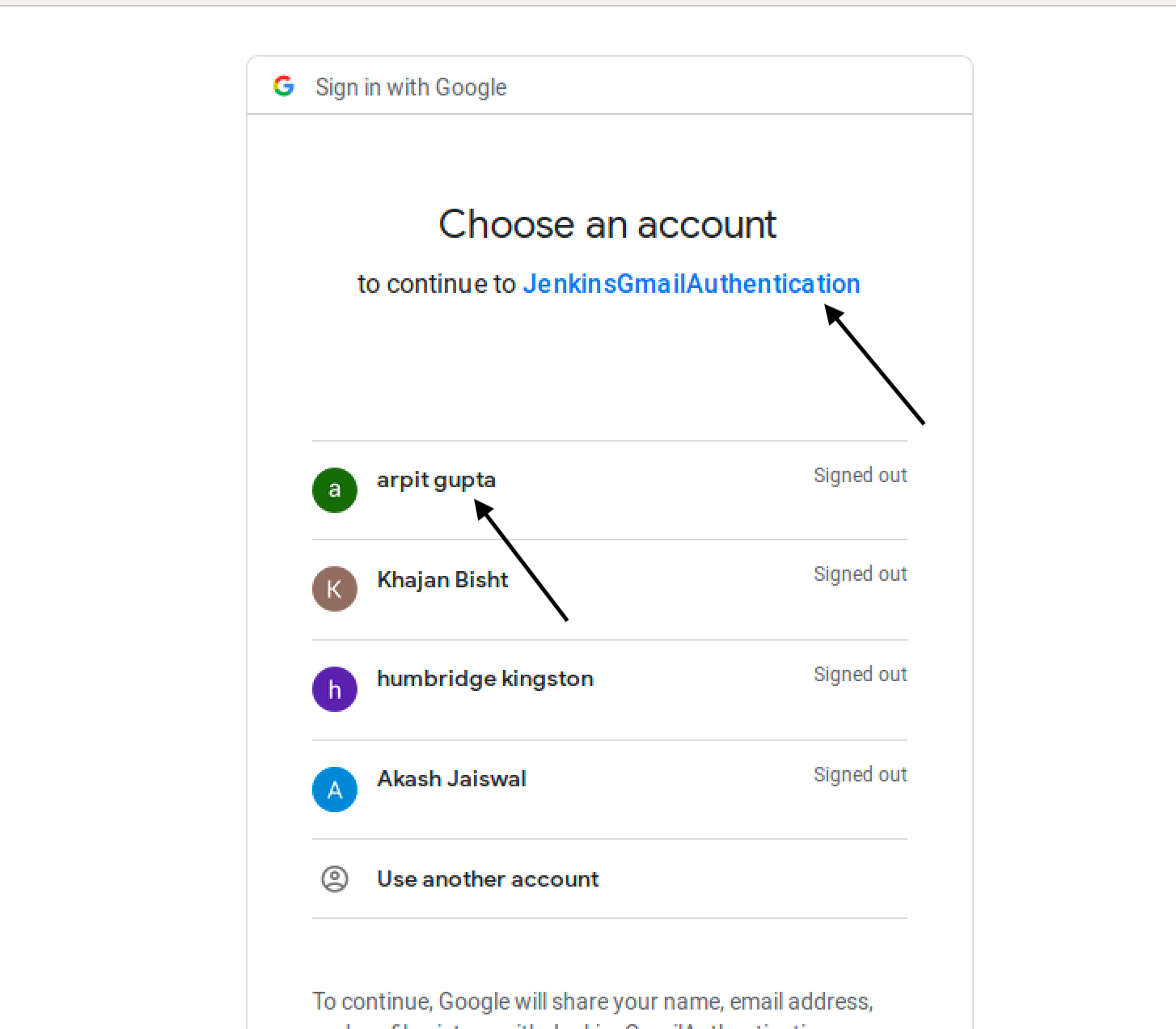
Now Click on login button on Jenkins UI, you will redirect to Gmail for login.
 
 
Select the account from which you want to log in.
 
 
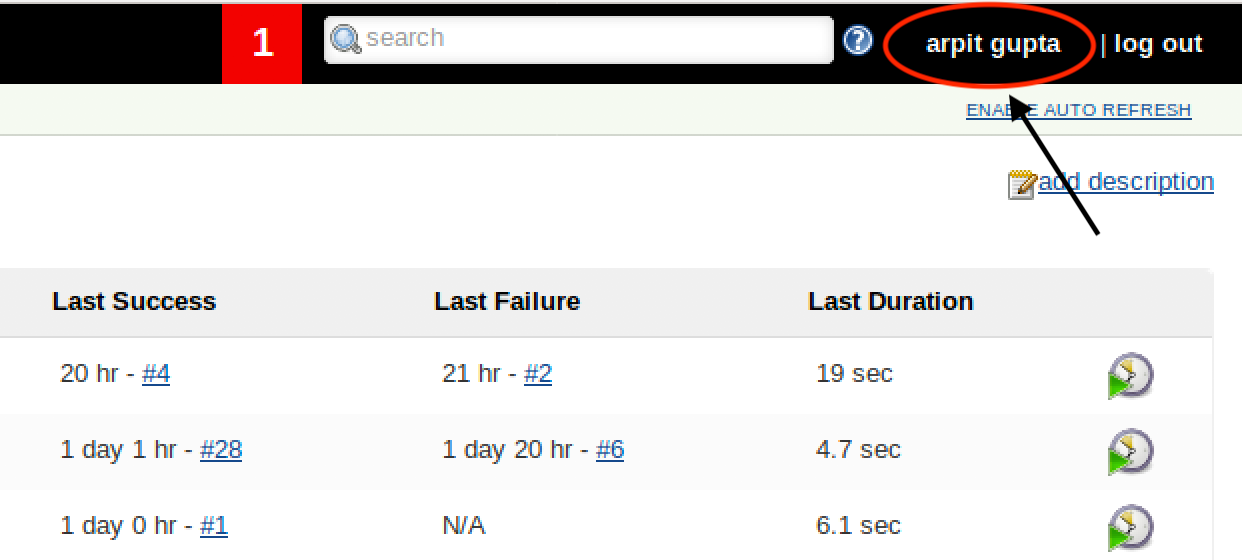
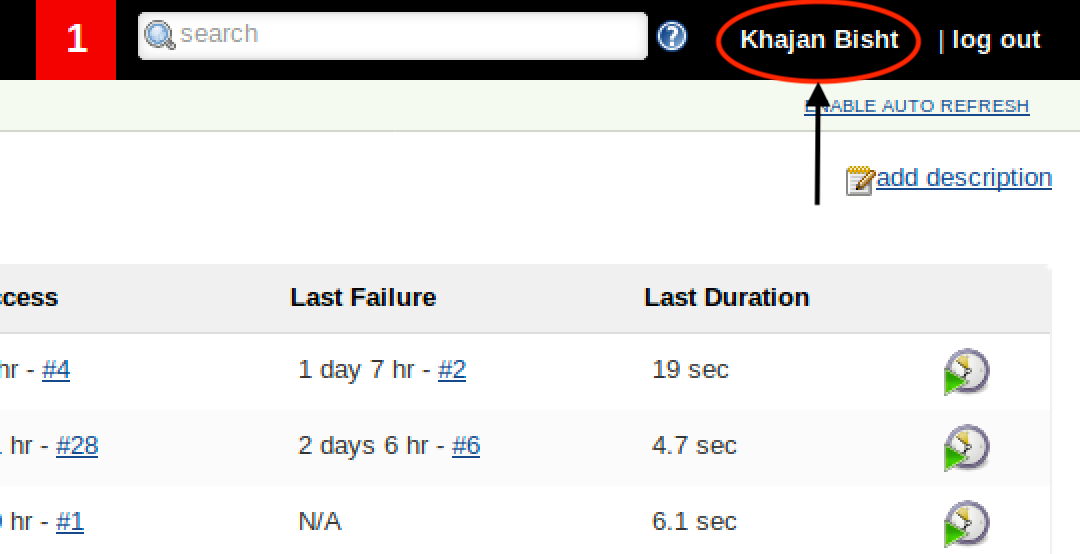
After selecting Account you will redirect to Jenkins and you are logged in as selected user.
 
 
You may be facing a problem when you log in again.
Logout from the current user and login again.
 
 
After redirected to Gmail select another user.
 
 
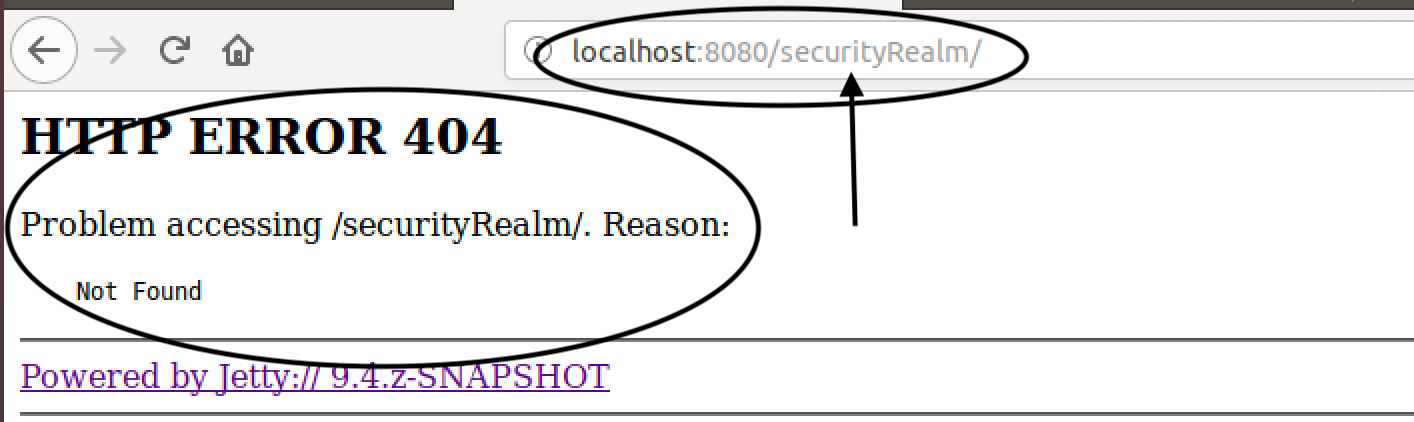
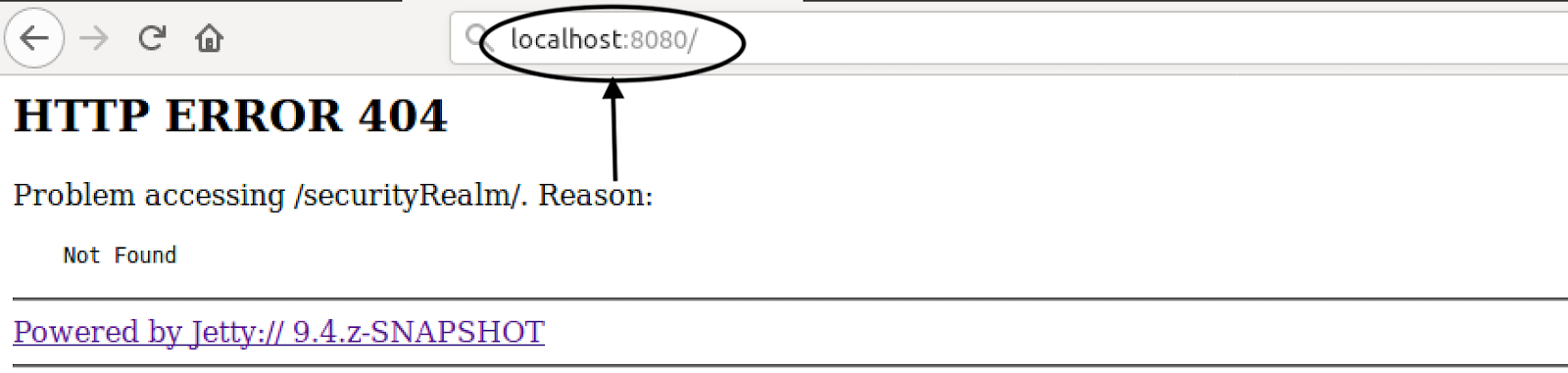
After selecting user you will be redirected to Error Page showing: HTTP ERROR 404.
 
 
Don’t worry, you have to just remove “securityRealm/” or enter again “localhost:8080”.
 
 
You are logged in with the selected user.
 
 
So now you know how to do Gmail Authentication between Google developer console and Jenkins when they are not directly reachable to each other.
Here the main bridge between both is Ngrok which host our Privately hosted Jenkins to outer internet.


Jenkins Pipeline Global Shared Libraries

When we say CI/CD as code, it should have modularity and reusability which results in Reducing integration problems and allowing you to deliver software more rapidly.

Jenkins Shared library is the concept of having a common pipeline code in the version control system that can be used by any number of pipelines just by referencing it. In fact, multiple teams can use the same library for their pipelines.

Our thought is putting all pipeline functions in vars is much more practical approach, while there is no other good way to do inheritance, we wanted to use Jenkins Pipelines the right way but it has turned out to be far more practical to use vars for global functions.

Practical Strategy
As we know Jenkins Pipeline’s shared library support allows us to define and develop a set of shared pipeline helpers in this repository and provides a straightforward way of using those functions in a Jenkinsfile.This simple example will just illustrate how you can provide input to a pipeline with a simple YAML file so you can centralize all of your pipelines into one library. The Jenkins shared library example:And the example app that uses it:

Directory Structure

You would have the following folder structure in a git repo:

└── vars
    ├── opstreePipeline.groovy
    ├── opstreeStatefulPipeline.groovy
    ├── opstreeStubsPipeline.groovy
    └── pipelineConfig.groovy

Setting up Library in Jenkins Console.

This repo would be configured in under Manage Jenkins > Configure System in the Global Pipeline Libraries section. In that section Jenkins requires you give this library a Name. Example opstree-library

Pipeline.yaml

Let’s assume that project repository would have a pipeline.yaml file in the project root that would provide input to the pipeline:Pipeline.yaml

ENVIRONMENT_NAME: test
SERVICE_NAME: opstree-service
DB_PORT: 3079
REDIS_PORT: 6079

Jenkinsfile

Then, to utilize the shared pipeline library, the Jenkinsfile in the root of the project repo would look like:

@Library ('opstree-library@master') _
opstreePipeline()

PipelineConfig.groovy

So how does it all work? First, the following function is called to get all of the configuration data from the pipeline.yaml file:

def call() {
  Map pipelineConfig = readYaml(file: "${WORKSPACE}/pipeline.yaml")
  return pipelineConfig
}

opstreePipeline.groovy

You can see the call to this function in opstreePipeline(), which is called by the Jenkinsfile.

def call() {
    node('Slave1') {

        stage('Checkout') {
            checkout scm
        }

         def p = pipelineConfig()

        stage('Prerequistes'){
            serviceName = sh (
                    script: "echo ${p.SERVICE_NAME}|cut -d '-' -f 1",
                    returnStdout: true
                ).trim()
        }

        stage('Build & Test') {
                sh "mvn --version"
                sh "mvn -Ddb_port=${p.DB_PORT} -Dredis_port=${p.REDIS_PORT} clean install"
        }

        stage ('Push Docker Image') {
            docker.withRegistry('https://registry-opstree.com', 'dockerhub') {
                sh "docker build -t opstree/${p.SERVICE_NAME}:${BUILD_NUMBER} ."
                sh "docker push opstree/${p.SERVICE_NAME}:${BUILD_NUMBER}"
            }
        }

        stage ('Deploy') {
            echo "We are going to deploy ${p.SERVICE_NAME}"
            sh "kubectl set image deployment/${p.SERVICE_NAME} ${p.SERVICE_NAME}=opstree/${p.SERVICE_NAME}:${BUILD_NUMBER} "
            sh "kubectl rollout status deployment/${p.SERVICE_NAME} -n ${p.ENVIRONMENT_NAME} "

    }
}

You can see the logic easily here. The pipeline is checking if the developer wants to deploy on which environment what db_port needs to be there.

Benefits

The benefits of this approach are many, some of them are as mentioned below:

  • How to write groovy code is now none of the developer’s perspective.
  • Structure of the Pipeline.yaml is really flexible, where entire data structures can be passed as input to the pipeline.
  • Code redundancy saved to a large extent.

 Jenkinsfiles could actually just look more commonly, like this:

@Library ('opstree-library@master') _
opstreePipeline()

and opstreePipeline() would just read the the project type from pipeline.yaml and dynamically run the exact function, like opstreeStatefulPipeline(), opstreeStubsPipeline.groovy() . since pipeline are not exactly groovy, this isn’t possible. So one of the drawback is that each project would have to have a different-looking Jenkinsfile. The solution is in progress!So, what do you think?

Reference links: 
Image: Google image search (jenkins.io)

AWS RDS cross account snapshot restoration

Many a times you may have faced problem where your production infra is on different AWS account and non prod on different account and you are required to restore the RDS snapshot to non prod account for testing.

Recently I got a task to restore my prod account RDS snapshot to a different account for testing purpose. It was a very interesting and new task for me. and I was in an awe, how AWS thinks about what all challenges we may face in real life and provides a solution to it.

For those who are not aware about RDS, I can brief RDS as a relational database service by Amazon Web Services (AWS), it is a managed service so we don’t have to worry about the underlying Operating System and Database software installation, we just have to use it.

Amazon RDS creates a storage volume snapshot of your DB instance backing up the entire DB instance and not just individual database. As I told you, we have to copy and restore an RDS snapshot to a different aws account. There is a catch!, you can directly copy an aws snapshot to a different region in same aws account, but to copy to a different aws account you need to share the snapshot to aws account and then restore from there, so lets begin.

To share an automated DB snapshot, create a manual DB snapshot by copying the automated snapshot, and then share that copy.

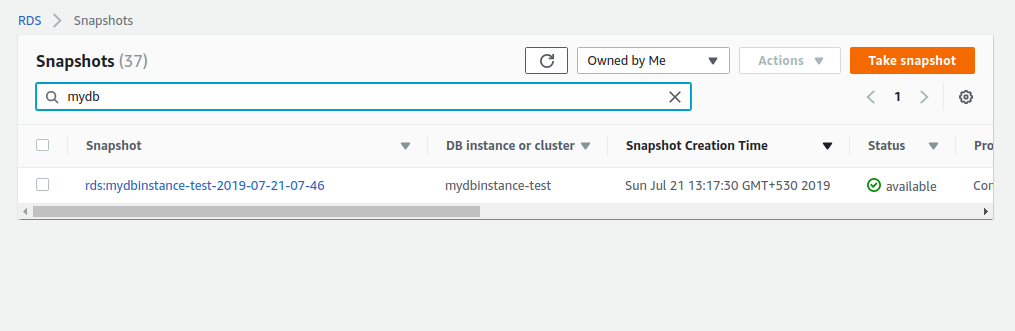
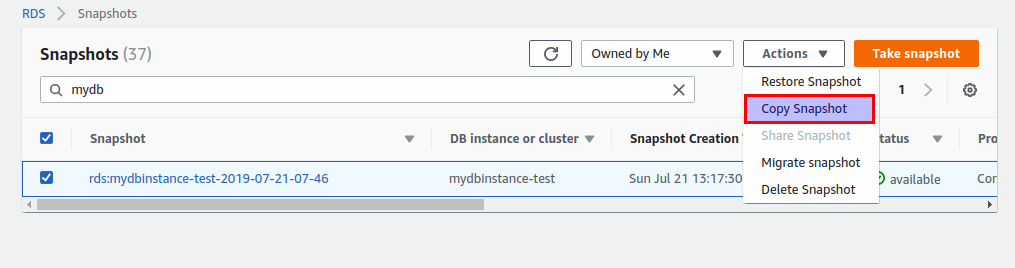
Step 1: Find the snapshot that you want to copy, and select it by clicking the checkbox next to it’s name. You can select a “Manual” snapshot, or one of the “Automatic” snapshots that are prefixed by “rds:”.

Step 2: From the “Snapshot Actions” menu, select “Copy Snapshot”.

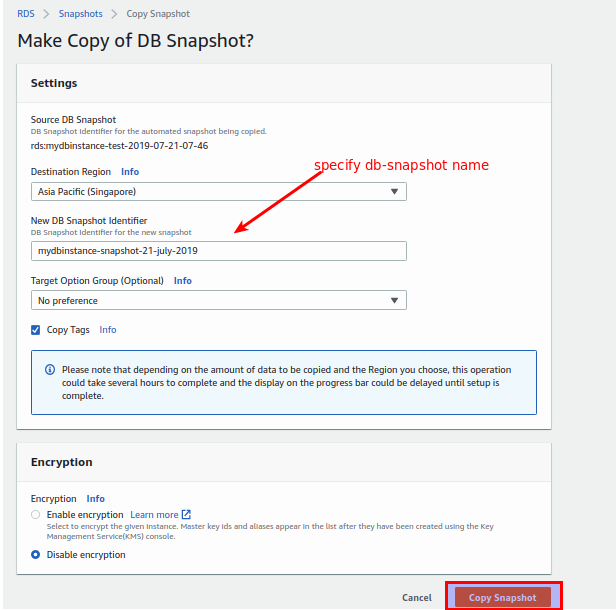
Step 3: On the page that appears: Select the target region. In this case, since we have to share this snapshot with another aws account we can select existing region.

  • Specify your new snapshot name in the “New DB Snapshot Identifier” field. This identifier must not already be used by a snapshot in the target region.
  • Check the “Copy Tags” checkbox if you want the tags on the source snapshot to be copied to the new snapshot.
  • Under “Encryption”, leave “Disable Encryption” selected.
  • Click the “Copy Snapshot” button.

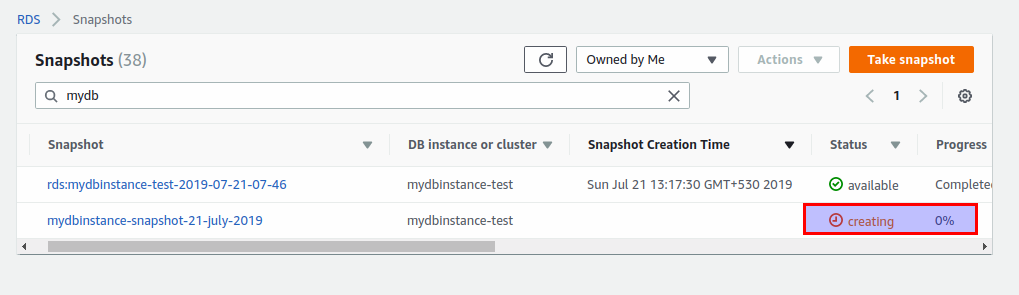
Step 4: Once you click on “Copy Snapshot”, you can see the snapshot being created.

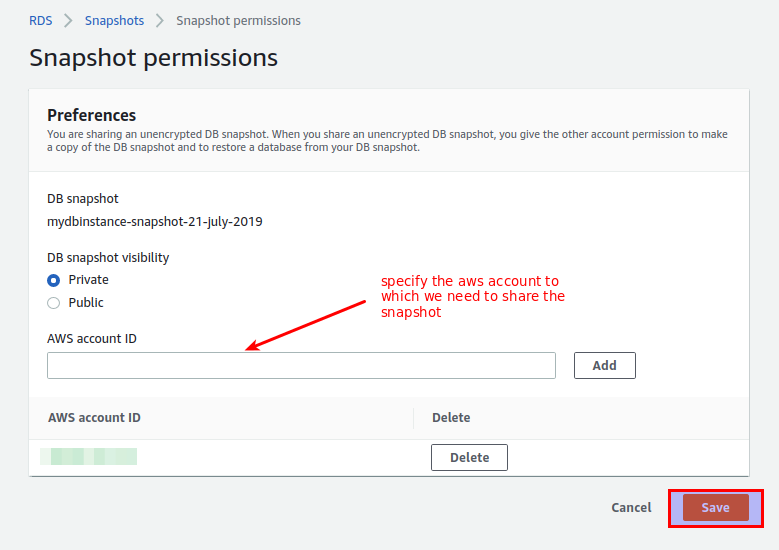
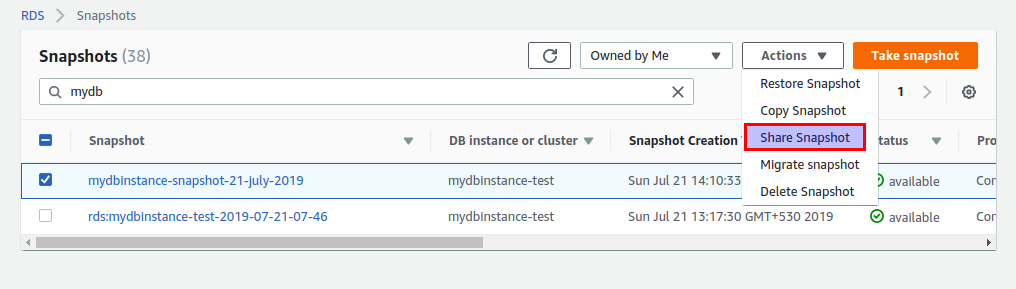
Step 5: Once the manual snapshot is created, select the created snapshot, and from the “Snapshot Actions” menu, select “Share Snapshot”.

Step 6: Define the “DB snapshot visibility” as private and add the “AWS account ID” to which we want to share the snapshot and click on save.

Till this point we have shared our db snapshot to the aws account where we need to restore the db.
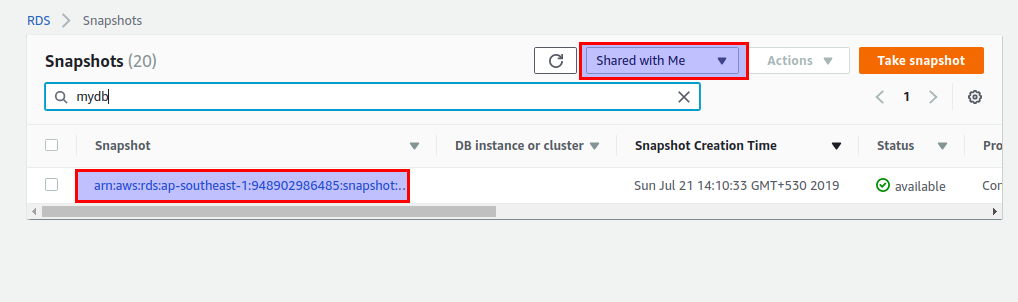
Now login to the other aws account and go to RDS console and check for snapshot that was shared just recently.

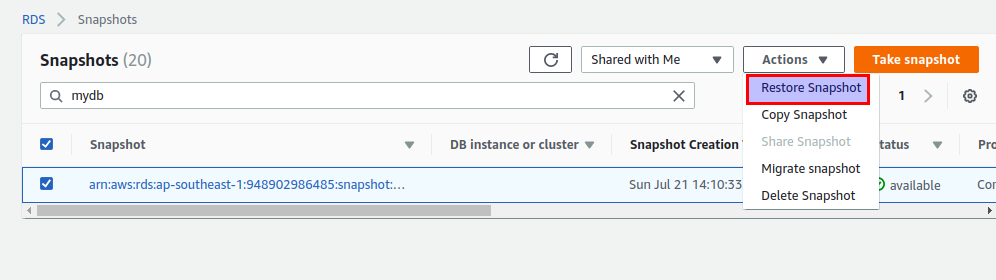
Step 7: Select the snapshot and from the “Snapshot Actions” menu select “Restore Snapshot”.

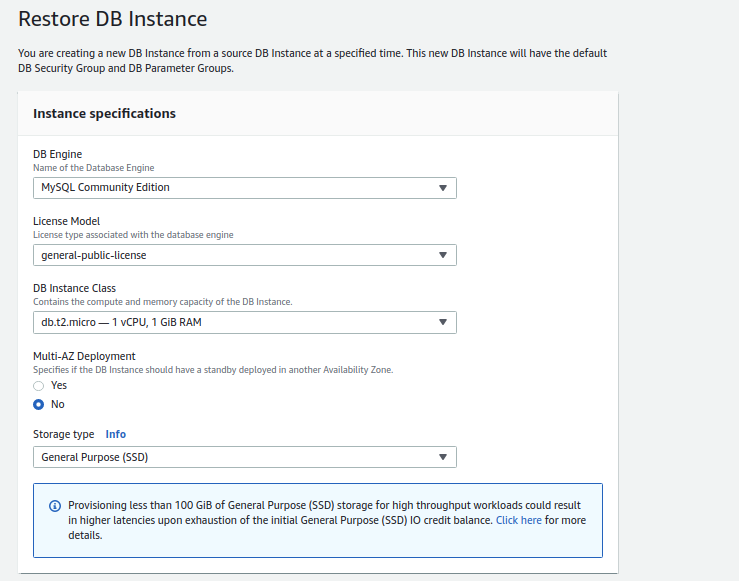
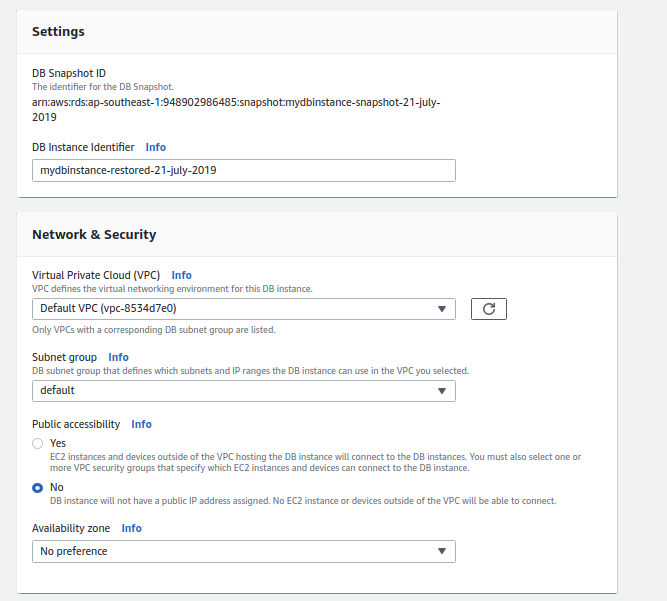
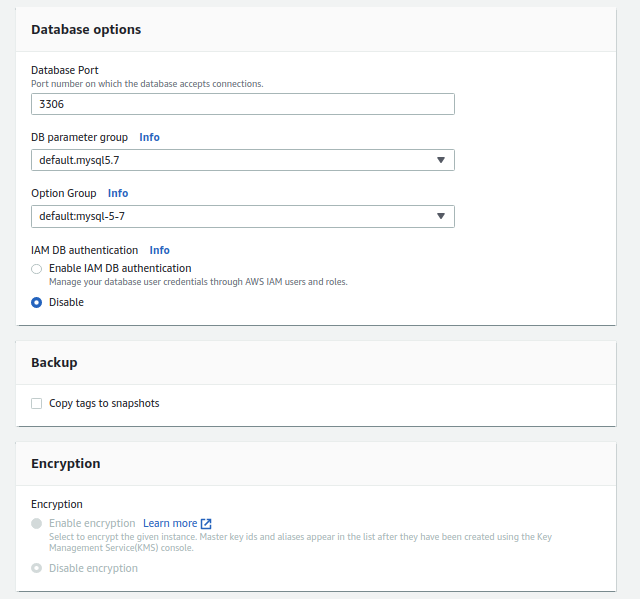
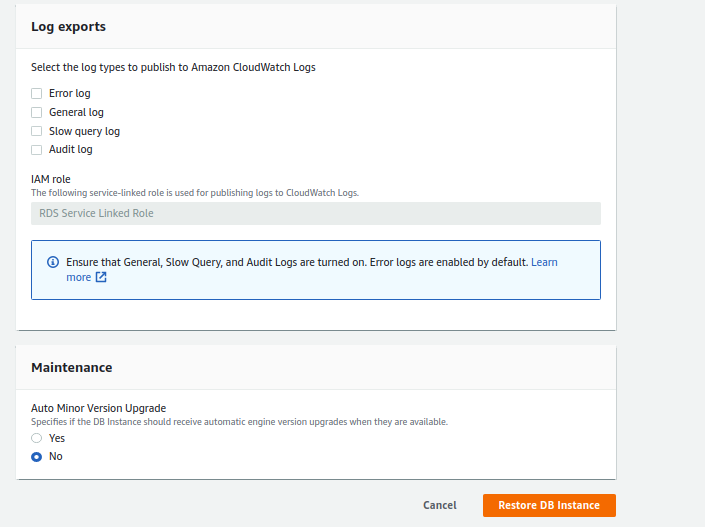
Step 8: From here we just need to restore the db as we do normally. Fill out the required details like “DB Instance class”, “Multi-AZ-Deployment”, “Storage Type”, “VPC ID”, “Subnet group”, “Availability Zone”, “Database Port”, “DB parameter group”, as per the need and requirement.

Step 9: Finally click on “Restore DB instance” and voila !!, you are done.

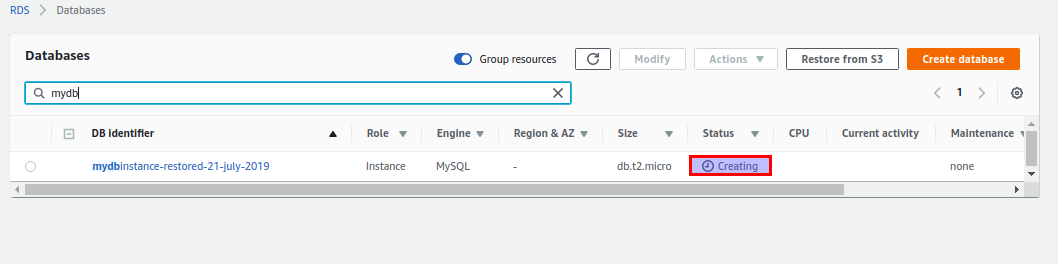
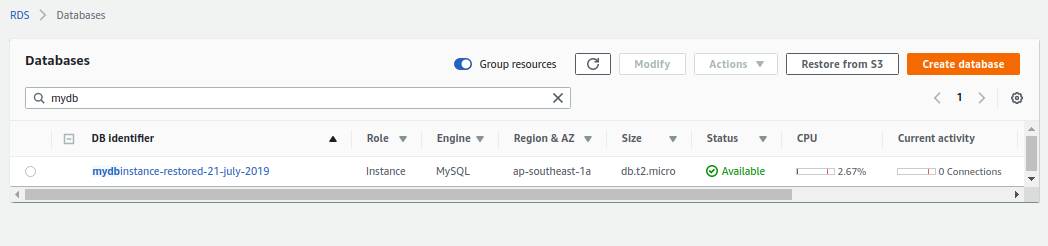
Step 10: You can see the db creation in process. Finally, you have restored the DB to a different AWS account !!

Conclusion:

So there you go. Everything you need to know to restore a production AWS RDS into a different AWS account. That’s cool !! Isn’t it ?, but I haven’t covered everything. There is a lot more to explore. We will walk through RDS best practices in our next blog, till then keep exploring our other tech blogs !!.

Image source: https://unsplash.com/photos/lRoX0shwjUQ


Why I love pods in Kubernetes? Part – 1

When I began my journey of learning Kubernetes, I always thought why Kubernetes has made the pod its smallest entity, why not the container. But when I started diving deep in it I realized, there is a big rationale behind it and now I thank Kubernetes for making the Pod as an only object, not containers.

After being inspired by the working of a Pod, I would like to share my experience and knowledge with you guys.

Image result for kubernetes pod memes

What exactly Pod means?

The literal meaning of pod means the peel of pea which holds the beans and following the same analogy in Kubernetes pod means a logical object which holds a container or more than one container.
The bookish definition could be – a pod represents a request to execute one or more containers on the same node.

Why Pod?

The question that needs to be raised why pod?So let me clear this, pods are considered the fundamental building blocks of Kubernetes, because all the Kubernetes workloads, like DeploymentsReplicaSets or Jobs are eventually expressed in terms of pods.

Pods are the one and only objects in Kubernetes that results in the execution of containers which means No Pod No Containers !!!

Now after the context setting over pod I would like to answer my beloved question:- Why Pod over container??

My answer is why not 🙂 

Let’s take an example, suppose you have an application which generates two types of logs one is access log and other logs are error log. Now you have to add log shipper agent, In case of the container, you will install the log shipper in the container image. Now you got another request to add application monitoring in the application. So again you have to recreate the container image with APM agent in it.
Don’t you think this is quite an untidy way to do it? Of course, it is, why I have to add these things in my application image, it makes my image quite bulky and difficult to manage.

What if I tell you that Kubernetes has its own way of dealing situations like this. 

Yup the solution is a sidecar. Just like in real life if I have a two sitter bike and I want to take 3 persons on a ride, So I will add a sidecar in my bike to take 2 persons together on the ride.
In a similar fashion, I can do the same thing with Kubernetes as well. To solve the above problem I will just create 3 containers (application, log-shipper and APM agent) in the same pod. Now the question is how they will access the data between them and how the networking magic will happen.
The answer is quite simple containers within the pod can share Pod IP address and can listen on localhost. For volume, we can share volumes also across the containers in a pod.

The architecture would be something like this:-

Related image

Now another interesting query arises that when to use sidecar and when not.

Just as shown in the above image we should not keep application and database as a sidecar in the same pod. The reason behind it is Kubernetes does not scale a container it scales a pod. So when autoscaling will happen it scales the application as well as database which could not be required.

Instead of that, we should keep log-shippers, health-check containers and monitoring agent as a sidecar because anyhow application will scale these agents also needs to be scaled with the application.

Now I am assuming you are also madly in love with the pods.

For diving deep in the pod stay tuned for the next part of this blog Why I love pods in Kubernetes? Part – 2. In my next part, I will discuss the different phases and lifecycle of the pod and how pod makes our life really smooth.
Thanks for reading, I’d really appreciate any and all feedback, please leave your comment below if you guys have any feedback.

Cheers till the next time.