Cert-Manager Issuer for Cross-Account Route 53 [ EKS ]

Cert-Manager is a very powerful tool when we talk about managing TLS certificates & issuers and no other tool comes near the Cert-Manager for kubernetes in terms of open source, visibility, documentation, installation option, integration, and many more. Even with the same account or cross-account option, there is a direct integration option provided by cert-manager CRDs. This will lead to ease of setting of certificates and managing those created certificates.

ASSUMPTION

For this session/blog, we are going to use ACME certificates [or Let’s encrypt certificates] using DNS01 challenger.

Before setting up we need to have the clarity of account and their functionality.

ACCOUNT-X — EKS SETUP

ACCOUNT Y — ROUTE 53

NOTE: For the same account, you can use serviceaccount to make a call through OIDC To AWS IAM Role.

Continue reading “Cert-Manager Issuer for Cross-Account Route 53 [ EKS ]”

How to Fix a Corrupted GUI after Downgrading Python on Ubuntu?

If you’ve recently downgraded Python on Ubuntu, you may have noticed that your GUI is not functioning properly. Specifically, the login screen may be corrupted or not loading at all, and you may not be able to log in or access your desktop. This is because the downgrade may have caused some dependencies to break, including the lightdm package that manages the display manager.

What is Lightdm ?

Lightdm is a display manager that manages the login screen and desktop environment for Ubuntu and other Linux distributions. It’s responsible for starting the X server, authenticating users, and loading the graphical user interface. If lightdm is not functioning properly, you may not be able to log in or access your desktop. Reinstalling lightdm is a simple and effective solution to fix these issues and restore your system’s GUI.

Downgrading Python can cause unexpected issues with your system, particularly with the graphical user interface (GUI). Specifically, the display manager known as lightdm may become corrupted, resulting in an unusable login screen and desktop environment.

Continue reading “How to Fix a Corrupted GUI after Downgrading Python on Ubuntu?”

ServiceNow – Azure DevOps Integration

The IT industry needs optimal efficiency in its enterprise, which is not an easy task. Traditional practices are still in use but are not beneficial as they can slow down the process considerably. So, here comes ServiceNow, which has become a complete packed solution for IT Industries.

ServiceNow is software based on the cloud, providing IT services for automating business tasks and their management. It uses Machine Learning technology to automate processes and create workflows. 

Azure DevOps supports a collaborative culture and set of processes that bring together developers, project managers, and contributors to develop software. It allows organizations to create and improve products at a faster pace than they can with traditional software development approaches.

In this article, we will discuss, how to use ServiceNow effectively by integrating it with Azure DevOps. Continue reading “ServiceNow – Azure DevOps Integration”

Introduction to Azure Active Directory

Introduction:

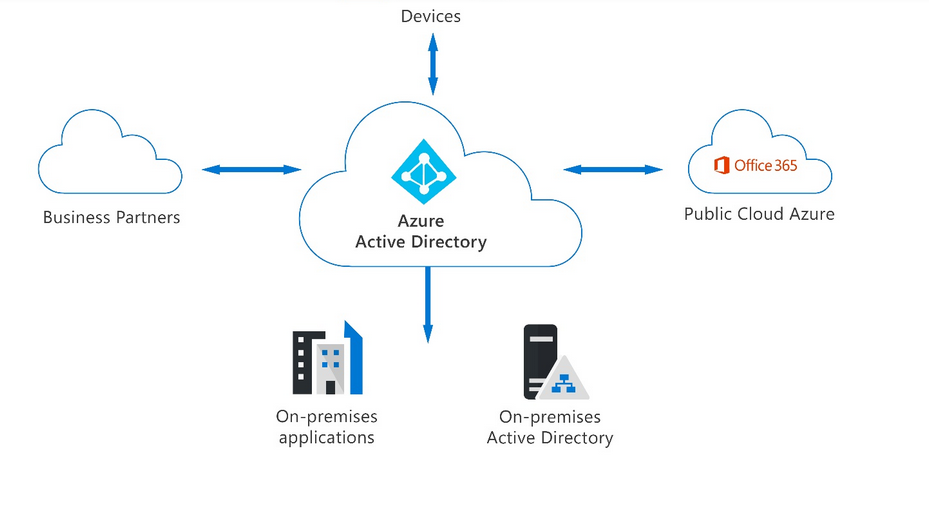
In organizations, employees often need access to various Azure services to perform their tasks. They can use services like SQL database or Azure container services when the system administrator assigns them a user id and password for each service. However, managing multiple user logins for each service can be a hassle for administrators, especially in organizations with over 1000 employees. Azure Active Directory (AD) helps solve this issue by enabling administrators to manage multiple user logins in a centralized manner.

Continue reading “Introduction to Azure Active Directory”

Split Tunneling Using OpenVPN

While working with a client, we needed to be connected with VPN all the time, it is when we noticed there was always a delay in response when browsing the internet on my system because all the traffic was going through a VPN tunnel to the VPN server located in the far region and this was the case for every employee working for that client. So, what is the solution for this if you are a cost-conscious company? You want minimal use of resources and improve overall network performance. You do split-tunneling, which we will be discussing in this blog, and how you can achieve it.

What is Split tunneling?

Split Tunneling is a powerful feature in OpenVPN that allows clients to decide which traffic should be sent through the VPN tunnel and which traffic should be sent directly to the Internet. This means that the client can choose to route only specific traffic through the VPN, such as traffic destined for a corporate network, while allowing other traffic to bypass the VPN. This can be useful for increasing the speed and reliability of internet access for certain types of traffic, and for conserving bandwidth on the VPN server.

Continue reading “Split Tunneling Using OpenVPN”